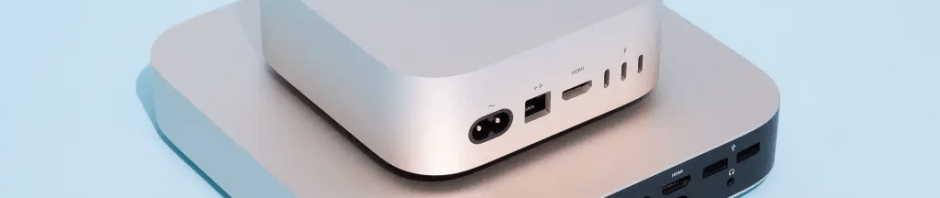

This week I set up the twelfth desktop personal computer for my use at home over the past 42 years. A new machine typically offers improvements in processing power, RAM, and storage size, and that is certainly true for my new Mac Mini M4 Pro, which replaced a Mac Mini M1 I purchased back in 2020 and had briefly experimented with when I was unable to travel due to the COVID-19 pandemic.
I didn’t actually use the M1 as my primary desktop machine until April 2024. Before that, I had used computers running Windows as my primary home platform for 30 years, and I had used MS-DOS machines for a decade before that.

My first computers were Color Computers I bought from Radio Shack in high school that used one of the most advanced of the various 8-bit microprocessors: the Motorola 6809E.
In college, I spent an amazing amount of money on an advanced Tandy Model 2000, which used the oddball 16-bit 80186 microprocessor and had much sharper graphics than the IBM PCs of that time. However, it wasn’t long until full compatibility with IBM PCs became a priority, and the Tandy 2000 was only semi-compatible. WordPerfect 4.2 worked fine for word processing, but I had to invest in a specific version of Lotus Symphony, as the IBM PC version of the Lotus 1-2-3 spreadsheet software was incompatible. So as I graduated from college in 1988, I invested in a PC clone with a 32-bit 80386DX microprocessor.
The only time I bought a desktop machine that was slower with less memory and storage than its predecessor was in 1989, when a friend and I bought a cheap desktop machine to run a bulletin board system (BBS) in Oklahoma City, which I soon transplanted to Bartlesville. That one used an NEC V20 microprocessor, which was a clone of the 16-bit 8088.
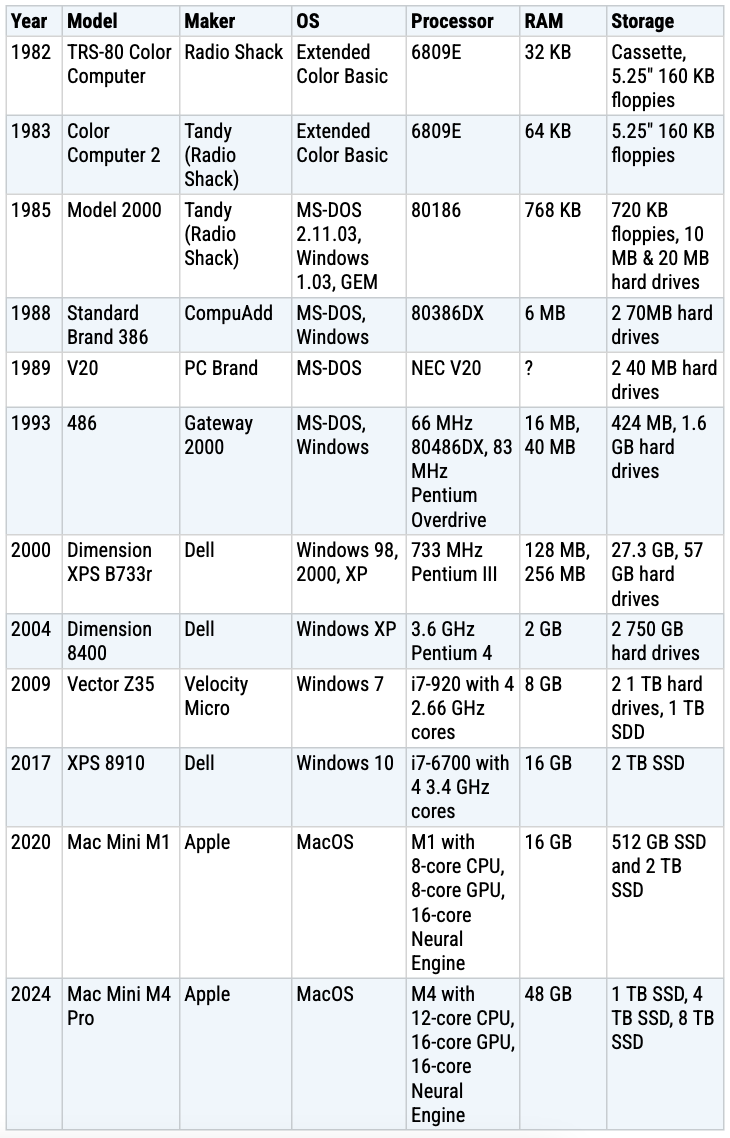
I had a couple of other 32-bit machines after that, with a Pentium 4 being my first computer with a 64-bit microprocessor back in 2004. Twenty years later, my new computer’s processor cores still process data and instructions in 64-bit chunks, and the clock speed of my 2004 single-core machine was 3.7 gigahertz, not that much slower than the 4.5 gigahertz for my latest computer.
As heat generation and power consumption limited how much chip makers could boost clock speed, they started adding more computing cores and software incorporated multithreading to divide workloads across multiple cores working in parallel. Thus, instead of a single core like in 2004, my latest machine’s microprocessor has 12 cores plus a 16-core graphics processing unit and 16-core Neural Engine to speed up machine learning models.
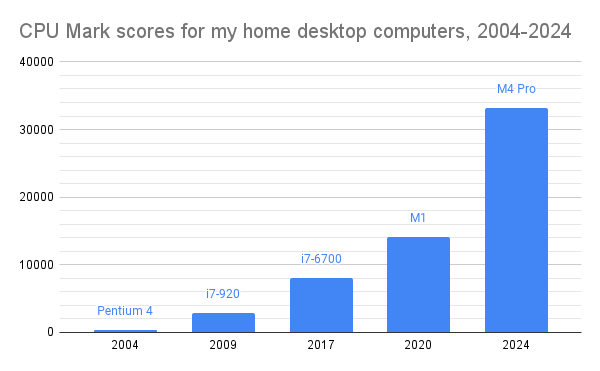
That allows my 2024 M4 Pro to score 86 times higher on CPU Mark than my 2004 Pentium 4 computer. The chart shows how computational power has improved for me at home over the past 20 years.
Apple says that my new M4 Pro has up to 1.8x faster CPU performance and 2.2x faster GPU performance than my M1 Mac Mini of 2020, and I’ve configured it with quadruple the amount of RAM and about triple the available non-backup storage. Those specs should meet my needs for many years. Nevertheless, the M1 is no slouch, and I’m hanging onto it as a fallback machine should the M4 ever go down for awhile.
I couldn’t resist calculating some comparisons of my new desktop to my first computer over 40 years ago. My new desktop has 1.5 million times as much RAM, and immediate access to over 15 million times more storage. The M4’s internal 1 TB drive writes at about 6,300 MB/s and reads at about 5,100 MB/s, while the external 4 TB drive reads and writes at about 3,400 MB/s. Both are multiple times faster than the M1’s internal and external drives, and their data transfer rates are 100,000 to 200,000 times faster than the 156-kilobyte 5.25″ floppy disk drives on my first TRS-80 desktop computer.
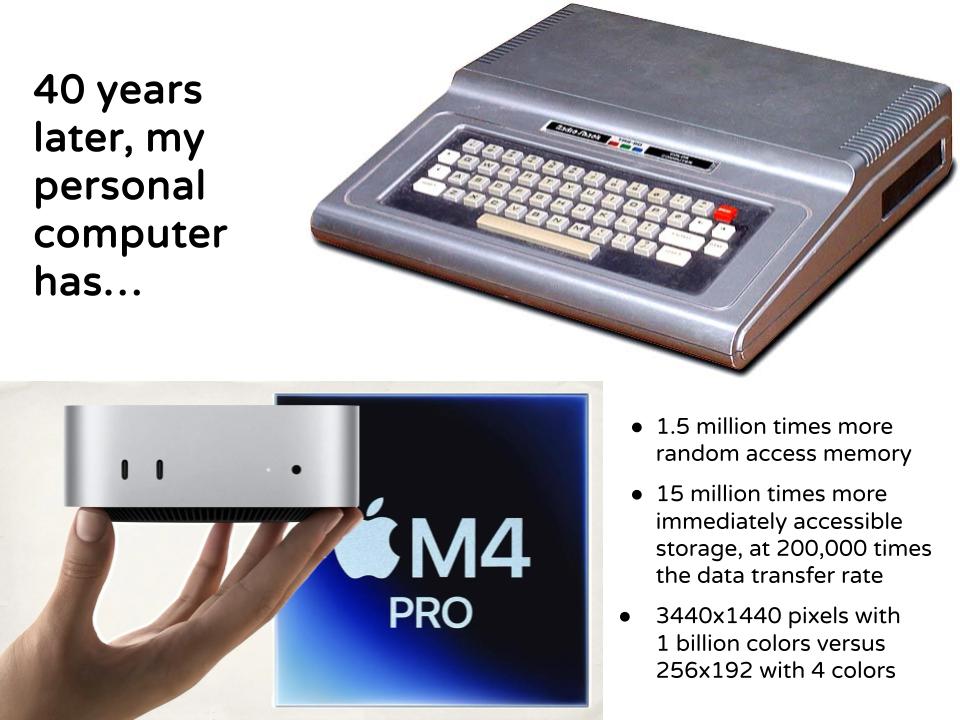
Of course, all of that progress came at some fiscal cost. Below I’ve charted the inflation-adjusted costs for my systems. (I don’t have the costs for the BBS system my friend and I purchased in 1989, so I’ve omitted it.)
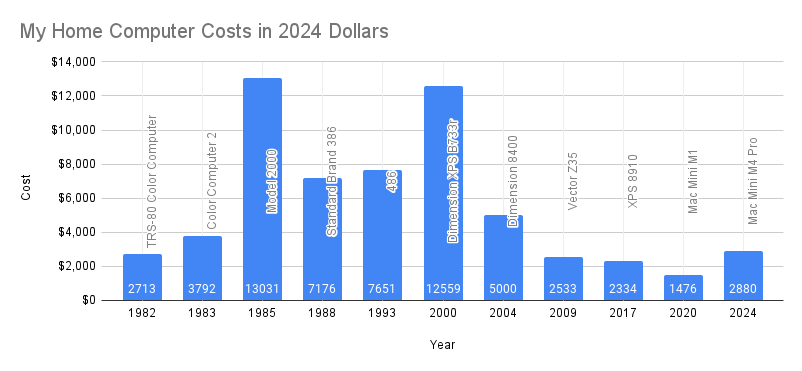
My first 16-bit computer, the Tandy Model 2000 in 1985, was the most expensive system with my first Dell computer, a Pentium 4 in 2000, coming in close behind. I spent more on my latest system than I’ve spent on one since 2004, but it is still considerably below the average and the median costs over my past 42 years of buying home computer systems. Its power and capacity make it a bargain if I take the long view.
The new system will certainly suffice for the projects I have in mind for my last 18 months of gainful employment and the first years of my retirement. I consider myself quite lucky to have used personal computers since I was ten years old and to have owned them since I was fifteen. They were of immense benefit to my higher education and working life.
My grade school years were low-tech, and I certainly didn’t suffer with the issues that have led to recent recommendations that children not be given smartphones or allowed to use social media until they are 16: I didn’t have a cell phone until I was in my 30s, and I didn’t have a smartphone until I was in my 40s. That means I recognize the amazing benefits of the various technologies and services while knowing how to survive without them. That’s a sweet spot I can appreciate.







 Meador Manor