Clearing the Cobwebs

Clearing the cobwebs along the Elk River Trail (click image for slideshow)

After a hot and humid August I have been itching to get back on the trail, but the weather has not made for a comfortable hike, especially given the ticks and chiggers that afflict the trails I like best in southeastern Oklahoma and northwestern Arkansas.  So for the past several weekends I’ve made long loops on the Pathfinder Parkway in the cooler morning air, biding my time for a hike along a more natural trail.  Finally today I got up early, had a big breakfast at the Boulevard Diner, and headed north to Elk City, Kansas.

Six months ago I hiked the Elk River Trail between Elk City and Independence.  I made three in-and-out day hikes, one from the west end, one from the east, and one in the middle to complete the 15-mile trail.  Recalling the numerous ticks I picked up on the trails around Elk City Lake on my past excursions, today I wore long hiking pants and thoroughly soaked my boots, socks, and pant cuffs with Cutter insect repellent.  I was delighted to finally find some Cutter spray at our Kmart awhile back, since it doesn’t stink like Deep Woods Off and also seems more effective.

Parking at the western trail head, I admired some purple thistle pines and then headed onward, finding the trail repeatedly crossed by immense spider webs.  I quickly picked up a long tree branch and spent the remainder of the hike sweeping it back and forth in front of me to help clear the numerous webs.  That combined with the high humidity and rising heat would quickly sap my energy.

I enjoyed a view of the river now and then, and the pattern of the morning sunlight on the eroded bluffs.  But after a couple of miles my hand began to ache from swishing the branch back and forth and I could feel a blister forming.  My forearms, glistening with sweat, sunscreen, and bug spray, trailed numerous spider threads.  When I reached a steep and slick waterway that would be a difficult crossing, I decided I’d had quite enough, thank you, and headed back.  That was a wise decision, for a bit later I left the trail to get a better view of the river and found myself stumbling and crashing to the ground.  Not yet recognizing how careless I’d become, I would later try going off trail uphill to see atop one of the many rock walls in the area.  Again I slipped and found myself sliding downhill on my posterior for a few feet.

Chastened, I paid more attention from there onward and stuck to the trail back to the car.  As soon as I caught sight of the trailhead, I celebrated by flinging my web-clearing branch as high and far as I could into the brush.  I’m still eager for some long day hikes this autumn, but tomorrow, instead of fighting spiderwebs along a trail, I’m grabbing my life jacket to meet some friends at Copan Lake and go float in the cool, cool water.

Click here for a slideshow from today’s day hike

Posted in day hike, photos, travel | Leave a comment

iPad Keyboard Tricks and Tips

Episode 3 of the TWiT network’s iPad Today podcast included some handy Tricks and Tips, prompting me to search out some more.  Here are my favorites:

  • Swipe up on the comma/explanation mark key on the virtual keyboard to insert an apostrophe.
  • Tap with more than one finger on the spacebar to insert multiple spaces (for tabbing, traditional end-of-sentence spacing, etc.).
  • Tap on the title bar in Safari to jump to the top of the page.
  • Tap four times to select a paragraph for cut and copy.
  • Hold down the .com key when entering a web address to get additional choices.
  • Hit both shift keys simultaneously for CAPS LOCK (or change one of the Settings to double-tap the shift key).
  • You can tap the “screen dots” below the icons to switch screens.
  • Press and hold ‘-‘ and then a subset appears (much like the .com button hold) and you then have access to long dash (—) and the bullet (•).
  • Press and hold period to get ellipsis (…).
  • Press and hold apostrophe for other apostrophe styles.
  • Press and hold a letter or punctuation key for various diacritical marks and alternate language marks.
  • To insert a symbol with only one keystroke, press and hold the .?123 key and then drag your finger to the mark you want and release there.  It inserts the symbol and returns to the usual letter keyboard.
Posted in technology | Leave a comment

One Set-Top Box to Rule Them All

The new Apple TV

Having fulfilled most of my hopes for couch surfing via tablet with their iPad, it was too much to hope that Apple would also solve the set-top box problem.  This week they announced their latest take on the Apple TV, announced this week amidst their iPod refresh.  I was rather disappointed by their new unit.

I currently use a Tivo HD and first-generation Apple TV with my HDTV.  Having dropped cable TV, I record over-the-air high-definition broadcasts with the Tivo and can also use it to watch Netflix streaming and Amazon Unbox.  I can also purchase movies and TV shows on the Apple TV, but I mostly use it for podcasts, music, Flickr, and YouTube.

The new Apple TV is a streaming-only device with no local storage, somewhat like a Roku but with movie and TV episode rentals through Apple plus access to your desktop computer’s iTunes library, and some limited ability to interface with an iPod or iPad.  It throws in Netflix streaming as well, the service which is becoming ubiquitous, although their streaming movie selection still pales in comparison to what you can get from them on DVD or Blu-Ray.

My Tivo HD is almost 3 years old

My Tivo HD will be three years old in January and my service contract will expire, meaning I’ll shift to $13 per month to keep it going or have to buy a 1, 2, or 3-year plan to keep it working for reduced rates.  I find myself watching fewer and fewer shows on that DVR, making me wonder if there isn’t a cheaper way to time-shift the paltry number of broadcast shows I really want.

Google TV is coming, promising to be a set-top box or integrated part of some television sets, with DVR capabilities plus some sort of internet video gateway.  If it could act somewhat like a Tivo without a service plan or with a cheaper plan than $13/month, that intrigues me.

But what I really want is for Apple to provide one set-top box to rule them all:

  • DVR capability for over-the-air HDTV broadcasts (a la Tivo)
  • Audio and video podcasts plus my music and photos library via iTunes
  • Run Apple iOS apps and full integration/remote control via the iPad and iPhone
  • Full internet browsing, including flash video and Hulu
  • Rent high-def movies from all studios and television shows from all networks
  • Amazon Unbox
  • Netflix streaming
  • YouTube
  • Flickr

The Mac Mini

That isn’t the way Steve Jobs’ hobby is going, however – at least not yet.  Perhaps Google TV will spur Apple to add more features, but it appears more likely that the best hope for this sort of functionality is a Mac Mini with Magic Trackpad, if they ever provide iOS support on it.  If I could spare $2,000 to replace my 2003 30″ CRT HDTV that lacks HDMI with a big new LCD HDTV and Mac Mini, I’d do it.

But my budget won’t absorb that hit, so instead I’ll be taking a close look at Google TV to see if it might be able to replace my Tivo or if I should just pay $13/month to keep the old Tivo going.  That along with my iPad and first-generation Apple TV should allow me to carry on inexpensively for another year.

UPDATE: In late September a good sale price finally led me to purchase a flat-screen HDTV with HDMI inputs.  I’ll probably renew my Tivo subscription, but I’ll definitely take a close look at what Google TV has to offer.

Posted in HDTV, technology | 1 Comment

My Favorite iPad Apps

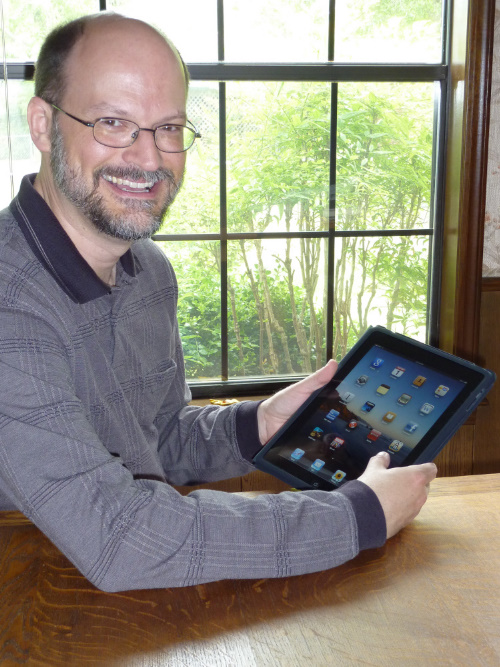
At home with my iPad

By request, here is a linked list of my favorite iPad apps.

Posted in technology | Leave a comment

How Star Trek artists imagined the iPad… 23 years ago

Star Trek's PADD presaged the iPad

There are a lot of similarities between Apple’s iPad and the mobile computing devices—known as PADDs—used in the Star Trek universe.  Ars Technica spoke to designers Michael Okuda, Denise Okuda, and Doug Drexler to find out the thinking and inspiration behind the PADD and how closely the iPad represents a real-life incarnation of that dream.

How Star Trek artists imagined the iPad… 23 years ago

Posted in technology | 2 Comments