
I love it when Beaker does Beethoven.
Beaker Does Beethoven
I love it when Beaker does Beethoven.
Posted in funny, music, video
Leave a comment
Winter Web Works
As the webmaster at Bartlesville High, I’ve noticed how many school districts are moving to paid services or more advanced open-source applications to bring a more professional and consistent look to their school websites. This allows them to have dynamic web pages with content that is more “live” and and changeable, thanks to PHP scripting and other services beyond the static web pages created with hypertext markup language (HTML) and cascading style sheets (CSS).
My district’s incessant budget problems leave us out of that world, so I decided to devote part of my Winter Break to updating the site as best I could with standard web tools at my disposal.

BHS Website in 2004-2005
First we have a snapshot of the site’s appearance from August, 2004 to January 2006. Navigation was by clicking on large glass block images. An internal image in each block became less transparent when you hovered over or selected it. That would then jump you to the sub-pages with similar navigation by a reduced stack of blocks on the left side of the screen. The site was all laid out using HTML tables with no Cacading Style Sheets (CSS), although I did use Javascript for the blocks navigation.
If you click on the image, you can visit the zombie version of the site that lives on at The Wayback Machine.
After 18 months of that design, my friend and fellow teacher Betty Henderson complained that the site needed a new look, suggesting that I look at Hollywood High School’s website for ideas. I liked their site (it has since changed) and stole and modified their confusing spaghetti of CSS code to create a new site for BHS.
That design lasted three years, with me learning CSS in the meantime to make the site behave better and to spruce up the many other websites I maintain. Javascript allowed images to be zoomed and for one accordion menu of frequently asked questions about the school. I received many compliments on it from folks outside of school who found it easy to navigate. You can also see the zombie version of that site at The Wayback Machine.
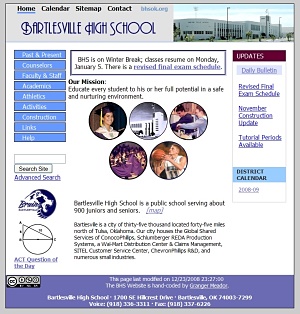
BHS Website in 2006-2008
The new design was more colorful and had stable navigation bars across the top and left side. Hardcoded to fit a screen 800 pixels wide and featuring oodles of rectangles, it began to look rather dated to me in this era of round shiny buttons. My home monitor’s 1680 pixel-wide screen made the site look too constricted, although it did work well on the tiny screen of my iPhone.
I decided it was time the site literally grew up, since today almost all browser windows are 1024 pixels wide or more (although smart phones are problematic for site design). So I grabbed a free CSS template, modified it heavily, and created our new site. I retained navigation bars across the top and left, although more complex pages also use a second left-side navigation bar, while others use horizontal tabs, and in several spots I use accordion menus to cram more stuff in on a page. I kept most of the navigation understated, since I have a feeling shiny 3D buttons may look dated in a few years – they only creep in on the major links at the top.

BHS Website for 2009
The new look is less colorful but strikes me as more professional. It still sticks to HTML, CSS, and Javascript. My CSS is improving, although I still use tables far too much to make things easier for me to format.
The content is largely the same except in two areas. First, I replaced the generic Help and Links pages with larger pages gathering together relevant resources for different audiences: students, faculty/staff, parents, alumni, and visitors/public.
Second, I’m experimenting with a news site based at sites.google.com in hopes of making it much easier to post, edit, and track news items. I’ve been hard coding each news item, which takes too long and is quite cumbersome to manage. Now, if our district internet filter will cooperate, I can post news stories without any coding and then have them automatically show up on the main site. Unfortunately Google Sites doesn’t offer RSS, so I had to format an RSS feed for it using Feed 43 and then found Feed2JS to translate that feed into a visible newslist on the main BHS website. If that patchwork holds, I’ll be a happy camper.
Websites age faster than dogs, so I don’t know how long this new design will endure. But a solid week of coding leaves me hoping it lives to a ripe old age.
Eliminating Overscan

Overscan
For years my Samsung TXN3071WHF HDTV has suffered from overscan. Most cathode-ray-tube (CRT) sets make the image too large to fit on the screen so that the edges are cut off. Many newer LCD and plasma televisions can disable overscan, but it is common on older CRTs. Cathode ray tube images tend to “bloom” or expand when bright images are displayed, and overscan makes this less noticeable.
Yes, I still use a CRT. While it is a high-definition set with 800 lines of resolution, it lacks HDMI ports and other modern amenities. Since it is only a 30″ set, I truly don’t need more resolution than that and Hollywood’s refusal to allow DVD upscaling over component video doesn’t really matter to me since a 480p image looks great on a 30″ screen. The good points about my old CRT are its bright screen, wide color gamut, and broad viewing angle.
I sit about nine feet from the screen, so a 30″ screen is acceptable to me, although I’m told I could go all the way up to a 50″ set showing 1080p images from my Blu-ray player and still avoid seeing pixels and have a far more immersive movie experience. (Here is a nifty graph of screen resolutions and seating distances.) I’m a single male, so I don’t mind if a 50″ set overpowers my living room, but I’m sure that most 480i images on broadcast television would look pretty lousy at that size and distance. So I’ll probably wait and purchase a LED-backlit 50″ 1080p LCD television in a couple of years when they will be much cheaper and more video sources are high definition.
Anyway, back to the point. The factory default for my TV is to overscan and the normal user menus offer no remedy. The problem has been especially noticeable when using my Apple TV in 1080i mode, with text falling off the sides of the screen. I also noticed it on election night when viewing HDTV over-the-air digital broadcasts – some of the local race results on the side of the screen were cut off. I hate overscan, since I want to see every bit of the original image, although it seems many people don’t pay much attention to overscan except on their computer monitors when it is most noticeable and truly annoying.
I did an internet search on my old TV and, voilà, found instructions on how to access its mysterious service menu. The secret keystrokes of MUTE-1-8-2-POWER on the remote bring up dozens of settings for the picture size, location, distortions, color, etc. I took the internet’s advice and scribbled down the original settings so I could restore them if need be.
Then I tackled the 480p settings by loading my Star Wars III: Revenge of the Sith DVD and activating its THX Optimizer. That option shows test patterns, including a 16:9 circle and edge boxes so you can eliminate overscan while keeping the screen width-to-height ratio properly balanced. Playing around with six of the two dozen settings achieved my goal of no overscan while retaining the proper width-to-height ratio.
Then I switched over to my Apple TV in 1080i mode and again fiddled with the service menu to eliminate overscan and keep the image in balance. Unfortunately I don’t have a Blu-ray disc with test patterns, so I had to do a bit more guesswork on those settings. If later I notice some problems, I’ll rent a Blu-ray test pattern disc from Netflix and do a more thorough fix.
But for now the overscan is gone and I am a happy viewer. The entire images are mine, all mine. And if a cameraman ever screws up and lets a boom mike into the shot, I’ll know it!
Posted in HDTV, technology
3 Comments
Netflix on TiVo

Netflix on TiVo
My purchase of a TiVo HD about a year ago continues to pay off. Now I can watch streaming movies from Netflix on the TiVo and the experience beats the pants off watching Netflix streaming movies on a computer. The instant gratification of a decent-quality stream is luxurious compared to the long wait to download a video to my Apple TV or to my TiVo from Amazon’s Video on Demand service, let alone waiting several days for a DVD or Blu-ray disc to arrive from Netflix.
Mind you, I still will insist of viewing great movies on Blu-ray discs I rent from Netflix. The video and audio quality of an actual disc are far better than the Netflix Watch Instantly stream. But the Netflix stream is certainly good enough for casual viewing. It certainly looks okay on my old-school 30″ CRT HDTV, which has 800 lines of resolution. I would likely be less satisfied if I had the gargantuan 50″ 1080p home theater TV I can’t justify buying (yet). And the stream is free with my current five-discs-per-month Netflix account, versus having to pony up to rent or buy a movie via Amazon or the Apple TV.
I just watched The Pixar Story, a documentary that isn’t yet available on Netflix disc, with the new Netflix streaming service on the TiVo. The video stream didn’t have to pause and buffer and only occasionally was I annoyed by macroblocks and other compression artifacts. It is annoying to have to edit my “Watch Instantly Queue” on the computer rather than being able to edit it on the TiVo, but it could be even more frustrating to try to search for movies and edit the queue using the limited controls on a TiVo infrared remote. CNET has a good review of the new service.
As Netflix expands its roster of Watch Instantly movies I will probably drop back to a cheaper 3-or-4 discs-per-month account, and I’m hopeful that their deals to get their streaming service on the TiVo, on the standalone Roku box, on Samsung players, and the Xbox 360 means they will survive the eventual death of movies on disc. I do hope, however, that economics don’t doom Blu-ray discs too early. Movie theaters are becoming obsolete and until we get larger bandwidth for true HD video streams we will still need Blu-ray discs to show quality movies with appropriate video and sound quality.
Posted in HDTV, technology
4 Comments








 Meador Manor