

Art by Caleb Charland
Caleb Charland is an artist whose photographic works make interesting use of physics, from magnetic fields to the parabolic trajectory of a projectile.
Art by Caleb Charland
Caleb Charland is an artist whose photographic works make interesting use of physics, from magnetic fields to the parabolic trajectory of a projectile.
My young adulthood was afflicted by a rapidly balding pate and now middle age brought the inevitable graying beard. I hate those new stiff white hairs. So, thirteen years after I grew my beard and despite my lack of affection for my jowls, I decided to try going clean-shaven. This will get a lot of reactions at work on Monday! I look younger but fatter and the slight beard tan is somewhat amusing.

Clean-shaven after 13 years

Sony BDP-S350
Impatient to move on from my HD-DVD debacle, I decided to not wait for the forthcoming Black Friday and beyond price drops. I just went out and bought a Blu Ray player.
I decided to get some use from my Amazon.com Prime account and bought the Sony BDP-S350. I paid about $265 for the thing, but rumor says Sears may have it for as low as $180 after Thanksgiving. If notoriously picky videophile Dan Ramer of dvdfile.com is satisfied with the higher-end Sony BDP-S550, then I’m safe to drop down a notch. I did NOT want a Sony PlayStation 3, even though many use it for Blu Ray movies, since I don’t play videogames and I love my Logitech Harmony 880 Universal Remote. The PS3 won’t take infrared commands, costs more, and I’m sure it is noisier.
It seemed best to get a Profile 2.0 Blu Ray player that could take advantage of online content and firmware updates. I’ll borrow a super-long CAT 5E cable from work for firmware updates. But the online BDLive content sounds less than interesting thus far and has brought user unhappiness with “frozen” players while content is being downloaded, so I won’t bother trying to get the player a permanent wired connection. If online extras are ever to matter, Sony and others will need to invest in 801.11 networking for their living room players. TiVo did it, and so can they, of course.

Mr. Kite in Across the Universe
I’ve only watched one full movie thus far and experimented a bit with a regular DVD. For my inaugural Blu Ray disc I chose from my local Hastings rental shop the visual and sonic feast of Julie Taymor’s Across the Universe. (I didn’t yet have my Netflix queue prepared for my jump to Blu Ray.) The film seemed a good test of the Blu Ray format, and I was quite pleased with the quality of the playback. The best part of the movie for me was U2’s Bono playing Doctor Robert and then Eddie Izzard’s unforgettable portrayal of Mr. Kite…you gotta see it, baby!
Now, mind you, my HDTV is an older 30″ CRT from Samsung that takes 1080i signals on analog component cables and displays only 800 lines. At that screen size and resolution, there just isn’t that big a jump in quality from 480p DVD to Blu Ray (or HD-DVD, for that matter). So why make the jump to high definition? I love great movies and I want to see them as clearly and with as many fun extras as is practical. And someday I’ll no doubt invest in a bigger flat screen HDTV that can deliver 1080p images carried on HDMI cabling and also upscale older DVDs. (My defunct Toshiba HD DVD player and the new Blu Ray one can upscale DVDs, but thanks to Hollywood’s paranoia they will only do so over a digitally protected HDMI cable.)
I was worried when I first popped in a regular DVD, one which had both full frame and widescreen versions of a film. I wanted to test how the player would handle a 4:3 DVD video on my 16:9 set since some older movie DVDs and most older TV shows on disc use that format. At first it was squishville with all of the usual horrid distortions when a 16:9 TV stretches a 4:3 image. On my Toshiba HD DVD player, I had to keep re-entering setup to shift it out of progressive and back into interlace mode on such discs so that my poor TV could squeeze the image back to normal. I am sick of that stupidity. But I finally fiddled enough with the video settings on the Blu Ray player so that it properly displayed the 4:3 imagery with pillarboxing in progressive mode, which is a great improvement. Who knows if the luck will hold on other oddly formatted DVDs, but I have hope.

Netflix on TiVo
Before settling on the Sony BDP-S350 I had given some thought to buying a Samsung unit that could stream my Netflix Watch Instantly movies. But their silly player also wanted a wired Ethernet connection and I wasn’t about to bother pulling wire into the living room nor was I going to invest in a new wireless router and separate wireless bridge to get a fake “wired” Ethernet connection in the living room.
Now it seems that problem will be solved, since Netflix and TiVo have each bought a clue and teamed up. By early December I should be able to watch my Netflix Watch Instantly movies on my TiVO HD, which has a wireless connection. The quality won’t compare to that of the Blu Ray player, but the instant gratification will come in handy.
So about a year after wasting my dough on an HD DVD player, I’m finally Blu. Now if only CBS would get off their collective butts and put the Remastered Star Trek out on Blu Ray. And we need all of the new Battlestar Galactica on Blu Ray, and Vertigo, and…we get the picture, don’t we?
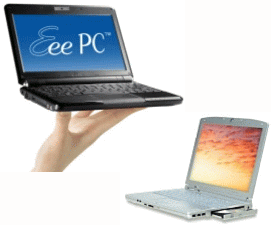
ASUS versus Averatec
For the past year I’ve been disappointed in the Averatec laptop computer I purchased back in 2005. It was slow to boot up with its dawdling hard drive, ran so hot that it repeatedly shut itself off, and burned up two batteries until they wouldn’t hold a charge. To top it off, its 802.11b/g wireless reception in hotels was simply awful.
I’ve been putting up with the darn thing, hoping that I might be able to replace it with an Apple laptop. But Apple’s new laptop computers released last week are priced out of my league. So I decided to give a netbook a try.
Netbooks are a new category of tiny laptop computers, made practical by Intel’s new Atom microprocessor. ASUS led the way last year with their Eee PC 701. Although crippled by a slow pre-Atom processor, tiny 7″ screen, and miniscule keyboard, its lowball price created a new category. Since then ASUS has expanded the line and a slew of other vendors have entered the netbook game.
I’ve been eyeballing netbook reviews for months and finally opted for the ASUS Eee PC 1000H. It cost well under $500 from buy.com and features:
I opted for the 10″ machine over a 9″ because reviewers found the keyboards on the 9″ machines too cramped. I couldn’t find any netbooks in Tulsa to get some hands-on time to judge for myself, so it was a relief to find that the keyboard on my 10″ machine is big enough for comfortable touch typing. I wouldn’t want to go any smaller. The 10″ netbook size nicely fills the niche between my desktop machine’s 20″ monitor and my iPhone; it is perfect for surfing the internet on the couch.
The machine’s fan is quiet and, unlike my Averatec, the computer runs cool enough to comfortably set it on my lap. I wish the display were a more standard 1024×768, but the slight vertical cramping is not a deal-killer. There’s a mode to compress a 1024×768 image onto the display, but its artifacts are pretty ugly. One nice compensation for the increased need for scrolling is that the touchpad is multitouch – I can swipe two fingers down it simultaneously to scroll a window.
The battery life has been excellent – I got 5 hours of use on the first charge, even though I ran the unit in overclocked mode (pumping the processor up to 1.8 GHz) for awhile. There are convenient buttons to switch screen modes and adjust the system clock from 1.2 to 1.6 to 1.8 GHz.
A very pleasant surprise was finding that I could still watch the Netflix Watch Instantly video stream using my wireless router’s 802.11g connection. I kept the ASUS 1000H in its 1.8 GHz mode and piped the VGA output to my HDTV with a little VGA-to-component converter I bought a couple of years back. The playback was actually much steadier than what I got previously on the Averatec.
One potential problem is the lack of a CD/DVD optical drive. But it was easy to work around that – I just mapped a CD drive on my desktop machine onto the ASUS via Windows File and Printer Sharing and my 802.11g wireless router. This worked fine for installing WordPerfect (yes, it lives!) and Microsoft Office (Word is awful, but I do like Excel and tolerate PowerPoint). The machine comes bundled with StarOffice and Skype, but I haven’t given them a whirl. It also has some bundled antivirus program – if they ever want to charge me for it I’ll probably switch over to AVG Free.
So I’m very pleased with the ASUS Eee PC 1000H. I plan to use it as my laptop for years to come and look forward to taking it on the road with me along with my iPhone and Kindle. With these three gizmos I’m finding computing more fun and useful than ever.

iGoogle
I love using iGoogle as my web browser home page, but today the geniuses at Google decided to switch everyone over to “Canvas View.” This mucked up the appearance of my page more than any of their earlier unannounced tweaks.
My version of the page shows my Google Reader entries, Gmails, Google Calendar, weather data and radar, as well as headline feeds from CNN, Boing Boing, digg.com’s Technology news, and Slate Magazine. Suddenly all of those feeds and emails had two-line descriptions/previews, lengthening the page so that it scrolled right off the bottom of the screen. And I HATE scrolling my home page!
Like most things Google, the primary iGoogle page has minimal visible controls. Just as they don’t tell you what is going on, they don’t tell you how to fix it. But a <irony>Google Search</irony> showed how to do it. You have to use the “My Account” link at the top right of the iGoogle screen to then access the iGoogle Settings. Then you can uncheck the “Show a short description for each feed article” option.








 Meador Manor