Lines are forming around the world today as folks eagerly purchase the second version of the iPhone. I plan to purchase the new iPhone myself in a couple of weeks. Why the delay? Because the service contract on my small minimalist cell phone of the past few years won’t expire until July 19, at which time I will be far from home enjoying the cool weather of the Pacific Northwest. Only when I return to the wonders of late July in Oklahoma will I be able to join the iPhone revolution.
The new phone will be a leap in size and complexity for me. Some years back I picked my current Samsung SCH-a570 precisely because it was cheap, tiny, and feature-limited. No camera, no downloads, no ringtones, nothing but voice and text messages. I keep my phone numbers private, so I get few calls to boot.
So why in the world am I going to buy a vastly more expen$ive phone and, due to the change in carrier and necessary data and text messaging plans, more than double my monthly cell phone bill? Not for phone calls, of course, and certainly not for the mediocre camera in the iPhone. It’s for the internet, love.
I’ve written earlier about my desire for mobile, near-instant internet access. One of the cheaper versions of the newly popular ultramobile computers might be tempting, but they seem too much and too little. They are too much of a computer for what I want, since I really just want to browse the net and not mess with Unix or the painfully slow Windows boot-and-update routine, nor spend time managing the limited disk capacity. And they are also too little, since they mostly rely upon Wi-Fi for web access, lacking easy access to cellular data networks. My recent stay in San Antonio cemented my frustrations with the miserable Wi-Fi technology one encounters outside the home. A group of us went to the National Educational Computing Conference there and I stayed at the Hampton Inn downtown. The staff was extraordinarily friendly and helpful, but the hotel Wi-Fi simply did not work. I could only connect successfully to a local pay-far-too-much-as-you-go Wi-Fi service.
Leery of the costly non-hotel Wi-Fi service, I instead used my latest gadget, the Amazon Kindle, to check my email, compose some brief replies, and browse a few columns and articles. The Kindle only took seconds to make a connection to Sprint’s EVDO service – strong clear signal, no need to login, and absolutely free on the Kindle (at least for now). I’ve thoroughly enjoyed reading three complete books on my Kindle in the past few weeks, and am happily filling it up with both purchased and copyright-free texts. So, given my satisfaction with my Kindle, why would I invest $2500 over the next two years – about $1500 over and above my current cell phone cost – in the new iPhone?
The Kindle’s superb reflective e-Ink screen makes it a wonderful device for reading books and long articles, but it is not a practical internet browser. It lacks the necessary control interface and screen color and contrast to allow one to surf the net comfortably. Filling in text boxes and selecting links on the Kindle is cumbersome, and most graphics look awful in four shades of grey.
I plan to continue to save links to long web articles on Google Notes for later retrieval via my Kindle, since its screen is so much easier on my eyes than any backlit display. That approach is better than printing hard copies all of the time as I had been doing. But I need something that can display web pages in their original formats, with full color and zoom capability. And time and again when viewing an oddly-composed webpage on my Kindle I wished I could touch the screen, a la the iPhone, to scroll and zoom the image.
The new applications appearing for the iPhone are also quite appealing. Google and other websites are releasing free software to enhance the use of their mobile services on the unit, and I’ll be able to use my new iPhone as a remote control for my Apple TV. The iPhone can also, of course, serve as an iPod for acquiring and playing back music, video, and podcasts.
So in a couple of weeks I’ll have a plethora of digital gadgets: a touch-screen GPS unit for automobile navigation, my old push-button GPS for navigating in Canada (since the touch-screen unit only does the continental US), a Kindle for reading books and long text articles from the web, a Sandisk Clip dedicated to audiobooks, an iPod nano, and a new iPhone. I’m running out of room in my cargo shorts for all of this stuff, so I await a future in which all of those functions are combined into a single device with a superb display, long battery life, convenient size, and constant cheap connectivity to a wonderful wireless world.
My brief mention of it in my Facebook status has already generated several inquiries, so below is my initial review. I’ll probably have more to say after I try the thing out on some trips this summer to San Antonio and Seattle.
See It in Action
If you’d like to see the $360 gizmo in action, the best non-Amazon videos I’ve found on it are from PocketNow‘s four-part series. You can, of course, see some promotional videos on it at Amazon.
The Sony Reader Got Burned
I’ve admired the “E ink” technology used in the competing Sony Reader for some time, but the Sony unit lacked two key features of the Kindle: a huge selection of electronic books at reasonable prices and a convenient, free, and portable web connection via Sprint’s cell phone network.
Easy on the Eyes
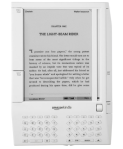
The 600 by 800 pixel screen has 4 levels of gray and is reflective instead of backlit. So you read the Kindle like you would a book – no backlighting to fatigue your eyes. In recent years I can’t even stand to read long blog posts on my desktop computer’s handsome 20″ LCD screen – I resort to printing out hard copies that don’t strain my aging eyeballs. I can read the Kindle for an extended period at its next-to-smallest font size without eyestrain. And I had no trouble reading it outdoors, either.
Of course there are compromises compared to a normal book. There is the problem of specular versus diffuse reflection, limited contrast, and photographs take a beating. Most of my books are coarse paperbacks and the diffused light bouncing off them makes them easy to read. The Kindle’s screen will pick up some glare from overhead lights which you have to dodge. The background of the Kindle’s screen is a light gray, not book paper white – although some of my old scifi pulps have a distinct yellow background! And with limited resolution and only 4 shades of gray, illustrations and photographs don’t hold a candle to their printed counterparts – although as you can see in the above shot, they aren’t hopeless. But text, glorious text, looks superb compared to other electronic displays.
The E ink display does flash to black whenever it redraws the screen, such as when you “turn the page” in your book. But it is fast and I got used to it very quickly – no worries.
Shopping in the Amazon
I have purchased oodles of regular books and technology items from Amazon for years and have always been impressed by its selection, reviews, suggestions, etc. They have quite a few books ready-to-go in Kindle format and with their purchasing power should be able to get publishers to keep adding to the pile of books. You pay $9.99 or less for new bestsellers and the older books I’ve browsed are cheaper than that. On my limited income I often resort to buying used books from Amazon’s site partners, but now I’ll be looking for Kindle format for texts. I know I’ll still peruse the big new and used bookstores in Tulsa – but unless a book has high-quality and crucial photographs and illustrations, I’ll probably think twice before buying it in the traditional form.
I’ve seen that one can also upload to the Kindle free books that are out of copyright from places like manybooks.net, feedbooks.com, wowio.com, and gutenberg.org – but with US copyright law in its current sad state, I think that relegates you pretty much to stuff published before the 1930s.
You can also put Word files on the Kindle and have Amazon convert PDF files for it and either have them uploaded via the Kindle’s cell connection for 10 cents a pop or transfer them yourself for free via USB. This seems of limited practicality, however, as I can attest that the Kindle cannot accurately render the layout of a complex PDF file.
Portable Surfing
It is very easy to browse for, sample, and download books from Amazon with the Kindle’s internet connection. You will need Sprint EVDO coverage at your location for a high-speed transfer, although the Kindle will fall back to a slower and more battery draining 1x connection if it must. Sprint’s map showed part of Bartlesville as having EVDO, but not my area. But I’m getting a top-notch EVDO signal at my house, so their map must be out of date. I downloaded a book today from Amazon in less than a minute. The Kindle does NOT use WiFi – it is the Sprint network or nothing, although you can of course hook it up to your computer and transfer files with a USB cable.
What is great about the internet connection is that you don’t have a contract with Sprint, you don’t pay any access fees, you don’t have to configure the hardware at all, etc. The Kindle is preconfigured to hop onto Sprint’s network with no help from you, and Amazon picks up the tab. The trade-off? Since you have no long-term contract, the $360 up-front cost of the Kindle is high compared to most cell phones.
A fun-but-not-guaranteed feature of the Kindle is its experimental web browser – something Amazon could shut off or start charging for it at its discretion. I was able to browse my school and personal websites, read articles on Wikipedia, do Google searches, and even retrieve my Gmail on my Kindle today. You can use a faster “basic” or a slower “advanced” web mode – the advanced version will format fancier pages better, allows Javascript (but not Java applets), etc. The interface is clunky and the experience pales in comparison to an iPhone, but by golly it’s free and while I have high-speed EVDO data service at my house, I don’t expect I’ll get high-speed 3G phone service anywhere in town.
To prolong its battery life, I use the convenient switch on the Kindle to shut off its cellular connection when I’m not shopping or surfing. Another nice thing about E ink is that it uses little or no power to maintain the display – so you can leave it on without worrying about it going dead on you. Try that with a backlit display! The Kindle is supposed to run for several days of regular use on a charge and even longer if you turn off the cell connection like I’m doing.
Now, Now, Mr. Meador
Another oddball Kindle experiment is NowNow, where you pose a question on any topic, send it off to the NowNow service, and within ten minutes you get up to three responses. This is already available on cell phones via text messaging, and if you’re wondering how it works, the answer is that your question is fed to human beings who are paid about a dime per question to look up a brief answer for you. So your mileage will vary! I haven’t tried this myself, but I can see it being useful at times.
Other Reading Features
You can also look up any word in the built-in dictionary, highlight text (put a bubble around lines of text, actually), make annotations, and “dog-ear” pages for bookmarks. For myself, that last feature is the only important one.
Drowning in Paper
Part of my motivation to try the Kindle is that I’m filling my house up with books. I can’t stand to sell them off, but I’m running out of wall space in my office – which is the large master bedroom in the house’s intended floor plan. The Kindle lets me carry dozens of huge tomes in the palm of my hand, and while I can’t share my electronic purchases with others, I get to keep them. Even after I delete them from the Kindle, I can always download them again from Amazon…unless Amazon goes out of business, etc.
This should be a real boon in traveling, especially coupled with the free instant access to the web. I desperately want a convenient, portable internet device to look up things on Wikipedia, check email, etc. The Kindle might satisfy that need, but for a true portable web experience you really need an iPhone. Part of my timing in purchasing the Kindle was that I can try it out for several weeks before I’m faced with the quandary of whether or not to buy a new 3G iPhone. Sure, the latest phone is only $200 or $300 up front, but with the mandatory voice and data plans you’ll end up spending a lot more over the two-year contract with AT&T.
Interface
As you’ll find out from any review on the web, the Kindle does have one major interface mistake. They put enormous next page and previous page buttons on its sides – buttons which are all too easy to push accidentally when trying to pick up or hold the device. But I’ve found that the simple solution offered by the helpful Kindle Fan Guide works for me: I cut a wide rubber band into a strip and tucked it under the large next page on the right side. Disabling that button lets me easily pick up and hold the unit on that side without triggering annoying page turns, using the existing buttons on the left side to navigate.
The Kindle has a cute little scroll wheel that moves a cursor vertically up and down to make selections. Current E Ink technology is too slow for a cursor in the reading area itself, and you can’t use this display as a touchscreen. So selecting individual words and hyperlinks is rather clunky and cumbersome, but it is workable. You first select the line and then the Kindle pops up a little dialog box from which you select what word or link in that line you wish to access.
The little built-in QWERTY keyboard works fine – I could type quickly using my thumbs and I am NOT adept at using my thumbs to text on cell phones. You can access the various symbols with a special key that pops up a dialog box – much like you would insert an oddball symbol in a Windows word processor.
Sound
The Kindle has a small speaker and a headphone jack and volume control for listening to audiobooks. I purchased an audiobook from Audible and successfully downloaded it to the Kindle via USB. The sound quality over the headphones was fine – I haven’t tried using the little speaker yet. You can also transfer music MP3 files to the Kindle via USB, but they can only be played randomly as background music. This is pretty limited, and I expect the next edition of the Kindle will add more MP3 playback controls.
Customization
The other customization I’ve made to my Kindle thus far is to replace its standard stock of screen-saver images, which are actually pretty beautiful, with one of my own creation. I used the shot you see in this post of me holding my Kindle and added to it my name, phone, and email and uploaded that image to the Kindle. Now whenever I put it in sleep mode that image appears, hopefully increasing the likelihood of its return should I misplace it. There is a place to put your contact information in the Kindle, but I wanted to make a bold statement that a non-user would see and understand.
Okay, that’s more than enough of my first impressions. Should you buy a Kindle? If you’ve got the cash, love to read, and want to try out electronic books, I think it is a great idea. But if you’ve already got or are planning to buy an iPhone, you might see if you can stand reading electronic books on it first. The iPhone is the internet in your pocket and is very elegant, powerful, and flexible. The Kindle is your personal library in your pocket, far easier on the eyes for reading text for long periods, and has the power of Amazon behind it. I just wish we could get Apple’s design team working on the Kindle – THAT would be a killer product!
I have listened to several dozen commencement speeches in the past quarter century, and even afflicted others with a few of my own. So trust me that J.K. Rowling’s recent Harvard address is worthwhile. You can watch the video, download and listen to the audio, or read the text. Any medium still conveys the humor and power of her message.
I’m going mad for MID – mobile internet device, that is. I want to quickly and easily access the internet from my couch, my car (when I’m NOT driving, thank you), and when I’m out of town. And I do NOT want to wait for Windoze to boot up or pause while it does yet another dang update, nor do I want to apply copious heat to sensitive anatomical parts.
I have an aging Averatec laptop, but it is painfully slow to boot and has abominable battery life, a sluggish hard disk, less-than-stellar WiFi reception, and painfully scorches my lap as its fan whirs angrily. One thing I do like is that it is small for a laptop with its 12″ screen.
So I was intrigued when Asus put out the Eee PC 700 for a couple hundred bucks. But it didn’t have built-in cellular internet capability, which would be boon when I’m out of town…Oklahoma doesn’t have the plenitude of WiFi hotspots one finds on the coasts. And now everyone is excited about the improved performance of the forthcoming Eee PC 901, but I’m quite put off by the $560 price. If I’m going to spend that kind of money, why not get a new Dell laptop? Or see if the promised Dell Mini Inspiron is worthwhile?
So maybe I should get a Nokia N810. It puts the internet at your fingertips but drat – it needs WiFi. I do like the big screen, but I’m not at all fond of styli.
Now I’m wondering if the best solution is to buy the new 3G iPhone from Apple and AT&T. My cheap US Cellular phone is getting long in the tooth and my contract will end in mid-July right after the new iPhone is released. I could get an 8 GB model for only $199 plus AT&T contract or push up to $299 for a 16 GB model. The 3rd party apps for the phone sound intriguing, as does the MobileMe service for push email, calendar, and contacts to the phone and my various computers.
A big downside, however, is that Bartlesville doesn’t have 3G phone service from AT&T. When I’m in town I’d still be stuck with the slower EDGE network, only able to go 3G when I’m in Tulsa or other metro areas. But having WiFi in the phone does help.
Another worry is the tiny screen. Sure, Apple has a marvelous touchscreen interface that can zoom in easily, but do I want to be zooming in and out all of the time? Do the websites I frequent have iPhone-friendly versions that would be less of a hassle?
What may push me over the EDGE is recalling the thrill of my first iPod. It was a revolutionary experience, reminding me of how excited I was to program my first home computer back in 1980. I have a feeling the iPhone would be even more exciting to use, despite the drawbacks of a small screen and inadequate AT&T network. At least I know the thing won’t burn a hole in my britches.

 Lines are forming around the world today as folks eagerly purchase the second version of the iPhone. I plan to purchase the new iPhone myself in a couple of weeks. Why the delay? Because the service contract on my small minimalist cell phone of the past few years won’t expire until July 19, at which time I will be far from home enjoying the cool weather of the Pacific Northwest. Only when I return to the wonders of late July in Oklahoma will I be able to join the iPhone revolution.
 The new phone will be a leap in size and complexity for me. Some years back I picked my current Samsung SCH-a570 precisely because it was cheap, tiny, and feature-limited. No camera, no downloads, no ringtones, nothing but voice and text messages. I keep my phone numbers private, so I get few calls to boot.


 I have listened to several dozen commencement speeches in the past quarter century, and even afflicted others with a few of my own. So trust me that
  I have an aging Averatec laptop, but it is painfully slow to boot and has abominable battery life, a sluggish hard disk, less-than-stellar WiFi reception, and painfully scorches my lap as its fan whirs angrily. One thing I do like is that it is small for a laptop with its 12″ screen.
 So I was intrigued when Asus put out the
  So maybe I should get a






 Meador Manor