
Computer cables have entangled me for almost a half-century, forcing me to twist recalcitrant asymmetrical connectors, twirl painful little thumb screws, and regularly trawl through junk drawers and boxes for various specialized cables or adapters.
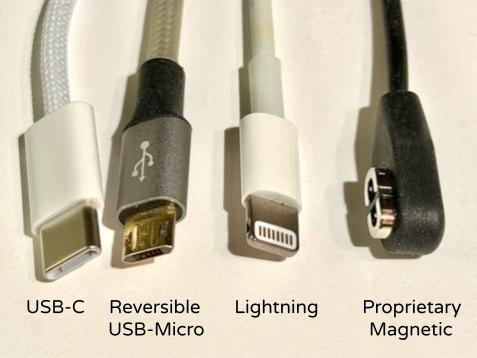
Not too long ago, I needed four different cables in a holder stuck to the side of my recliner’s lampstand so that I could charge my iPad with USB-C, my Kindle with USB-Micro, my iPhone with Lightning, and my bone conduction headset with a proprietary magnetic connector. I also have MagSafe induction chargers for my Apple Watch and iPhone.
Now, a decade after USB-C debuted, I can use it for all of my portable devices that require wired charging. It took that long for it to become universal and for my older gadgets to age out. In 2024, I replaced my Kindle Oasis with a Kindle Paperwhite Signature Edition, and this year I bought a new SHOKZ OpenRun headset that replaced their convenient-to-use but proprietary magnetic charger connector with USB-C. Replacing my iPhone 14 Pro with an iPhone 17 Pro finally allowed me to abandon the Lightning cables, adapters, and earbuds I have accumulated since 2012.
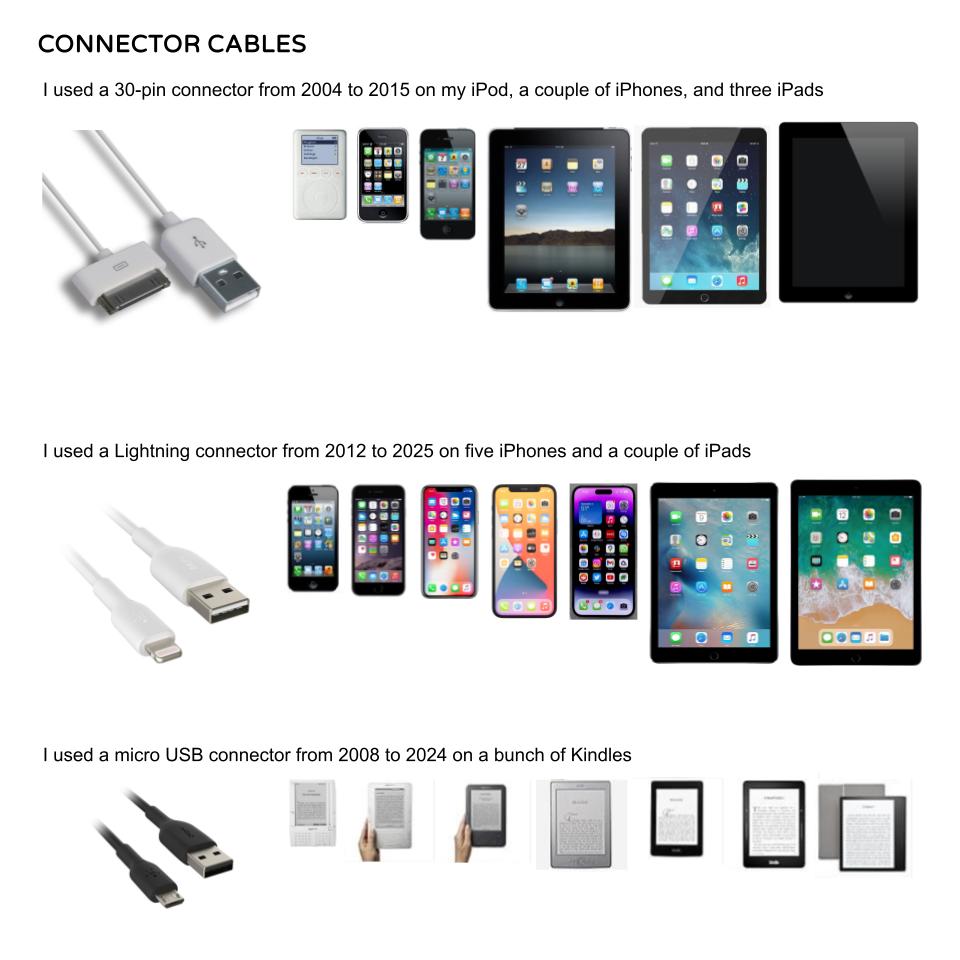
Before Lightning, I endured Apple 30-pin connectors from 2004 to 2015 on various devices. Lightning was an improvement, being diminutive and symmetrical, meaning it didn’t matter which way you plugged in the cable, unlike most USB cables until USB-C came along. The convenience of not having to twist a cable into the correct orientation to insert it led me to buy an unusual reversible USB-Micro cable for charging my Kindle back in 2020. First world problems!
My Mac Mini also features USB-C ports for its accessories, but it still has some USB-A ports and a 3.5 mm audio jack that remain in active use. I remember when USB-A debuted back in 1996, while 3.5 mm jacks were designed in the 1950s, originally for transistor radio earpieces.
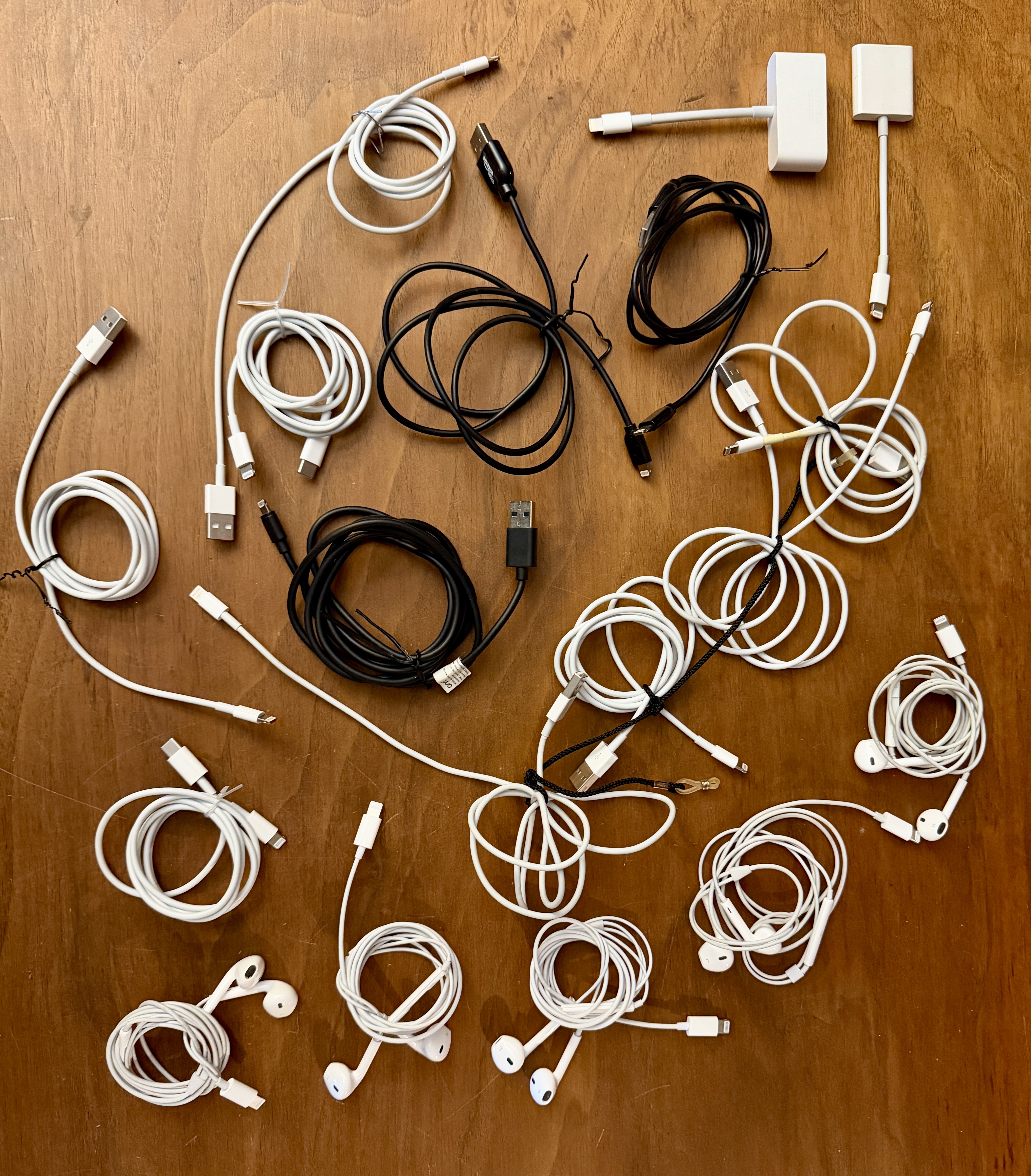
I went through the house gathering my Lightning cables, adapters, and earbuds. I found five sets of earbuds, nine USB-A cables, two USB-C cables, and a couple of adapters. I’m sure there are even more Lightning items lurking at work.
Apple stopped including EarPods and power adapters with new iPhones back in 2020, and while I have oodles of power adapters, I only had one off-brand set of USB-C earbuds I could use with my new iPhone 17 Pro. So I ordered two sets of Apple EarPods. I’ve tried various wireless earbuds, including one set of AirPods back in 2017. While I like my wireless bone conduction headset for use around the house, on walks I just want the wired EarPods. They never need charging and are more comfortable for me to wear than various alternatives. I do have a set of over-the-ear Tribit XFree Tune Bluetooth Headphones, purchased in 2019, that I use on the rare occasions that I want high-quality headphone sound.
Prior Connections
The first computers I used were the Radio Shack TRS-80 Model I and Color Computers in the late 1970s and early 1980s. They used 5-pin DIN ports and cables. I always called them DIN plugs, but I didn’t know until composing this post what DIN stood for: Deutsches Institut für Normung, or the German Institute for Standardization, which developed a 3-pin version in the mid-1950s and expanded to five pins a few years later as stereo gear became commonplace.
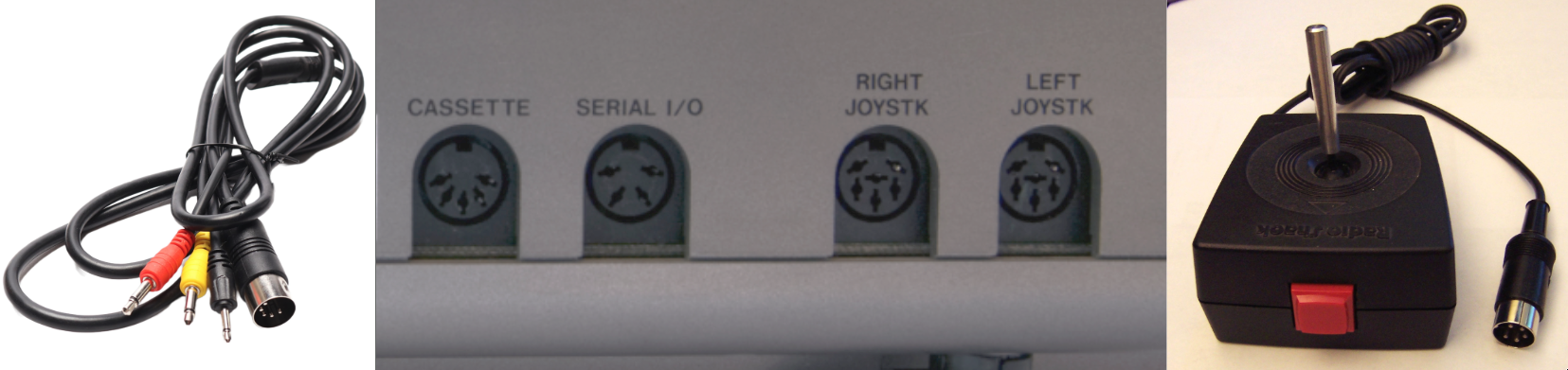
Standardization was important for vendors, although I stuck with Radio Shack for both my cassette recorder, the first way I had to store and retrieve programs, and my joysticks. I’d say their lousy original and marginally better Deluxe joysticks contributed to my relative lack of interest in video games, although I did enjoy playing Lancer, Pooyan, and Zaxxon on my CoCos. Hey, SuperGirl was impressed by the Coco, so I was in good company.

My far more functional 1985 Tandy Model 2000 had a DE-9 video port, proprietary parallel printer port, and a DB-25 port for a RS-232 serial connection. The common D-subminiature connectors were introduced by Cannon (not to be confused with Canon) back in 1952 for the military/aerospace market, with the “D” referring to the shape of their perimeter metal shield. A fun bit of trivia is that the second letter referred to the type of metal shield. The DB-25 was so common on early computers that when the DE-9 began to be used as well, computer people unfamiliar with the D-subminiature nomenclature mistakenly called them DB-9 ports, not realizing that a DB-9 would have been a 9-pin connector in the large “B” shield used for the 25-pin connectors, whereas the video ports actually were using the smaller “E” shield.
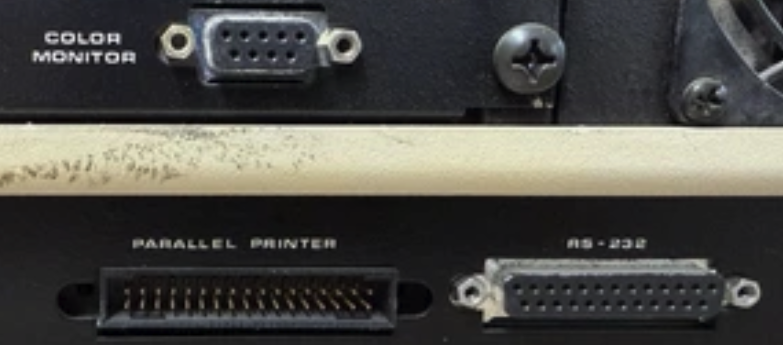
DB-25 ports were often serial RS-232 ones that followed the “Recommended Standard 232” introduced by the Electronic Industries Association in 1960 for serial communications. You might wonder why older computers would use 25-pin ports and cables for serial communications that later could run over four-wire USB-A cables. The older devices needed more pins so that they could support a full two-channel serial communication standard with pins for data and a multitude of control signals. Eventually, technological advancements allowed for a shift to 9-pin RS-232 serial ports before USB supplanted them.
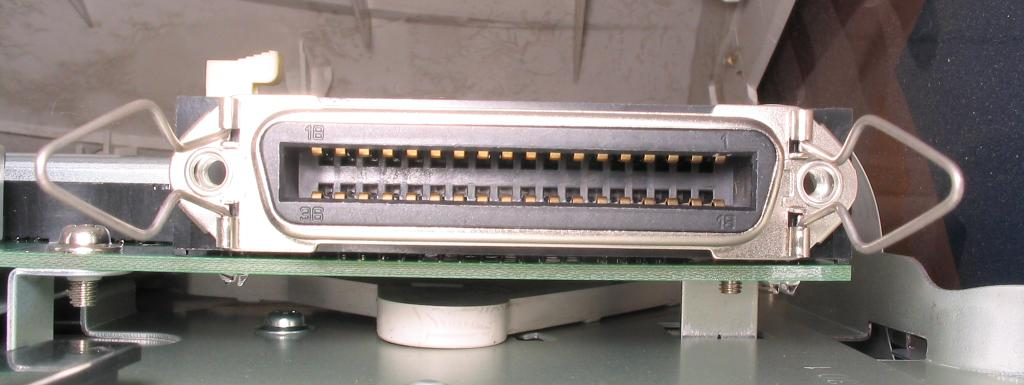
For years, my various printers used bulky parallel ports, eventually standardizing on Centronics ones (aka IEEE 1284) that came from a subsidiary of Wang Laboratories, which made the first and only dedicated word processor I ever used back when I worked for the Oklahoma Department of Tourism. Parallel ports could send an entire 7-bit or 8-bit ASCII value across its multiple wires, while devices using serial ports would have to buffer the data bit-by-bit and turn that back into multi-bit values.
I never had any personal computing equipment that used the SCSI or Small Computer System Interface ports, although at work I did have a physics laboratory equipment interface that used it. Of course, there have been a slew of different audiovisual connectors, but that is a whole ‘nother level of complexity I chose to avoid in this post.

Keyboards and mice might use 5-pin, DE-9, DB-25, or proprietary connectors, but eventually many used color-coded 6-pin mini-DIN connectors commonly called PS/2 ports. Those were introduced with the IBM Personal System/2 series of computers in 1987. Nowadays I like wired USB keyboards and wireless mice.
Eventually computers advanced to where most of the cables and connectors could standardize on the Universal Serial Bus, which was introduced in 1996. Of course, that was hardly the end of the story, with many variations on the USB connectors being introduced over the decades.
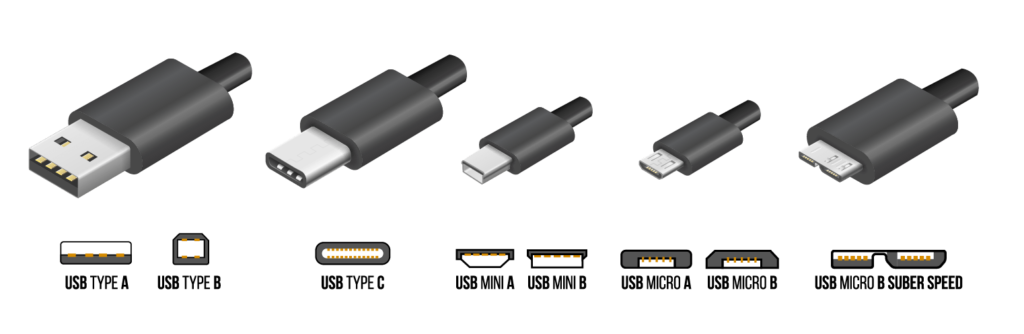
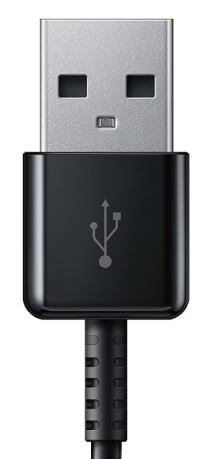
We still see plenty of USB Type A ports and cables, with the more square-shaped USB Type B still frequently used on printers. We’ve all been frustrated countless times by the asymmetrical design of the USB-A, -B, -Mini, and -Micro connections forcing us to struggle to twirl cable ends around to plug them in. The trident-like USB logo is required to be on the “up” side of a cable end, which can help if you can even see it and also figure out which way is considered “up”.
The later USB 3.0 standard calls for nine wires instead of four. The insulators in such “SuperSpeed” plugs and receptacles are supposed to be a specific blue color (Pantone 300 C) and you need to use an appropriate cable, which has SS for SuperSpeed at the base of the trident indicating it has the extra wires in it. Using an old cable will slow everything back down to the older 4-wire standard.


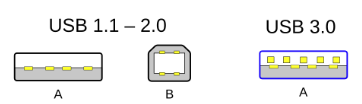
Printers still use the USB Type B port because originally that was considered the sturdy one to be used for “client” devices, and they don’t need to bother with a smaller port. However, many other devices needed smaller Mini and Micro ports, which I always found truly annoying. I don’t know how many times I have stared at a port or a cable end to figure out if it is a Mini or a Micro, and then have to squint to see which way I would need to orient the cable. Thankfully you can now get reversible USB-Micro and even USB-A cables.
USB-C made things easier to plug in with its small reversible design, with up to 24 wires to provide higher transfer rates and power while supporting various data types:
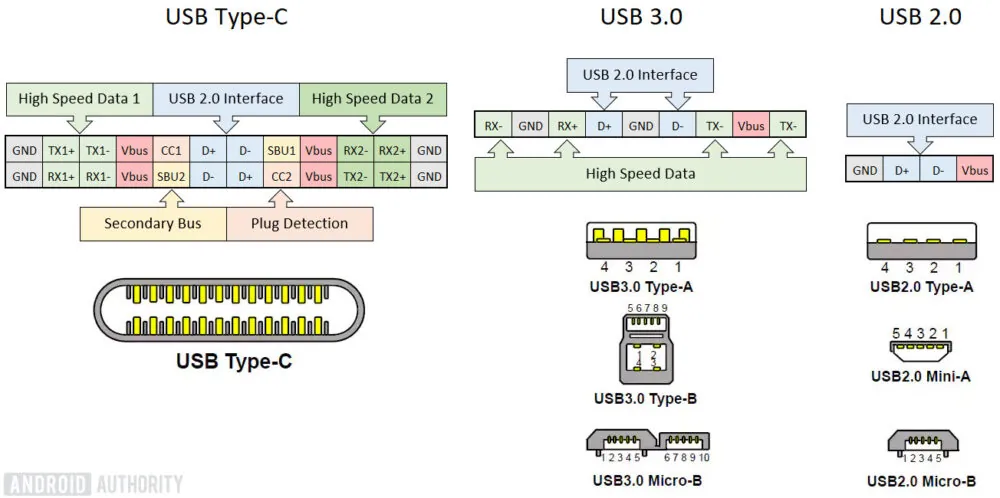
However, that very flexibility can confuse folks. Some of our school Chromebooks have USB-C ports that are not just for charging or serial data, but can also function as DisplayPorts for multiple external monitors and the like. People used to HDMI or, heaven forbid, VGA, can be surprised when I use a USB-C DisplayPort.
The many different capabilities of USB-C have led to a profusion of labels:

Apple has a long history of screwing users over with its various specialized connectors, and it only abandoned Lightning and switched to USB-C because the European Union adopted a Common Charger Directive in October 2022 that required USB-C charging, beginning in late 2024, for mobile phones, tablets, digital cameras, headphones, headsets, videogame consoles, portable speakers, e-readers, keyboards, mice, portable navigation systems, and earbuds sold in the European Union. That requirement expands to laptops in late April 2026.
So in the technology world, the EU is like California is for cars in the USA; they have enough market clout to force manufacturers to cooperate and standardize, which often makes things better for consumers. However, regulations can also backfire, such as the annoying cookies notices we see on websites all of the time and most people just blast through.
I’m grateful that Lightning was arrested by the EU, however. Good riddance, and here’s hoping that USB-C can remain a viable standard for many years to come.
December 2025 Update: I had bagged up and stored the many Lightning cables and chargers. That proved its worth when I realized that the remote control for my 2017 Apple TV 4K needed a Lightning cable for recharging. So a spark remains…for now.








 Meador Manor
You’re lucky you never got caught up in the snarl of Macintosh specific cables! A few of the WTFs you missed out on just in the ’80s and ’90s:
Personally I really liked the modular connectors both for keyboard/mouse and for networking (including the 8P8C plugs on later Ethernet). They were easy to connect & disconnect and easy to splice and repair. I wish USB had been based on them!
A friend bought the first Mac, and I remember its coiled keyboard cable. It was fascinating to watch it eject 3.5″ floppies, which were new to me, and the graphical user interface was a stunner at the time, although he had to do oodles of disk swapping with the limited memory and only the internal drive. That motivated me to buy GEM for my Tandy 2000 to get my own graphical user interface, and I used it for a few college projects.