

Do you find yourself spending too much time scrolling on Facebook past random nonsense? Does your inbox get clogged with emails of fresh posts from different online services? If so, here are a couple of strategies that might improve your online experience.
Facebook Friends Feed
Recently my default newsfeed on Facebook has been filled with stories from various groups that represent minor, sometimes very minor, interests of mine that the service has gleaned from untold number of cookies and signals across various services. Too many entries are written by artificial intelligence, with telltale signals in phrasing, wordy repetition of main points, and annoying punchy, upbeat summary paragraphs.
The best solution I’ve found is to switch to the Friends Feed as shown here for the mobile app or on the website with this link. (To find it on the web version, I had to click See more in the left sidebar, select Feeds, and then select Friends.) You’ll still get plenty of ads, but far less algorithmic content.

A Substack Problem
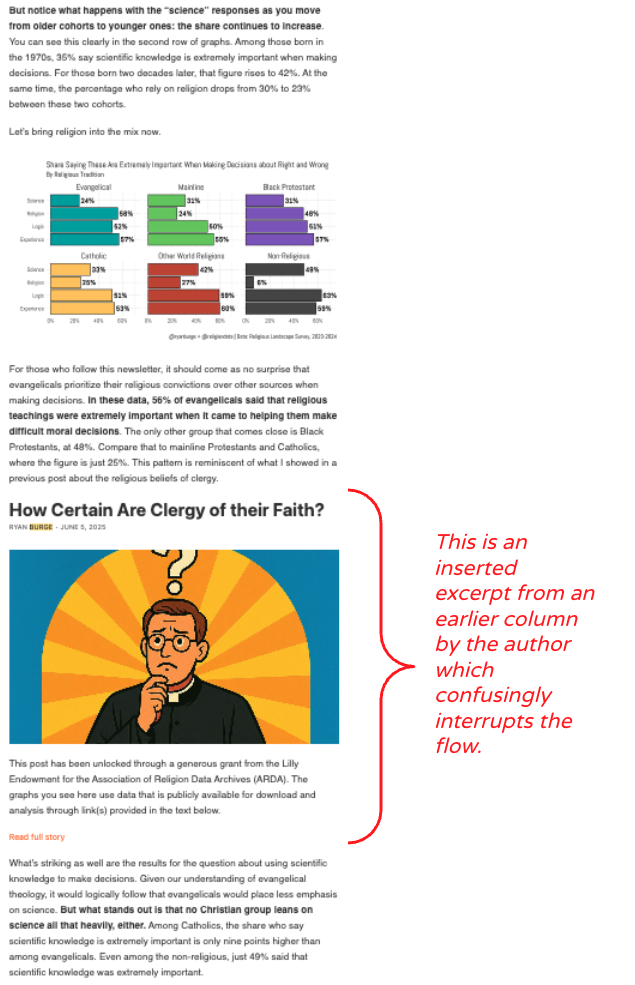
Several writers I appreciate post on Substack. I currently have paid subscriptions for James Lileks, Ryan Burge’s Graphs About Religion, and Retro Tech Reads, and Your Local Epidemiologist was a godsend during the COVID-19 pandemic.
I don’t care for Substack’s website nor app interfaces, but it will gladly email me new posts from those columnists. I could use those to read the articles, but they tend to pile up in my inbox, and the emails I receive have the same drawback I’ve seen in some posts on their website and app.
In an attempt to promote traffic, Substack often inserts a headline, graphic, and initial paragraph from an earlier, related post by the same writer within each post. However, they stupidly (or connivingly) use the same identical formatting for those “previews” and the post I’m trying to read. If they would just color the background differently for the previews, I wouldn’t be so annoyed.
However, I found a solution, and it was an old one, in web terms: RSS.
RSS
Really Simple Syndication, or RSS, is a standardized web feed format that allows users to subscribe to and receive automatic updates from websites, blogs, and news sources. It acts as an efficient way to track new content, such as articles or podcast episodes, in one centralized “feed reader” without visiting each site individually. As Cory Doctorow pointed out, “This conduit is anti-lock-in, it works for nearly the whole internet. It is surveillance-resistant, far more accessible than the web or any mobile app interface. It is my secret super-power.”
RSS was first introduced around 1999 by Netscape, if you even know what Netscape was. I once used RSS to populate one of the windows in my old iGoogle web browser default home page, a web portal that Google started offering in 2005 and discontinued in 2013 as part of its continual process of creating and then killing useful services.
I hadn’t consciously used an RSS feed in a decade or so, but Doctorow motivated me to seek out a new reader. As a Mac and iOS user, I chose the open source NetNewsWire. If I were still using Windows at home, I would check out some of Zapier’s recommendations, such as Feedly, which is free for up to 100 feeds.
The great news is that adding feeds to NetNewsWire is usually dead simple. I can often just visit a website of interest, highlight its web address URL and hit CTRL+C to copy that, click the + icon at the top of the sidebar in NetNewsWire, and hit CTRL+V to paste in the URL. For most sites, that is all it needs to figure out the RSS feed and create a new entry in my feeds group.
There are some sites that don’t work with RSS, while for others a web search for a RSS feed URL may get them working. For example, I could not get the feed for Oklahoma Voice to work using their default web address, but a Google search for “Oklahoma Voice RSS” told me https://oklahomavoice.com/feed/ would work. Being a persistent experimenter, I also discovered that https://oklahomavoice.com/category/education/feed/ would allow me to only see their education posts.
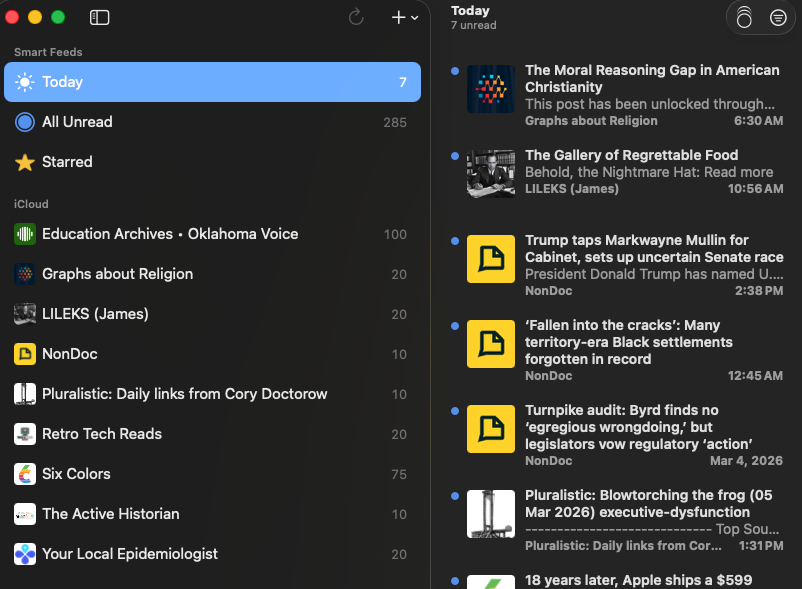
I added the NetNewsWire app to my iPad and managed to turn on an iCloud group and shift my saved feeds into that to keep everything synced across my Mac and iPad. The program also allows one to create folders to group related feeds if you go hog wild or just have an organizational streak.
I was delighted to discover that reading Substack posts with the RSS reader stripped entries of the confusing inserts, and it is certainly easier to skim through and read articles of interest with NetNewsWire than opening individual emails.
I was disappointed to find that I couldn’t find useful RSS feeds for my Patreon accounts, as that platform’s user interfaces are abysmal. While Patreon can support audio-only podcast feeds, I wanted a feed of all posts for a given creator since I read Bloom County comics there, watch TechMoan‘s Video Oddcasts for patrons, and the like, but no dice.
So good old RSS can’t solve everything, but it can solve some things.






 Meador Manor