A Year without Cable TV or POTS

Cutting Bills

Cutting Bills

It has been over a year since I cancelled my cable TV and Plain Old Telephone Service (POTS).  And I haven’t regretted those choices.

Home Video without Cable TV

My home video has been exclusively via over-the-air digital broadcasts, Netflix, and the internet since then.  My Tivo HD DVR has proven to be a good investment for this transition, as I can not only record and watch over-the-air digital high-definition broadcasts with it, but also easily order up and view Netflix Watch Instantly movies and Amazon Videos on Demand.   There were two cable TV shows I refused to give up, and the Amazon service on my Tivo brought me the SciFi channel’s Battlestar Galactica, while my Apple TV brought me Comedy Central’s South Park.  And now I can even watch many cable TV shows for free via Hulu, viewing them on my television without a computer by using the Boxee service on my Apple TV, which I’ve hacked with aTV Flash.

Economically, the switch from the bundled digital cable/internet service to only a 5 Mbps internet service saved me $700 over the year.  I invested the savings in buying the Tivo HD and its service plan, which works out to $220 annually over the first three years of Tivo service.  That cost should fall to about $100 annually after the hardware is paid off in the third year.  Buying a season of episodes for each of the two TV shows cost a total of $65.  But the Watch Instantly feature of Netflix, made painless by the Tivo, allowed me to drop my Netflix plan from 5 to 4 discs per month, so that saved me $72.  So in the end I’d say that I really saved $487 over the year, or about $40 per month, on home video.

VoIP and Cellular Telephony

I’ve never been a big user of telephones and many people have ditched landline service entirely to rely exclusively on their cell phones.  But I didn’t like the idea of carrying a cell phone around the house or running to it when there was a call, nor having to ensure it was always charged for calls.  So I decided to keep my two wirelesss telephone handsets active by using a 500-minute Residential Basic voice-over-internet plan (VoIP) with Vonage, which saved me about $23 per month.  But later I switched from a basic cell phone from US Cellular to the iPhone 3G from AT&T, and that increased the cost of my cell phone service by about $38 per month.  So now the overall cost of my telephone services has risen by $180 annually, or about $15 per month.  But with that increase came the luxury of the internet in my pocket via the iPhone 3G and a Vonage account that rings both my home phones and cell phone simultaneously.

The best part of ditching landline POTS was that my new VoIP phone number was unlisted.  I’d been on the direct marketing do-not-call list for years, but that didn’t stop all of those annoying political, marketing research, and charity calls.  Going unlisted sure did.

Looking Ahead

Having weaned myself off a traditional phone service, I’m now thinking I may join the trend and go cellular-only.  I make and receive very few calls, so giving up my VoIP phone won’t come close to using up the minutes on my cell phone plan.  And I keep my iPhone 3G charged up all of the time since I use it for email, news, as a book reader, GPS, and so forth.  That would save me about $290 a year.

And I find that I’m watching far fewer DVDs (and Blu-rays) these days with the ever-increasing video options through the internet.  I could drop down to a 3 discs-per-month plan on Netflix to save another $84 annually.  Those changes would cause me very little inconvenience and more than double my true overall savings on video and telephony to almost $700 a year.  Given that I certainly won’t be getting a raise under our current economic conditions, that sounds pretty good to me.

Posted in technology | 1 Comment

Public Oddities

Odd Public Sculptures

Odd Public Sculptures

Public sculptures can get pretty weird.

Posted in photos, random | Leave a comment

Dream of Electric Sheep


These are not the electric sheep Philip K. Dick was writing about.

Posted in video | Leave a comment

InstaKindle

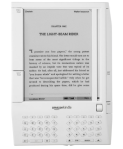
Instapaper, Kindle Edition

Instapaper, Kindle Edition

For my breakfast this morning at Eggbert’s, I decided to opt out of the increasingly sparse print edition of the Tulsa World.  Instead, I took both my Kindle and my iPhone with me.

After scanning the Tulsa World headlines on my iPhone via their mobile site, I opened up my Kindle and activated its web browser to read some online articles I’d save with the marvelous Instapaper site, which I’ve written about before.  But for some reason I couldn’t login to Instapaper via the Kindle’s primitive web browser.  I’d already been disappointed in how the Kindle browser was rendering the new icon design of Instapaper, and now this.

But I wasn’t about to give up on Instapaper, which has been so incredibly useful to me.  So I pulled out my iPhone, started its Instapaper app, and used it to read Jerry Pournelle’s latest Chaos Manor column.  The iPhone is great for reading articles when I don’t have my Kindle with me, but its cramped screen really slows down my reading.

This evening I decided to look into what was amiss with using Instapaper on my Kindle, and was delighted to discover that Instapaper now has native Kindle support.  You can have a digest of your saved Instapaper articles emailed automagically to your Kindle and then browse through them like a book, which is even more convenient than accessing them via the Kindle’s web browser.

You have to configure your Kindle account to accept emails from Instapaper and provide Instapaper with your Kindle’s email address.  Then digests of your saved articles can be sent to your Kindle, each one complete with a hyperlinked table of contents.  This is far more convenient than logging in through the Kindle browser and bouncing back and forth between the saved articles and the Instapaper website’s index.  And, to top  it off, the Kindle’s rendering of the articles in this format is far better than its web browser’s rendition of them.

Amazon will charge you 10 cents to convert and upload each emailed digest from Instapaper, but even if you sent yourself a daily update, that would only amount to $3.10 per month at most.  And Instapaper let’s you send updates daily or weekly, and delay updates until a set number of unread entries have built up.

Hooray for Marco Arment, who has added great value to my Kindle, my iPhone, and my web experience in general.  Instapaper just keeps getting better.

Posted in technology, web link | 1 Comment

The laptop is dead! Long live the laptop!

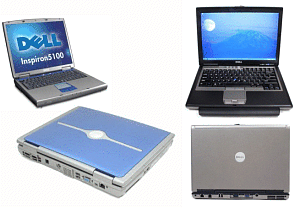
Blue Devil is replaced by Bland Devil

Blue Devil is replaced by Bland Devil

I always like to run computers into the ground before I replace them, and today my school laptop foundered after six years of steady use.  Blue Devil was purchased as part of equipping our brand new Science Wing back in 2003.  It’s a Dell Inspiron 5100 running Windows XP on a 2.4 GHz Pentium 4 microprocessor with 512 MB of RAM.  We purchased six of these units, one for each lab, and all but two had already been retired by other frustrated teachers.

But Blue Devil had hung in there until today, when the district’s new Lightspeed Security Agent software humbled her.  The security software was running the CPU and disk so hard that the unit was virtually unusable and by noon had overheated to where it shut itself off.  I reported the problem so that Tech Services might eventually look into it, but clearly it was time to move on.

Thankfully the district bought some science laptops last summer, so now I’m using Bland Devil, a Dell Latitude D630 with a terribly boring appearance.  I thought Inspirons were uninspiring, but Latitudes lack any attitude at all.  They bring drab to a whole new level.  But inside that boring Latitude case is a 2.0 GHz Core 2 Duo microprocessor and 2 GB of RAM, so at least it can stay afloat while running the security software.  One thing I don’t like is its 16×9 ratio screen, which is not a good match for my 4×3 ratio LCD projector: I lose screen height on the projection when cloning the display.  But I shan’t complain much, since I’m lucky there was anything available to take Blue Devil‘s place.

Thankfully the new machine is still running Windows XP and not Vista, which I despise.  And I suppose I should be glad to have Office 2007 on the thing instead of 2003, but I’ve yet to adapt to that stupid ribbon interface.

Next week I’ll introduce Bland Devil to Corel WordPerfect X4.  Yes, I’m still using WordPerfect after almost a quarter century, and I love it!  The granular control over a document in WordPerfect with its “reveal codes” feature still beats Word hands down for me.  And I still use Corel Presentations Graphics X4 for vector graphics work.  But I will happily admit that Excel and PowerPoint are better than whatever Corel bundles with WordPerfect.

Le Roi est mort, vive le Roi!

Posted in technology | 1 Comment