Facebook Acquaintances

Graph by Danny Sullivan

Facebook versus Sex

Molly Schoemann (and no, I have no idea who she is, but that’s the internet!) has posted a funny and cogent take on the downside of Facebook.  The site has swollen to well over 100 million accounts and consequently the number of “friends” one can accumulate is becoming problematic.

As a high school teacher (who has to be careful not to post anything on Facebook or this website that he doesn’t mind a complete stranger seeing), I have already accumulated over 400 Facebook Friends (FF).  The vast majority of them are former students, mostly from the past few years, whom I know only from the context of my classroom.  Most of the rest of my FF are merely acquaintances, and my closest friends don’t even use the service…at least not yet.

I should note that I do like, very much, how the service lets me easily and casually reconnect with former students and various acquaintances when they wish to communicate with me.  When a someone pings me, it is great that I can quickly find out if they are still in school/which school/what major, what sort of work they do, whether they are married, etc.  So I do NOT want to lose any FF or limit the growth of my friends lists.  But I dearly wish the service made better and easier use of those friends lists.

Those lists have let me categorize my FF as students, coworkers, etc. but Facebook needs to make it easy to set my News Feed to default to a selected list.  At least for now I have to click on several settings to filter the feed each time I visit the site.  I also would like a simpler yet subtler interface to tailor what can be viewed on my own account for different friend lists.  The current privacy settings are too blunt, awkward, and limiting.

Some of my former students who are exploring the ups and downs of college life are already complaining about how their parents or their friends’ parents want to be their FF and how that alters the dynamics of the site.  And lord knows they presumably would rather not have their old physics teacher scanning their walls or scrutinizing their photos, yet many don’t appear to be implementing privacy filters based on friend lists.  I suspect Facebook could go the way of MySpace and lose some of its core audience to a rival service if it doesn’t implement a better system for filtering different types of friends and allowing one to easily present different personas to different audiences.

UPDATE: 3 months later, Facebook implemented a new home page that allowed users to change the default page to the newsfeed from a specific group of friends.  Problem solved!

Posted in funny, random, web link | 1 Comment

Carpe Telephonem

Be somebody and answer that telephone.

Posted in video | Leave a comment

Beaker Does Beethoven

I love it when Beaker does Beethoven.

Posted in funny, music, video | Leave a comment

Inertia

I don’t think these workers took physics.

Posted in funny, physics, video | Leave a comment

Winter Web Works

As the webmaster at Bartlesville High, I’ve noticed how many school districts are moving to paid services or more advanced open-source applications to bring a more professional and consistent look to their school websites. This allows them to have dynamic web pages with content that is more “live” and and changeable, thanks to PHP scripting and other services beyond the static web pages created with hypertext markup language (HTML) and cascading style sheets (CSS).

My district’s incessant budget problems leave us out of that world, so I decided to devote part of my Winter Break to updating the site as best I could with standard web tools at my disposal.

BHS Website in 2004-2005

BHS Website in 2004-2005

First we have a snapshot of the site’s appearance from August, 2004 to January 2006. Navigation was by clicking on large glass block images. An internal image in each block became less transparent when you hovered over or selected it. That would then jump you to the sub-pages with similar navigation by a reduced stack of blocks on the left side of the screen. The site was all laid out using HTML tables with no Cacading Style Sheets (CSS), although I did use Javascript for the blocks navigation.

If you click on the image, you can visit the zombie version of the site that lives on at The Wayback Machine.

After 18 months of that design, my friend and fellow teacher Betty Henderson complained that the site needed a new look, suggesting that I look at Hollywood High School’s website for ideas. I liked their site (it has since changed) and stole and modified their confusing spaghetti of CSS code to create a new site for BHS.

That design lasted three years, with me learning CSS in the meantime to make the site behave better and to spruce up the many other websites I maintain. Javascript allowed images to be zoomed and for one accordion menu of frequently asked questions about the school. I received many compliments on it from folks outside of school who found it easy to navigate. You can also see the zombie version of that site at The Wayback Machine.

BHS Website in 2006-2008

BHS Website in 2006-2008

The new design was more colorful and had stable navigation bars across the top and left side. Hardcoded to fit a screen 800 pixels wide and featuring oodles of rectangles, it began to look rather dated to me in this era of round shiny buttons. My home monitor’s 1680 pixel-wide screen made the site look too constricted, although it did work well on the tiny screen of my iPhone.

I decided it was time the site literally grew up, since today almost all browser windows are 1024 pixels wide or more (although smart phones are problematic for site design). So I grabbed a free CSS template, modified it heavily, and created our new site. I retained navigation bars across the top and left, although more complex pages also use a second left-side navigation bar, while others use horizontal tabs, and in several spots I use accordion menus to cram more stuff in on a page. I kept most of the navigation understated, since I have a feeling shiny 3D buttons may look dated in a few years – they only creep in on the major links at the top.

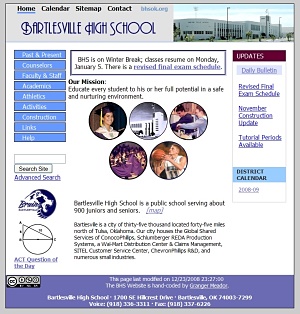
BHS Website for 2009

BHS Website for 2009

The new look is less colorful but strikes me as more professional. It still sticks to HTML, CSS, and Javascript. My CSS is improving, although I still use tables far too much to make things easier for me to format.

The content is largely the same except in two areas. First, I replaced the generic Help and Links pages with larger pages gathering together relevant resources for different audiences: students, faculty/staff, parents, alumni, and visitors/public.

Second, I’m experimenting with a news site based at sites.google.com in hopes of making it much easier to post, edit, and track news items. I’ve been hard coding each news item, which takes too long and is quite cumbersome to manage. Now, if our district internet filter will cooperate, I can post news stories without any coding and then have them automatically show up on the main site. Unfortunately Google Sites doesn’t offer RSS, so I had to format an RSS feed for it using Feed 43 and then found Feed2JS to translate that feed into a visible newslist on the main BHS website. If that patchwork holds, I’ll be a happy camper.

Websites age faster than dogs, so I don’t know how long this new design will endure. But a solid week of coding leaves me hoping it lives to a ripe old age.

Posted in technology, web design | Tagged | Leave a comment