ASUS versus Averatec

Asus versus Averatec

ASUS versus Averatec

ASUS Eee PC 1000H at Amazon

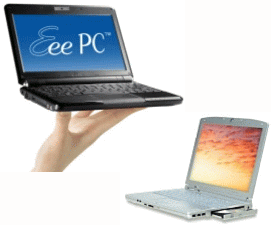
For the past year I’ve been disappointed in the Averatec laptop computer I purchased back in 2005.  It was slow to boot up with its dawdling hard drive, ran so hot that it repeatedly shut itself off, and burned up two batteries until they wouldn’t hold a charge.  To top it off, its 802.11b/g wireless reception in hotels was simply awful.

I’ve been putting up with the darn thing, hoping that I might be able to replace it with an Apple laptop.  But Apple’s new laptop computers released last week are priced out of my league.  So I decided to give a netbook a try.

Netbooks are a new category of tiny laptop computers, made practical by Intel’s new Atom microprocessor.  ASUS led the way last year with their Eee PC 701.  Although crippled by a slow pre-Atom processor, tiny 7″ screen, and miniscule keyboard, its lowball price created a new category.  Since then ASUS has expanded the line and a slew of other vendors have entered the netbook game.

I’ve been eyeballing netbook reviews for months and finally opted for the ASUS Eee PC 1000H.  It cost well under $500 from buy.com and features:

  • 10.2 inch 1024×600 display
  • 1.6 GHz Intel Atom processor
  • 1 GB RAM
  • 160 GB of hard drive space
  • 802.11n and Bluetooth wireless networking
  • 3 USB 2.0 ports, MMC/SD (HC) card reader, VGA port
  • Windows XP Home Edition
  • 6-cell battery

I opted for the 10″ machine over a 9″ because reviewers found the keyboards on the 9″ machines too cramped.  I couldn’t find any netbooks in Tulsa to get some hands-on time to judge for myself, so it was a relief to find that the keyboard on my 10″ machine is big enough for comfortable touch typing.  I wouldn’t want to go any smaller.  The 10″ netbook size nicely fills the niche between my desktop machine’s 20″ monitor and my iPhone; it is perfect for surfing the internet on the couch.

The machine’s fan is quiet and, unlike my Averatec, the computer runs cool enough to comfortably set it on my lap.  I wish the display were a more standard 1024×768, but the slight vertical cramping is not a deal-killer.  There’s a mode to compress a 1024×768 image onto the display, but its artifacts are pretty ugly.  One nice compensation for the increased need for scrolling is that the touchpad is multitouch – I can swipe two fingers down it simultaneously to scroll a window.

The battery life has been excellent – I got 5 hours of use on the first charge, even though I ran the unit in overclocked mode (pumping the processor up to 1.8 GHz) for awhile.  There are convenient buttons to switch screen modes and adjust the system clock from 1.2 to 1.6 to 1.8 GHz.

A very pleasant surprise was finding that I could still watch the Netflix Watch Instantly video stream using my wireless router’s 802.11g connection.  I kept the ASUS 1000H in its 1.8 GHz mode and piped the VGA output to my HDTV with a little VGA-to-component converter I bought a couple of years back.  The playback was actually much steadier than what I got previously on the Averatec.

One potential problem is the lack of a CD/DVD optical drive.  But it was easy to work around that – I just mapped a CD drive on my desktop machine onto the ASUS via Windows File and Printer Sharing and my 802.11g wireless router.  This worked fine for installing WordPerfect (yes, it lives!) and Microsoft Office (Word is awful, but I do like Excel and tolerate PowerPoint).  The machine comes bundled with StarOffice and Skype, but I haven’t given them a whirl.  It also has some bundled antivirus program – if they ever want to charge me for it I’ll probably switch over to AVG Free.

So I’m very pleased with the ASUS Eee PC 1000H.  I plan to use it as my laptop for years to come and look forward to taking it on the road with me along with my iPhone and Kindle.  With these three gizmos I’m finding computing more fun and useful than ever.

Posted in technology | 6 Comments

iGoogle iRritation

iGoogle

iGoogle

I love using iGoogle as my web browser home page, but today the geniuses at Google decided to switch everyone over to “Canvas View.”  This mucked up the appearance of my page more than any of their earlier unannounced tweaks.

My version of the page shows my Google Reader entries, Gmails, Google Calendar, weather data and radar, as well as headline feeds from CNN, Boing Boing, digg.com’s Technology news, and Slate Magazine.  Suddenly all of those feeds and emails had two-line descriptions/previews, lengthening the page so that it scrolled right off the bottom of the screen.  And I HATE scrolling my home page!

Like most things Google, the primary iGoogle page has minimal visible controls.  Just as they don’t tell you what is going on, they don’t tell you how to fix it.  But a <irony>Google Search</irony> showed how to do it.  You have to use the “My Account” link at the top right of the iGoogle screen to then access the iGoogle Settings.  Then you can uncheck the “Show a short description for each feed article” option.

Posted in technology, web link | 1 Comment

Anything But Horrible

Dr. Horribles Sing-Along Blog

Dr. Horrible's Sing-Along Blog

Dr. Horrible’s Sing-Along Blog at Amazon

I have only passing familiarity with Joss Whedon’s work in Buffy the Vampire Slayer and Firefly, but I can certainly recommend the three-part show he created during the writer’s strike and has been showing on Hulu and selling via Apples’ iTunesDr. Horrible’s Sing-Along Blog has some marvelous singing and acting by Doogie Howser Neil Patrick Harris, a touching performance by Felicia Day and a fun over-the-top Nathan Fillion.

Perhaps this is reflected in his other work as well, but the ending was darker than I expected, giving the episodes greater weight and pathos. I’ve bought the videos, the soundtrack, and have spent much more than that assembling a tribute costume for Halloween this year.

Posted in funny, music, video, web link | 1 Comment

Google Sat

Google Satellite

Google Satellites

For years I’ve used satellite tracking software in my physics classes, showing students how we can track the thousands of orbiting objects around Earth.  We usually calculate the orbit of the space station or space telescope and confirm our results online.  Now the fun and free Google Earth application has added satellite tracking.

There is a post about this in the Google Earth Blog where you can load the Google Earth plugin into your browsers and play with the application.  You can also watch a YouTube video of the new feature.

If you have the Google Earth application loaded onto your computer, load the Analytic Graphics Incorporated KML file to give it this capability.

Of course you can also stick with NASA’s online J-Track 3D for fancy satellite tracking, or track the Hubble Space Telescope and International Space Station.

Posted in physics, technology, web link | Leave a comment

Instant Paper

InstaPaper website

InstaPaper website

I’m still thoroughly enjoying my Amazon Kindle and Apple iPhone 3G, and there is a great website/application that helps me capture online articles for them: Instapaper.

I installed their shortcut into Firefox and now, whenever I see a lengthy article I would like to peruse later, I click Instapaper’s Read Later shortcut up in my menu bar.  The article is saved and later I can visit the Instapaper website on my Kindle or use the Instapaper application on my iPhone to quickly access and read it.  There is an option to show the article in text-only mode, which is useful for the Kindle.

The Instapaper website also has a Give me something to read link where interesting articles are collected – I found several of interest.  But for me the richest mine for great articles has been the books article archive at Salon.com.  I once was a paid premium member of that service, but gave it up because the gems were too few for the cost, but lately the service has been free and accessible.  Another source of lengthy and interesting articles is The New Atlantis.

I still find the Kindle far preferable to the iPhone for this sort of thing, since it has a much bigger screen and the E ink technology is easier on the eyes.  One simply has to scroll too much and too often on the iPhone when reading a long article.

So, if you have a Kindle or an iPhone or just need an easy way to save online articles for later viewing with your computer’s browser, I highly recommend Instapaper.

Posted in technology, web link | 1 Comment