Ode to Joy: The Spark of the Gods

I believe in miracles, or at least in miracles of human achievement against the greatest odds. I invite you to invest the time to contemplate the following miracle:

There are many great human achievements on display in that wonderful 1960s performance extract. There is the symphonic achievement of dozens of skilled musicians and vocalists of the Berlin Philharmonic, guided by the gifted if dictatorial conductor Herbert von Karajan, who also directed the film. In clips no longer freely available online, there is the powerful singing of the quartet composed of bass-baritone Walter Berry, tenor Waldemar Kmentt, contralto Hilde Rössel-Majdan, and soprano Gundula Janowitz. There is the beautiful concert hall designed by Hans Scharoun.

But of course the miracle on display here is the fourth movement of Ludwig van Beethoven‘s Ninth Symphony in D minor, commonly known as the Ode to Joy. He based it on a poem by Friedrich Schiller and created the world’s first choral symphony by featuring the human voice on the same level as the symphonic instruments. The miracle is that this, one of the greatest pieces of music ever written, was brought to completion when Beethoven was completely deaf from tinnitus.

When I hear the 9th I always think of how, at its 1824 premiere, Beethoven made his first on-stage appearance in 12 years to a packed hall in Vienna. Michael Umlauf and Beethoven jointly conducted the work, obliged to do so since Beethoven couldn’t hear a blessed thing. When the work ended, Beethoven was several measures off and still gesticulating. Contralto Caroline Unger walked over and turned Ludwig around so that he could see the audience’s cheers and applause. He received five standing ovations. Ludwig van Beethoven truly had Götterfunken, the poem’s “spark of the Gods”, in his humbled, handicapped, human form.

Below is how the miracle is portrayed, with Hollywood changes, in Immortal BelovedI do love how they portray the harsh reality of what his ears could actually perceive against the joyous music in his mind.

Here is the libretto, with Beethoven’s additions to the original poem by Friedrich Schiller shown in italics:

German original
English translation
O Freunde, nicht diese Töne!
Sondern laßt uns angenehmere anstimmen,
und freudenvollere.
Freude! (men’s chorus: Freude! )
Freude! (chorus again: Freude! )
Oh friends, not these tones!
Rather, let us raise our voices in more pleasing
And more joyful sounds!
Joy! (Joy!)
Joy! (Joy!)
Freude, schöner Götterfunken*
Tochter aus Elysium,
Wir betreten feuertrunken,
Himmlische, dein Heiligtum!
Deine Zauber binden wieder
Was die Mode streng geteilt;
Alle Menschen werden Brüder,
Wo dein sanfter Flügel weilt.
Joy, beautiful spark of the gods*
Daughter of Elysium,
We enter, drunk with fire,
Heavenly one, your sanctuary!
Your magic reunites
What custom strictly divided.
All men become brothers,
Where your gentle wing rests.
Wem der große Wurf gelungen,
Eines Freundes Freund zu sein;
Wer ein holdes Weib errungen,
Mische seinen Jubel ein!
Ja, wer auch nur eine Seele
Sein nennt auf dem Erdenrund!
Und wer’s nie gekonnt, der stehle
Weinend sich aus diesem Bund!
Whoever has had the great fortune
To be a friend’s friend,
Whoever has won a devoted wife,
Join in our jubilation!
Indeed, whoever can call even one soul
His own on this earth!
And whoever was never able to, must creep
Tearfully away from this band!
Freude trinken alle Wesen
An den Brüsten der Natur;
Alle Guten, alle Bösen
Folgen ihrer Rosenspur.
Küsse gab sie uns und Reben,
Einen Freund, geprüft im Tod;
Wollust ward dem Wurm gegeben,
Und der Cherub steht vor Gott.
Vor Gott!
Joy all creatures drink
At the breasts of nature;
All good, all bad
Follow her trail of roses.
Kisses she gave us, and vines,
A friend, proved to the end;
Pleasure was given to the worm,
And the cherub stands before God.
Before God!
Froh, wie seine Sonnen fliegen
Durch des Himmels prächt’gen Plan,
Laufet, Brüder, eure Bahn,
Freudig, wie ein Held zum Siegen.
Glad, as His suns fly
Through the Heaven’s glorious design,
Run, brothers, your path,
Joyful, as a hero to victory.
Seid umschlungen, Millionen!
Diesen Kuß der ganzen Welt!
Brüder, über’m Sternenzelt
Muss ein lieber Vater wohnen.
Ihr stürzt nieder, Millionen?
Ahnest du den Schöpfer, Welt?
Such’ ihn über’m Sternenzelt!
Über Sternen muss er wohnen.
Be embraced, millions!
This kiss for the whole world!
Brothers, above the starry canopy
Must a loving Father dwell.
Do you bow down, millions?
Do you sense the Creator, world?
Seek Him beyond the starry canopy!
Beyond the stars must He dwell.
(the finale repeats the words:)
Seid umschlungen, Millionen!
Diesen Kuß der ganzen Welt!
Brüder, über’m Sternenzelt
Muss ein lieber Vater wohnen.
Seid umschlungen,
Diesen Kuß der ganzen Welt!
Freude, schöner Götterfunken
Tochter aus Elysium,
Freude, schöner Götterfunken
Götterfunken!
(the finale repeats the words:)
Be embraced, you millions!
This kiss for the whole world!
Brothers, beyond the star-canopy
Must a loving Father dwell.
Be embraced,
This kiss for the whole world!
Joy, beautiful spark of the gods,
Daughter of Elysium,
Joy, beautiful spark of the gods
Spark of the gods!
Posted in music, video | 1 Comment

The Kindle Paperwhite

This month I received my Kindle Paperwhite e-reader, the fourth Kindle I’ve owned and the best thus far. I love the “electronic ink” screens since they are easier on my eyes for extended reading than the backlit displays on my iPhones and iPads, and the convenience of having many books available to read in a small package, with no need to prop open the pages for reading, means I always try to read a book on a Kindle unless color illustrations are its major focus.

Generation 1 2 3 5
Purchased in… June 2008 February 2009 September 2010 October 2012
My Cost $360 $360 $139 $139
Resolution 600×800 (167 ppi) 600×800 (167 ppi) 600×800 (167 ppi) 758×1024 (212 ppi)
Connectivity Cellular Cellular WiFi WiFi
Major Improvements Improved forward/back buttons; 16-level grayscale instead of 4 Further button refinements; better contrast with Pearl display Front lit; improved contrast and resolution; improved battery life
My Review Kindling Kindle 2: Evolutionary, Not Revolutionary The Case of the Crashing Kindle This post

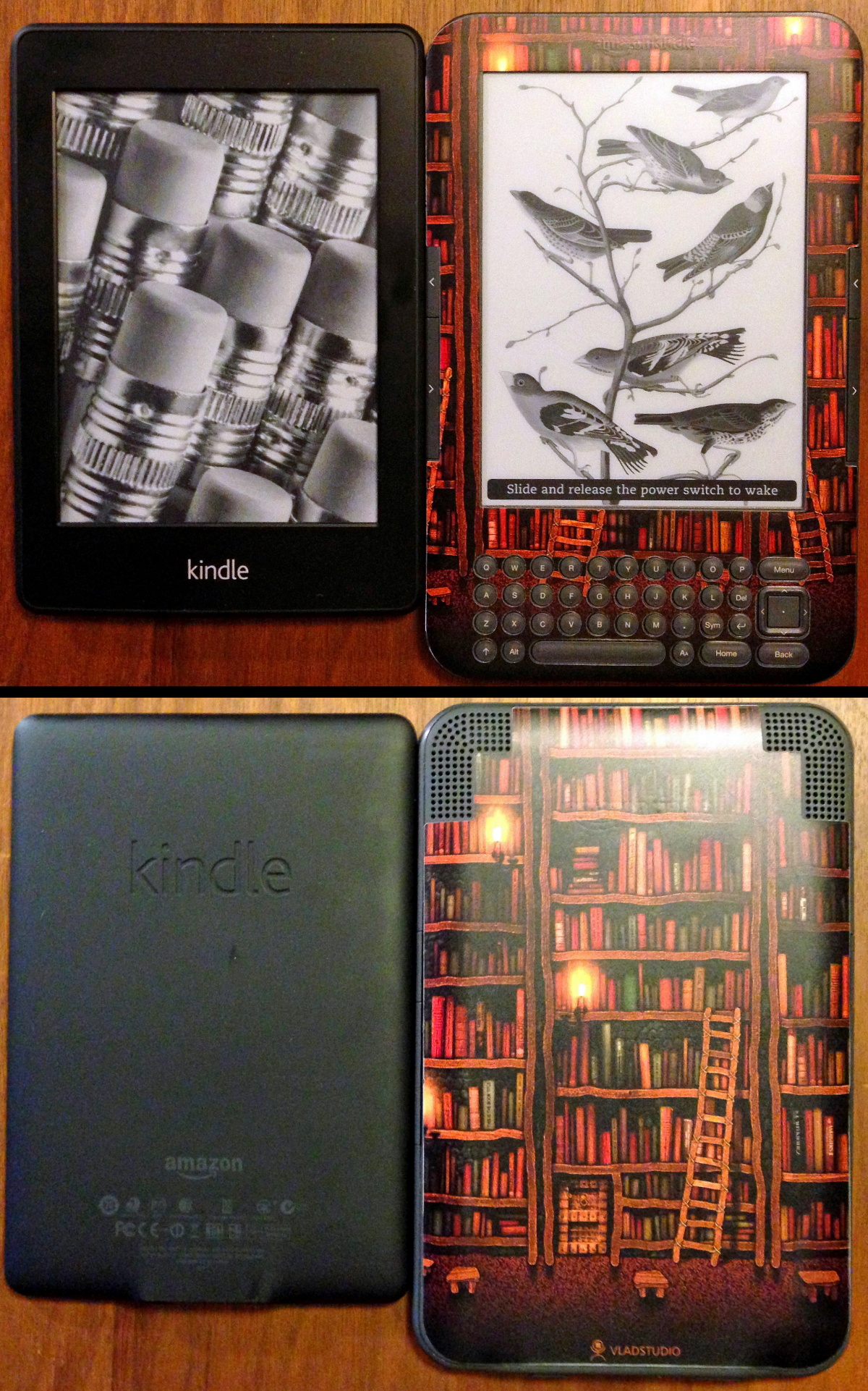
I skipped the fourth-generation Kindle Touch, since the display improvements were minimal and I was quite content with my third keyboard model and didn’t see much added value in a touch screen. I discarded the defective Amazon case, skinning my third Kindle with an attractive vinyl overlay on the front and back and carrying it around in a soft BUILT sleeve.

But the fifth generation Kindle Paperwhite brings a front-lit display with improved resolution, so I decided to upgrade again. I again face the choice of a WiFi-only or WiFi with Cellular model and opted again to save money by getting the WiFi-only model, plowing $40 of the $50 savings into the ad-free option, which provides attractive “off” screens instead of displaying ads when you turn the unit off. I’ve been using the $139 ad-free WiFi model for  over a week now, so I am ready to share my impressions.

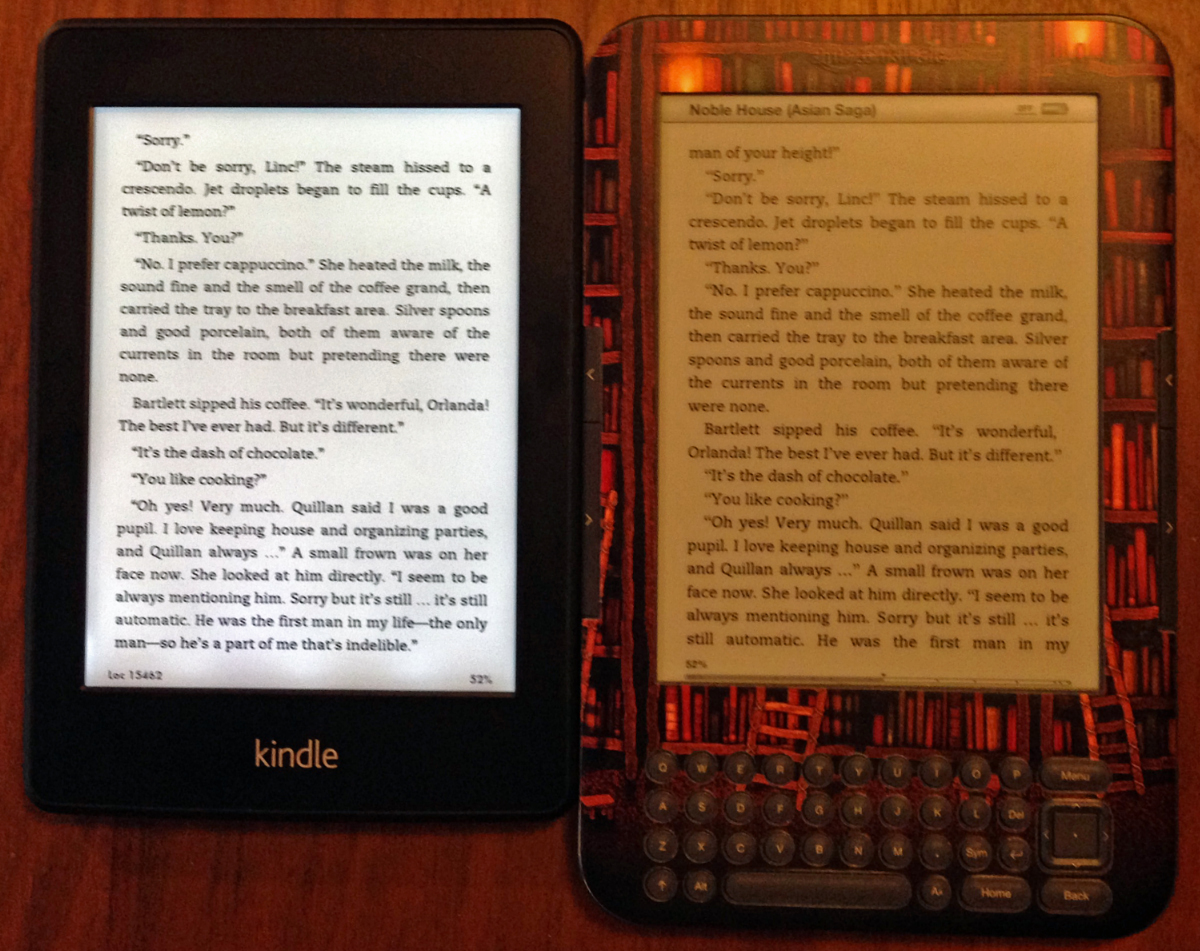
The Paperwhite (left) is smaller but sturdier than the Kindle 3

Smaller Size but Similar Heft

My first impression of my new Kindle was surprise at its seemingly diminutive size. It is only slightly narrower than my third Kindle, but the loss of the keyboard makes it shorter, which made it seem smaller than I had expected it to be. The weight is down from 0.54 pounds (2.4 newtons) to 0.49 pounds (2.2 newtons), but the decreased size disguises the reduced weight in the newer unit’s slightly greater density, amplified by a more rigid body.

Sturdier Feel

Overall the new unit feels sturdier and less likely to bend and break. It is the best casing thus far. The first Kindle had a weird shape with horrible large side buttons which were too easily triggered, while the second one had much better buttons, but the case did show marked signs of wear after a year of use. My Kindle 3 was known to pop open at the seams on occasion when flexed, and the Amazon add-on cover was useless since it would change the pages or crash the Kindle when closed and transported. I could easily snap the Kindle 3 back together without any annoyance, but the new unit feels much more substantial. It fits down in my old Kindle 3 BUILT soft sleeve for travel. I don’t intend to put a skin on my Paperwhite since the back is now a matte soft-touch plastic and is comfortable to the touch, providing a good grip.

The Touchscreen

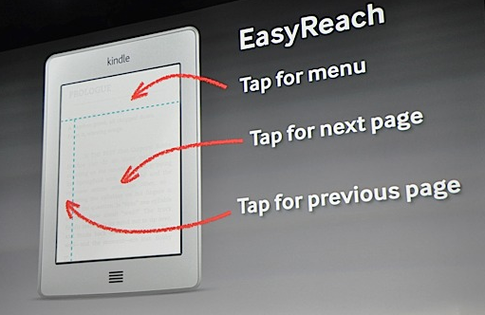
Tap zones on the Paperwhite

The Paperwhite is only available in a touchscreen version, and I was leery of that. I don’t enjoy having to wipe off the screens of my iPhone and iPad, which easily smear, but thankfully I have yet to encounter annoying smears on the Paperwhite. I had wondered how responsive the Kindle’s touchscreen might be compared to the Apple products, but the inherently slower speed of the e-ink display, although much faster than previous generations and far less annoying, disguises any lag.

Losing the hardware keyboard is no great loss since interacting with the touch screen controls is fast and easy. However, I do miss the dedicated hardware forward and back buttons on the sides of the unit. It isn’t hard to tap the right spot on the Paperwhite to change pages (and I do mean “right” when advancing a page, and that is not completely comfortable for me as a southpaw), but I liked the old way I could grip the bezel and just click the buttons underneath my grip to change pages without moving any fingers. The new bezel is wide enough for comfort, but I wouldn’t want it to be any narrower.

Frontlit Display is a Big Improvement

The Paperwhite has a front-lit display with several white LEDs at the bottom of the screen shooting light through waveguides across the screen. The text area is lit evenly enough for my taste, although you can easily perceive where the lights are because of uneven lighting at the bottom of the display below the text. This is not annoying in use, and the lights greatly increase the perceived whiteness of the background and improve the contrast of the display. You can adjust the light level and turn it off, but the screen looks far better with having it on all of the time. I found a single light level which is comfortable for me both in a lit and an unlit room. And reading the Kindle in the dark is a new experience, since all of the previous models relied on ambient illumination.

The frontlit display is a big improvement

Silence, Please

My earlier Kindle had speakers and text-to-speech recognition, so it could read a book to me if the book’s publisher didn’t disallow it. But I almost never used that feature and won’t miss it, and I’ve never used a Kindle to listen to music or audiobooks since I always have my more capable iPhone at hand (with improved ear buds on the new iPhone 5).

Interface

I’m getting used to the changes in the interface design because of the touchscreen. When selecting something to read, the Paperwhite defaults to displaying the covers of books instead of a text listing, but I was able to switch it back to the list view, which I prefer. I leave the WiFi on all of the time, whereas on my Kindle 3 I would always manually turn the WiFi on and off to improve battery life. Thankfully the Paperwhite’s long battery life withstands both the frontlit display and always-on WiFi with aplomb and I have yet to recharge it despite hours of reading. This means WhisperSync can keep my Amazon-purchased books in sync across devices – when I’m not carrying my Kindle on the road I can instead read with my iPhone’s or iPad’s Kindle app, and those apps and the Paperwhite keep the books in sync when I switch devices, so I don’t have to hunt for where I left off. This was true for the Kindle 3, but didn’t work in practice because I kept its WiFi shut off.

Conclusion

So I’m very pleased with my Kindle Paperwhite, and the only change I would make, if I had my druthers, would be having dedicated page change buttons on its left and right sides. I’ll send off my Kindle 3 to a new life somewhere, as I did with my earlier Kindles. Unlike most electronics when they become obsolete, I can’t stand to throw away a Kindle – it would feel just as wrong as throwing away a good book!

Posted in books, technology | 2 Comments

October in the Osage Hills

October 8, 2012

Sand Creek (click image for slideshow)

With highs only in the 50s, I was bound to be lured out on the trails this past weekend. I had some advance work to do in preparation of an inservice day next week, since I’ll be starting that day with a presentation to most of the secondary school teachers across our district. But right after lunch one day I planned to make the quick drive west to Osage Hills State Park to get some hiking in on its very familiar terrain.

My hike was delayed by home improvements

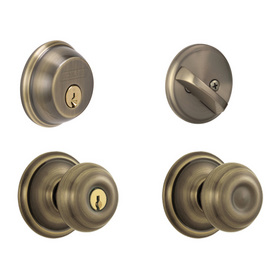
My hike was delayed, however, when my 31-year-old house key broke off in a door lock. I moaned because I knew the only remaining keys were some lousy Wal-Mart copies which only worked in a few of the aged knob and deadbolt locks on the house. That and the fact that two of the doorknob locks had become inoperable over time forced me to finally take the plunge and change out the three door knob and three deadbolt locks scattered about four different doors of Meador Manor. (Yeah, I know, a real manor would have more doors with keys than that.)

So I trudged to the home improvement store and bought three matched sets of knobs and bolts and proceeded to swap out all of the house locks. That took some puttering about to get everything oriented just right so all of the locks would operate, but now I’m delighted to have a bunch of locks and knobs which all work perfectly. Well, except for the back door which has sagged and has to be yanked upward to make the deadbolt operable, and I’m not tackling shimming that door up anytime soon. Even better, I have six bright and shiny new keys which all work well. I can lose five keys and still get in the house – not bad!

Spillway Bluff

With that chore completed I drove out to Osage Hills and parked at Lake Lookout. A dock has been added so that boats can now be tied up instead of having to be beached, and they evidently added some paddleboats over the summer, but the summer heat kept me away and I never got to see them. I walked along the dam and climbed down to the spillway area to visit one of my favorite spots where the bluff has fallen away, creating a shallow archway in the side of the bluff. If I hadn’t lost time to the door locks I would have stretched out on the huge boulder there for some rest in the sun, but instead I gazed out over the calm waters of the lake and then headed out along the trail toward the ruins of the old CCC camp.

I was surprised to find the trail blocked off as I approached the camp, but the signs showed the part I was already on was closed. I’d noticed some fresh gravel strewn along part of the trail while earlier sections were a bit overgrown, so evidently trail maintenance was underway but not an active project this day.

Tiny Trail Flower

Near the tiny old CCC amphitheater hewn from the bluff rock I took a macro shot of a tiny flower and followed the trail to the old observation tower. I climbed up and saw a bird, probably a turkey vulture, gliding across the gently rolling hills in the distance. I hopped on a picnic table for a view of the blackjack oaks and other cross timber trees dotting the hills in the other direction.

Descending to the campground, I found the social trail leading off from one campsite to a fire ring out in the woods I’d discovered some time ago, and then backtracked to the campground and took another social trail shortcut over to the bluffs trail. A couple and their small child were heading toward the bluffs, so I opted to bushwhack down the dry streambed all the way south to Sand Creek itself. Several large trees along the streambed had exposed roots – with a bit more erosion they will tumble, as some of their neighbors have already done, forming temporary bridges across the channel. One fallen tree had a large gall which had rotted open.

Sand Creek Bluffs

I bushwhacked my way over to the bluffs and gazed over the still waters of the creek below. I then backtracked to the cabin trail, trailing behind the family I’d spied earlier. When we reached the group camp, I paused atop the high bluff to shoot the creek and give them time to move on down the trail. When I reached the falls, I found the drought had completely stopped their flow. That made it easy to cross the ledge to the other side of the creek and I bushwhacked my way uphill to find the park fence line. Then I returned to the trails, making my way back to Lake Lookout, with a stop for some high swinging in the playground along the way.

There was more trail maintenance going on with the lake trail closed where you can turn off toward the tower. I worked my way around the blockade and followed the lake trail until I could easily bushwhack to the Lake Lookout road and my car, having completed about five miles on all of the main hiking trails except the creek loop. On my next visit this fall I’ll probably hike the bike trails for a change of pace…literally.

Hot Hamburger

It was dinner time when I reached Bartlesville, and since I was on the western end of Frank Phillips I was lured into Murphy’s Steak House for their famous hot hamburger: a patty on bread with a mound of french fries on top and gravy over all. That no doubt gave my Lipitor a challenge. Then I indulged further with a tasty slice of lemon pie. Ribbons of cloud crossed the sky, illuminated by the setting sun, as I reached home.

It won’t be long until Fall Break, right after that inservice day when, as usual, I’ll be leading meetings instead of being led, which is a mixed blessing. Hopefully the weather will allow me to take an overnight trip to hike some trails more than a day trip away.

Click here for a slideshow from this day hike

Posted in day hike, home repair, photos, travel | Leave a comment

All Your Love (I Miss Loving)

My September 2012 Song of the Month

All Your Love (I Miss Loving) from Bingo!

I only rarely attend music concerts by pop artists. I’ll drive hours to attend Pink Martini concert, who often perform with local symphonic groups, but the only time I went to concerts by pop artists was when I worked the concession stands at Oklahoma City venues to earn money for our high school’s Junior Classical League. Soooo nerdy!

But when some friends at work mentioned having tickets to the Steve Miller Band concert at the Hard Rock Casino in Catoosa, I leapt at the opportunity. He had a long string of pop hits in the 1970s and 1980s, with my favorites being Take the Money and Run, Jet Airliner, and The JokerAt the Catoosa concert I would hear all of these and other hits like Abracadabra, Fly Like An Eagle, SwingTown, Rock’nMe, and Jungle Love. Everything was spot-on great. Joseph Wooten really shines on his keyboard solo on Fly Like An Eagle.

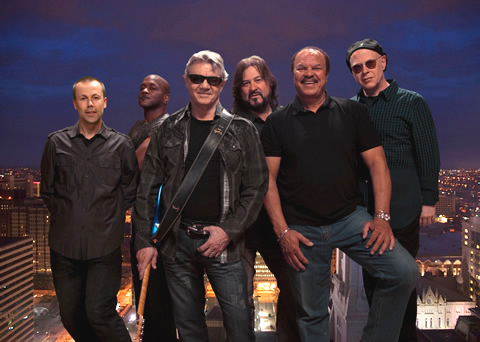
The Steve Miller Band of today: Jacob Peterson, Joseph Wooten, Steve Miller, Kenny Lee Lewis, Sonny Charles, & Gordy Knudtson

But Steve also played some lesser-known tracks from various albums and a few blues numbers from his 2010 album Bingo! The song which took me by surprise was All Your Love (I Miss Loving) with Sonny Charles of the Checkmates doing the lead vocal. Steve lauded songwriter and bluesman Otis Rush of Chicago for this song, first recorded in 1958. Steve calls the song a “love rhumba” – he says Otis Rush treated him very well when Steve was very young seeing him in clubs in Chicago, taking off his guitar and handing it to Steve and inviting him to play.

The dark Afro-Cuban sound of the Steve Miller Band’s performance with Sonny Charles made me want to hear that song again, so when I got home I looked it up and found out about the Bingo! album, which came after a 17-year break in studio albums for Steve Miller. All Your Love (I Miss Loving) is the 8th track, featuring Michael Carabello on the congas and Adrian Areas on the timbales with the reverb-laden guitar playing reminiscent of Jimi Hendrix. The 1958 version of the song by Otis Rush was recently inducted into the Blues Foundation Hall of Fame, and influenced the later Black Magic Woman by Peter Green and made famous by Santana as well as Beyond Here Lies Nothin’ by Bob Dylan.

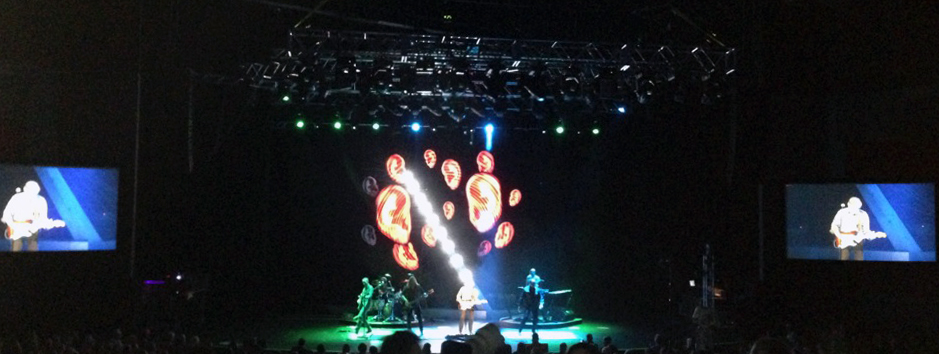
Steve Miller Band performing at the Hard Rock Casino in Catoosa on September 28, 2012

I also really like some other tracks on Bingo! and bought the whole extended Special Edition of the album. Sonny Charles’s Ooh Poo Pah Doo (YouTube) was fun at the live concert and on the album, and You Got Me Dizzy (YouTube video) is well-placed on the album right after All Your Love (I Miss Loving) as an upbeat contrast.


All Your Love (I Miss Loving)
Cover by Sonny Charles and the Steve Miller Band

All the love pretty baby, I have in store for you.
You know I love you baby, I know you love me too.

All your loving, I miss loving.
All your kissing, I miss kissing.
All your loving, I miss loving.
All your kissing, I miss kissing.
Before I met you baby, I didn’t know what I’d been missing.

All the love pretty baby, I have in store for you.
You know I love you baby, I know you love me too.

Ohhhhh…..mmmmmmm….
Aw shucks!

October 2012 Song of the Month >

< August 2012 Song of the Month

Posted in music | Leave a comment

Apple Updates: iOS 6 and iPhone 5

September 29, 2012

I received my iPhone 5 this week.

Four years ago I bought my first smartphone: the iPhone 3G. It was empowering to have the internet almost always available, and the phone enabled me to allow my occasional day hikes to explode the following year into a full-blown obsession which thankfully has both physical and emotional health benefits. Having audiobooks and podcasts to entertain me on the road and along my walks, coupled with my TomTom GPS app and later my MotionX GPS trail tracker, encouraged me to take 156 days to hike almost 1,000 miles since July 2009.

I enjoyed the upgrade in 2010 to the iPhone 4, although the reception problems with its around-the-rim antenna made the limitations of AT&T’s rural phone network, my technological lifeline on many travels, even more annoying. I enjoyed the iOS environment enough to buy Apple’s iPad and upgrade my pads with each new release. I use the pad around the house to watch videos, get my daily text-based news, and surf the internet.

So I was very interested in this fall’s release of the latest operating system, iOS 6, for both my iPhone and iPad,, as well as upgrading from my iPhone 4 to the iPhone 5. The standard two-year phone contract means I only upgrade the phone every other year, and I feel I hit the cycle in the right spot: I skipped the iPhone 3GS and iPhone 4S and instead my phone upgrades match up to the major product revisions rather than simply hardware speed boosts and refinements.

Siri’s Potential

I’m hopeful Siri will make me a safer driver.

I’ve never had the vaunted Siri voice-recognition assistant before, and the voice commands for audio playback control on my first two iPhones never worked well enough to bother with. Siri is like the Star Trek computer brought to life with less gear grinding, but I always regarded the talking computer in my favorite television show of all time as more of a dramatic device tailored to the needs of television entertainment than a future necessity.

iOS 6 brought Siri to my iPad, but not my iPhone 4. I’d have to wait a few weeks for the iPhone 5 to have Siri in my pocket. And I’ve only rarely used Siri on the iPad, since voice control seems superfluous when I have my hands free. But having Siri available when I’m driving sounds promising – I know I shouldn’t be trying to read and type on my iPhone while driving, although I do manipulate the TomTom GPS app and the iPhone’s playback controls while driving. With Siri I could hopefully control playback, make calls, send texts, and manipulate turn-by-turn GPS functions without having to take my hands off the wheel to manipulate icons and keyboards, except for pushing the home button a couple of time to activate Siri and then having to confirm some of Siri’s actions. I haven’t had a chance to really try all of that yet since the iPhone 5 only arrived a couple of days ago, but I’m looking forward to it.

VERDICT on Siri: I’m still in the discovery phase and haven’t even gone to trial yet.

10/2 UPDATE: On a trip to and from Oklahoma City, I never used Siri. I’ll need to be driving to unfamiliar locales to put it to the test.

Maps

I will continue to use my TomTom GPS app for road trips.

Unfortunately the arrival of Siri marks the departure of both the YouTube and Maps apps which I’ve used for years on the iPads and iPhones. Apple had a deal with Google which provided the back-end for the Maps app but did not offer the voice turn-by-turn driving directions Google added to Android smartphones some time ago. So while I could get graphical driving directions, locate business and points of interests with smart links, and use Google’s Street View to even get an idea of what my destination looked like, the built-in Maps app was not a practical way to navigate when driving alone.

Years ago I bought the then-quite-expensive TomTom GPS app to address this shortcoming. It has been upgraded steadily since then, so the up-front cost no longer stings. Somewhat like when Google updates its various free services, I’m not always thrilled with the changes in my TomTom app, but overall it has improved. I call it Trixie since with the voice I’ve selected it is my navigatrix and also because the inevitable shortcomings of GPS and the on-board maps and database means it sometimes leads me astray.

The TomTom app was greatly improved when it began linking to Google Local Search awhile back. The latest upgrade defaulted to using Facebook’s Places and that fooled me into thinking the Google Local Search was gone, which was a great disappointment. But I find that I can still access the Google database if I press the right icon in my Places search, which is a relief. Google simply has the best database out there, although it does have its flaws, having directed me more than once to a spot a mile or more distant from the actual location of the business I was seeking. It is addresses along the busy highway corridors in smaller towns which seem to be the most unreliable.

But the TomTom app has been a godsend for my travels and will remain so for now, even though iOS 6 finally brings built-in audio turn-by-turn GPS navigation to the iPhone 4S and my new iPhone 5. That’s because Apple ditched Google Maps for its own solution and, as evidenced by the recent apology by CEO Tim Cook, its maps product has significant shortcomings. My limited use has shown that it is not nearly as powerful as the old Maps app in regards to search and it lacks Street View. But the new Maps app is far from useless: it had no trouble finding a Tulsa restaurant location listing last night and allowed me to quickly phone in for reservations. I’ve downloaded the Live Street View Free app so I can use Street View if needed, although the experience is far from seamless.

But on my frequent road trips I often am in rural areas with slow or non-existent cellular data service, so I wouldn’t rely on the new or the old built-in Maps app anyway, since it needs access to an online database to function. My TomTom GPS app has its maps built-in and many points of interest (POIs) to boot, although its on-board database of POIs is a pale and skinny shadow of Google’s robust online database. So I’ll continue to rely on my TomTom GPS app for road trips and only use the built-in Maps app for quick searches and directions in metro areas.

VERDICT on Maps: Use the TomTom GPS app for road trips for its on-board maps and database; Apple Maps will do for quick searches in metro areas until Google offers something better or Apple catches up. Try Live Street View Free as an enhancement when needed.

10/2 UPDATE: I used Apple’s turn-by-turn directions on the drive home from Oklahoma City. The visuals were attractive and the directions accurate, but the estimated time of arrival was not as accurate as my TomTom and I could not zoom very far out on the view without switching to Overview mode. I will be happy to use the Apple Maps app for quick turn-by-turn directions but for longer trips will rely on my TomTom app.

YouTube

The decent old YouTube app on the iPad has disappeared, replaced by an inferior iPhone app from Google.

The biggest disappointment in iOS 6 has been the loss of the YouTube app on my iPad. Apple wrote that app years ago and hadn’t updated it, but it worked very well for my needs, allowing me to quickly access new video podcasts I had subscribed to in YouTube. And the app allowed me to quickly flip my viewing from the iPad to my large HDTV by using the AirPlay service and my Apple TV box. The new operating system deletes the old built-in YouTube app and offers no suitable replacement for the iPad.

I presume Google was caught off-guard, since their only response thus far has been to release a YouTube app that works okay on the iPhone, but is annoying on the iPad. Their new app insists on listing videos only in portrait mode, and I only use my iPad in that orientation when reading a long text article or my Tulsa World. Since my iPad is usually sitting on a surface using the great ZeroChroma Vario case with built-in stand, it is most annoying to have to pick it up and turn it to portrait orientation to pick a video to watch, and then have to rotate back to landscape mode to watch the video full-screen.

Even worse, the stupid app does not support AirPlay nearly as well as the old one did. The new one can only display video through the Apple TV in mirroring mode, which means you have to dedicate your iPhone or iPad to playing the video. The old app would send video and audio to the Apple TV via AirPlay and keep working in the background when you switched to a different app. Google needs to get that functionality back, pronto!

I’ve tried some alternatives, from Frequency to Squrl to Vodio, but each of them had significant drawbacks. So for now I’m watching all of my TWiT network technology podcasts using their own TWiT iPad app, which supports AirPlay in the background. But I’m stuck using the lousy YouTube app to watch the wonderful model-building videos posted by Steve Neill and other YouTube videos.

VERDICT on YouTube: Watching YouTube videos on the iPad or iPhone has taken a significant step backward in the new release. Google’s YouTube iPhone app needs to be “plussed” to offer landscape mode on the iPad and needs to add background AirPlay capability.

10/2 UPDATE: Chrystal Cain Shiarla recommended Jasmine, an iPhone/iPad YouTube client app that supports background AirPlay. I’m back in business on my iPad!

Welcome Changes in iOS 6

Siri is the most obvious new feature of iOS 6 for my iPad 3, but a few other new features of iOS 6, independent of the new iPhone 5 hardware, have stood out for me.

  • I’m glad that I no longer have to put in my iTunes password when I just want to install a free app update.
  • I learned to never leave my iPhone or iPad by my bed at night, because texts, reminders, and unwanted phone calls could make the device light up and make noise, waking me unnecessarily since I am a light sleeper and insomniac. I immediately used iOS 6’s new Do Not Disturb settings to tell both devices to keep dark and quiet during my normal sleep time unless someone in my contacts list is trying to reach me.
  • I haven’t used them yet, but I like the various options you can invoke when receiving a call while you are busy.
  • I shot my first iOS 6 panorama on the iPhone 5 tonight. I didn’t have subject matter worthwhile to post the photo, however of the orchard along the Pathfinder Parkway. Previously I’ve used the Autostitch Panorama  and PhotoSynth apps for such functionality, but having it built into the normal Camera app makes it far more likely to be used. However, the iPhone 5 camera is no match for my Canon superzoom camera; most of the photos I took at a Steve Miller Band concert last night at the Hard Rock Casino in Catoosa were unimpressive; here’s the best of the bunch after some cropping and Photoshop tweaking, and the original photo is shown below, which was shot with the flash on – shots without flash led to massive blooming and oversaturation of the performers on the brightly lit stage.

10/2 UPDATE: Andy Ihnatko also had annoying low-light blurring on the iPhone 5 and speculates that it is switching to a four-pixel blend mode for low light which is causing the loss of resolution, made apparent in zoomed images. Hopefully he’s right and a software update can fix this, reserving the pixel-blend mode for lower-light situations.

Unaltered iPhone 5 photo of a Steve Miller concert.

The iPhone 5

I was so eager to get an iPhone 5, yet unwilling to suffer waiting in lines, that I got up at 3:30 a.m. to order one an hour after pre-orders began. Even then the demand was high enough that I was told I’d have to wait two weeks after they went on sale in stores to receive mine. Thankfully it came in much earlier than that, only five days after the sales debut. I got a quotation from Gazelle for my iPhone 4 before the iPhone 5 announcement and shipped it off today, so I’ll get back $175 to cover part of the $399 up-front cost of my new phone.

I spent the dough to get the 64 GB iPhone 5.

Memory Management and iCloud

I ordered the largest 64 GB model since my 32 GB iPhone 4 had maxed out its memory with my various apps plus my large collection of iTunes-rated songs, audiobooks, and podcasts. I had to set the phone to use 128 kpbs AAC audio files rather than 256 kpbs and to only load the latest 10 unplayed episodes of each podcast to save space. iCloud music management was more annoying than useful, with slow-to-update-or-appear playlists and having to force many songs to be uploaded into iCloud before I could get them on the phone, so I had finally turned it off on the old phone.

I’m trying iCloud music sync again on my new phone, although I was careful to not turn that on until I had synced it with iTunes on my Windows desktop computer to preload over 2,000 rated songs from my collection via USB cable rather than using up over 15 GB of my CableOne internet bandwidth to update the phone via iCloud over WiFi. Then I turned on iCloud and it is now syncing my music and the like.

Sadly the same frustrations with iCloud I had before are recurring, so I’ll likely turn that off and return to manual syncing with iTunes, even though iTunes on Windows is a bloated slow hog. It is supposed to be updated later this fall and I sure hope they slim it down and speed it up!

Hardware

I like the new design, which is a bit taller than before, enough room for another row of icons on each screen, which is welcome. Apps don’t have to be updated to still look fine on the bigger screen, and the phone is very snappy and responsive. Unlike my iPhone 4, the new phone supports the so-called 4G service AT&T offers in Bartlesville and Tulsa, which is HSPA+. Web pages load noticeably faster than with 3G, let alone poor old EDGE, although I suspect I would get even better results with LTE service. Too bad AT&T’s LTE in the Sooner State is currently limited to the Oklahoma City metro area. I’ll be there in a couple of days and will try to run some speed tests.

10/2 UPDATE: While briefly in Oklahoma City I ran some off-the-cuff speed tests:

Location Network Best Download Speed (Mbps) Best Upload Speed (Mbps)
Bartlesville My home’s WiFi (802.11n on 5 GHz band to a cable modem’s 10 Mbps service) 8.83 0.97
Bartlesville AT&T HSPA+ at my home 5.28 0.74
Oklahoma City AT&T TLE at my parents’ home 8.51 2.97
Oklahoma City My parents’ WiFi (802.11g  to a DSL line) 4.72 0.53
Oklahoma City Bricktown hotel’s WiFi 5.81 2.84

So, as expected, the TLE cellular data service was very fast (although in my little test it was nowhere near as fast as what some folks are getting with TLE around the country), while my local HSPA+ “4G” data service was nice but not spectacular, albeit noticeably faster than 3G and of course EDGE.

The phone is noticeably lighter and slimmer, and I’m glad the back is no longer glass. For years I used a very thin plastic case to help with the antenna signal attenuation problem on my iPhone 4, but eventually chucked that and used it bare. I’m using the iPhone 5 uncased as well, a risk since I didn’t buy AppleCare for it, but I’ve yet to break an iPhone. I need to find a nice slim belt holster, since the cheap BlueHarbor ones I’ve used for the iPhone 4 do not fit well.

Everybody wants to know about the iPhone 5.

The phone looks much like the iPhone 4, but the larger size is a give-away. A local patrolman pulled me over today because my car’s license tag had expired (either the reminder card was lost in the mail or wasn’t sent due to budget cuts or a bureaucratic snafu), and as soon as he looked in the car he eagerly asked, “Is that the iPhone 5? Do you like it?”

That helped prompt me to write this review, although I doubt the friendly patrolman will ever know about it. By the way, he let me off with a warning and I promptly drove to the tag agency to get my new sticker, but it was closed on weekends. That prompted me to find out that I could renew my tag online and have a new sticker mailed to me, so I did that and they should now email a reminder to me each summer so I can follow that routine. I also added an annual reminder to my online calendar system.
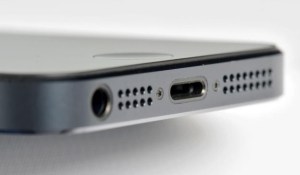
Changes in the headphone and sync/charging ports on the new phone are annoying.

My “conservation of happiness” principle applies to this hardware upgrade, however. The improved size, weight, and speed are offset by cable connection annoyances. They ditched the 30-pin connector used for years for both iPhones and iPads for a new smaller one, prompting me to order three expensive new cables to make charging my iPhone easier: one for battery pack in my hiking backpack, another for the spot in the living room where I typically place the phone to be charged, and a third one for the car. The cable that came with the iPhone is hooked up to my Windows desktop computer. I could use one cable for everything, but I’m sure I’d lose track of it and don’t need the hassle.

Thankfully when I wired my old car radio with an FM modulator to feed the iPhone audio signal through the car speakers I used a standard TRS audio cable and not a 30-pin connector. But Apple moved the line out jack from the top of the phone to the bottom. I was annoyed when they did that in some iPods years back and truly dislike it on the phone. It means I have to feed the cable in the car up through the bottom of the dashboard phone mount. Gravity tugs down the cable and causes the connection to cut out if the cable isn’t plugged in very firmly. You can’t just put the phone upside down in the holder, because in portrait mode it insists on having the home button at the bottom of the phone and won’t rotate the display 180 degrees. I find all of this annoying and stupid.

VERDICT on the iPhone 5: A faster processor and 4G support while being lighter, slimmer, and longer are all nice improvements, outweighing the annoying port changes.

The Future

It will be interesting to see how much I use Siri on my road trips. I hope it proves useful and makes me a safer driver. I also look forward to seeing what I can get out of the iPhone 5 camera on those occasions when I’m not carrying my Canon superzoom camera.

I expect Google will get its act together and release a better YouTube app for the iPad and eventually offer an iPhone Google Maps app. Until then, my TomTom GPS and Apple Maps, combined with occasional use of Live Street View Free, should meet my needs.
I empathize with this fellow.

I’m glad I upgraded to the iPhone 5, but I had been tempted to investigate the larger Samsung Galaxy S3, prompted to do so by my presbyopia and some nice photos I’ve seen taken with the S3. It has never been fun to be nearsighted, and presbyopia makes it all the more agonizing. I probably need larger bifocal lenses, but decent frames with the Crizal lenses I like are incredibly expensive.

I’ve made a large investment in the iOS ecosystem and know that it is more seamless, if at times more limiting, than Android. So while I’m still using Windows at school and home for desktop computing, my mobile hardware is still all Apple.

The last couple of weeks have been fun with iOS and iPhone upgrades, and later in October I should receive my fourth Kindle: the Paperwhite. Great gadget goodness!

Posted in technology, travel | 2 Comments