Warm and Windy Day at Fall River Lake

Fall River Lake (click image for slideshow)

The penultimate day of 2010 was unseasonably warm and windy, reaching over 70 degrees Fahrenheit with winds of over 20 miles per hour in southeastern Kansas. I drove 20 miles north to Caney and picked up fellow science teacher Betty Henderson for a day hike 45 miles more miles north at Fall River State Park.

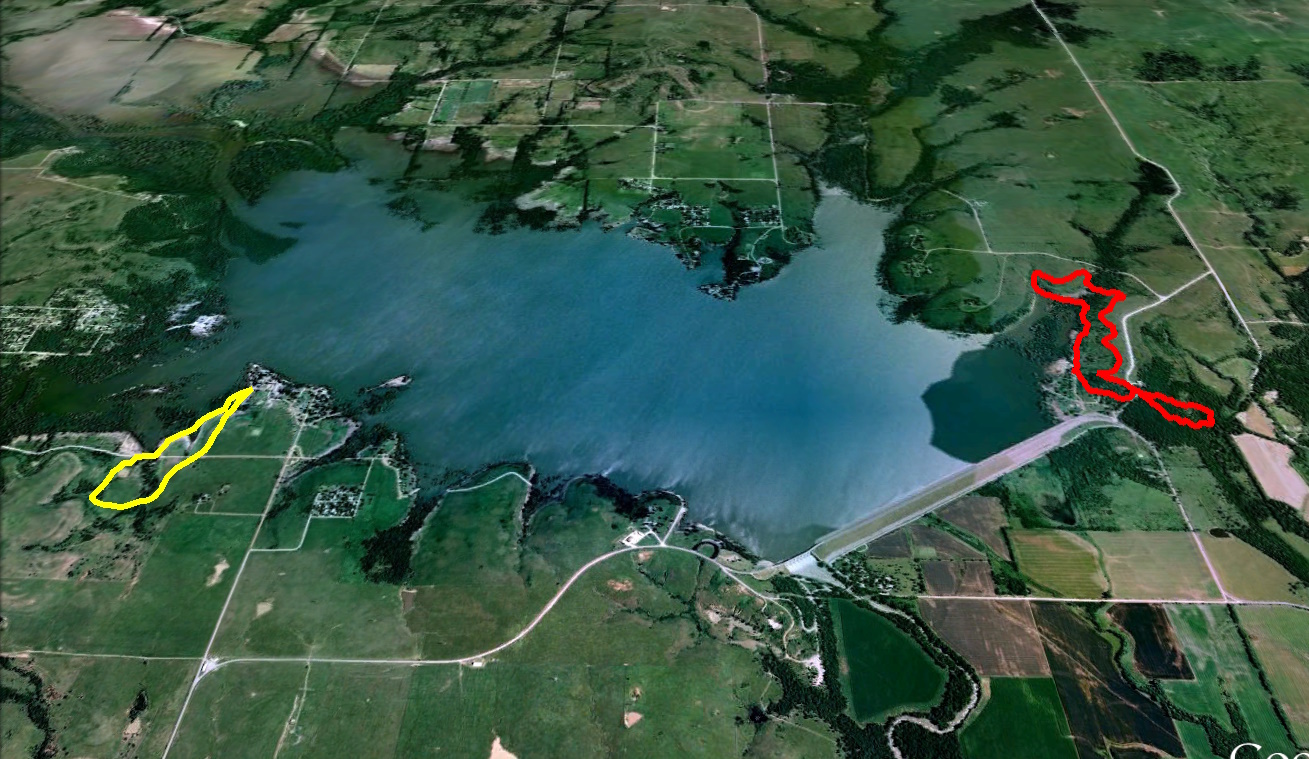
We paid a day use fee and drove into the Fredonia Bay area to hike the 1.5 mile loop at Casner Creek. This trail was mostly a mown path through grassland and was not photogenic this time of year. After an uneventful trip through the grass for over half a mile we reached a small bridge over dry Casner Creek. The trail soon turned back north and we could glimpse Fall River Lake up ahead. The lake was down considerably and we managed to spook a deer or two. I spied an old board and tried to windsurf on it, but the water was too low. After crossing what I termed Brokeback Bridge, we returned to the trailhead, with tall grass leaning over in the strong south wind.

A drive over to the lake shore gave Betty a chance to explore a small ledge below a tree before spotting a massive tree with exposed gnarled roots. It was surrounded by partially eaten hedge apples. Throughout the day she was on the lookout for an eagle she had seen earlier, but mostly saw hawks and gulls. Driving over to the Quarry Bay area northeast of the dam, we ate Subway sandwiches we had purchased in Independence.

We then set out on the linked Overlook, Post Oak, Catclaw, and Bluestem Prairie trails for a combined loop of three miles. Thankfully most of these trails were in hollows and amongst trees offering some shelter from the strong wind. We saw a small sandstone ledge which we would return to later in the loop and use for a breather. The Post Oak trail was the prettiest one, with a few lichen-covered sandstone outcrops and a view over Craig Creek. The trail wound around to an overlook of the lake, and then we crossed the largest pedestrian bridge of the day to a small creek leading into Quarry Bay. There were a few large boulders by the trailside and after crossing the creek we travelled through a winter-barren thicket towards Quarry Bay. The trail led south down the east side of the bay through tangled trees which in winter resembled a massive cobweb.

Our last stop was over below the dam. As soon as Betty saw the old bridge across the river here, she recalled this as where her parents took her and her brothers to fish many years ago. We went down to the river to shoot the bridge. Along the way Betty hooted about a crazy set of signs that seemed to encourage those in wheelchairs to cautiously wheel down a steep metal stairway.

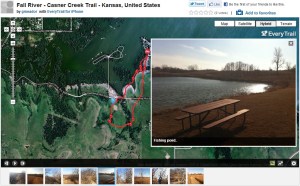
It was a fun sunny day allowing me to experiment with different iPhone trail apps, using one of them to easily create an interactive trail map, albeit for the inferior Casner Creek trail.

Click here for a slideshow from this day hike

Click here for an interactive map of the Casner Creek Trail

Posted in day hike, photos, travel | 1 Comment

Trail Trials

In my previous post I discussed GPS enhancements for my day hikes. I’ve now built three fly-throughs of recent hikes, with linked photos, in Google Earth. The results are very nice, but it takes more time and effort than I would prefer. I decided to try out some new GPS hiking apps on my iPhone 4 and see what nifty things I could make with them. At the same time, I would try adding geolocation data to the photos I took with my regular camera with two different GPX file sync programs.

MotionX

Up to now, I’ve always used MotionX GPS. It has many features and I’ve gotten used to its quirks, but it does have some drawbacks. Its photo placemarks are not integrated with its tracks, and its user interface is needlessly complicated and noisy. I especially dislike how I have to manually rename tracks and its method for pre-downloading map tiles is quite cumbersome.

Today it was unusually warm and windy for the end of the calendar year, with a high temperature of 71 degrees Fahrenheit and winds of over 20 miles per hour.  I decided to try out some new hiking apps while on a day hike with fellow science teacher Betty Henderson at Fall River Lake in southeastern Kansas.

I drove north into Kansas, picked up Betty in Caney, and we drove on northward to Fall River Lake to hike the Casner Creek, Post Oak, Catclaw, and Bluestem Trails. I knew the scenery would be subdued and thus it was a great time to try the new iPhone hiking apps: EveryTrail Pro and AccuTerra Unlimited.

Using EveryTrail Pro on Casner Creek

We first drove over to the Fredonia Bay area, paid the day use fee, and took the Casner Creek trail loop, which winds 1.5 miles across a grassland. It was not a pretty hiking area this time of year, but I used the EveryTrail Pro app to track our progress and periodically hit the camera button on its tracking screen to take a representative photo. At some places I also composed a shot with my “real” camera.

A few days beforehand I had taken the time to download the terrain maps in the app for the area since I suspected there would be no data service out at the lake. That was indeed the case, but I was disappointed to find that I had to zoom pretty far out on the app’s map to see the terrain map I had previously downloaded – so far out that it wasn’t of much use.

At the end of the day I reviewed the track and the photos linked to it, adding a caption to each one and then telling it to upload everything to the EveryTrail website. That went fine until I hit the first photo upload and the app gave me an “Out of RAM” error. Later I tried again, probably not having my TomTom GPS navigation app running this time, and the photos uploaded successfully.

What I like about EveryTrail Pro is the map it creates on its website using the track and photos you upload. It defaults to an interactive Google map satellite view of the hiking track with photo placemarks which the map automagically scrolls through, popping up the image matching each placemark. You can change to other types of maps, zoom around, and so forth. You can scroll along the photo thumbnails below the map to see where they are on the route and click them to see a larger image. A “statistics” button shows you an elevation and speed graph in a window you can relocate, and if you scroll along the graph you see the corresponding points on the track. You can download the map to Google Earth and also export a GPX file. All very nice and, best of all, very automated!

Using AccuTerra Unlimited on the Post Oak, Catclaw, and Bluestem Trails

Betty and I then drove over to the lake for some shots, had a sandwich lunch, and set out on the linked trails in the Quarry Bay area northeast of the dam. This time I tracked our progress with the AccuTerra Unlimited app, snapping photos along the way with the iPhone’s camera app, since I had not noticed a camera icon in the AccuTerra app. It turns out you have to “Track” button on the screen to get the Camera button to appear for photos. So none of the photos I took along the way created placemarks in the AccuTerra app. So I wound up only testing its tracking feature, not its ability to create photo placemarks.

I had also pre-loaded terrain maps in this app beforehand, being careful to download both the larger-scale and smaller-scale versions for the lake area. This app did show a more useful terrain map during the hike, although it doesn’t represent your progress as a tracking line but instead shows a series of placement dots as you go around. When you are done it shows a regular tracking line.

This app has less intuitive controls – I’ve already mentioned how it doesn’t show a camera icon on the tracking map, and after the hike I had trouble finding out how to access my stored track. I discovered you hit “Map View” and then pick “Library” to see your saved track. It has a “walking tour” that recreates your path, but it doesn’t seem to have an interrupt, so it makes you sit through the entire trip, which is annoying. I emailed the track to myself, which sent me a temporary link (good for a month) to view the hike with Google Maps in my browser. That gave me a map which I could then easily export to Google Earth via a KMZ file.

Using the Generated Tracks

I loaded the GPX file from EveryTrail Pro and the KMZ file from AccuTerra Unlimited (via Google Maps) into Google Earth, where I created my typical sort of static trail map. So either app could generate the same sort of data I’ve previously extracted from the MotionX app. I then downloaded the pictures from my “real” camera so I could try adding geolocation data to them using the GPX and KMZ files from today’s hikes.

I first tried using the GeoSetter program to sync my own photos to the GPX file info created by EveryTrail Pro, but although it said it found the GPS data, it did not write it into the picture files. That program is so complicated I may have had something set wrong. It had no luck at all with the data from AccuTerra Unlimited. The KMZ and KML files I exported from Google Earth did not work, nor did a GPX file I created using a free KML-to-GPX conversion utility I found online.

A friend from my grade school days, Dale Blue, had indicated via Facebook that he uses the GPicSync program to sync photos with GPS tracks, so I downloaded that program.  Once I got the UTC time code set right, it worked great with the GPX file generated by EveryTrail pro, not only inserting coordinates into the pictures but also creating a nice Google Earth track with linked photo placemarks. That’s great, although the placemarks did not have the proper photo links for use on a website. It would still take a lot of manual work to post a photo tour.  And GPicSync also had no luck with the files I had created from the AccuTerra Pro app’s data.

My Verdict

Even though I liked its terrain map better during the hike, I’m not going to bother with the AccuTerra Unlimited app since the data I got from it was far less useful. I am impressed with EveryTrail Pro, however, for how it generates an interactive Google Map with photo placemarks and speed/elevation graphs. That’s definitely more than MotionX can do at this point, and I’m going to try out EveryTrail Pro some more and see if I can improve its terrain mapping or just live with it. And I’ll use EveryTrail Pro’s GPX files with GPicSync to add geolocation data to the photos I take with my regular camera.

THE WINNERS:

EveryTrail Pro for its easy creation of interactive trail maps

GPicSync for adding geolocation data to existing photos

Posted in day hike, photos, technology, travel | 3 Comments

Skinning the Kindle

I love my Kindle 3 (since I’ve rid myself of the defective cover from Amazon), but now I carry it around without a cover and its drab brown case was uninspiring.  So I splurged on the Library skin from DecalGirl.  Here are some unscientific before-and-after shots I shot with my iPhone:

I know, I did not match up the background and lighting and what was on the screen, but I really do like my Kindle’s new skin. It looks warmer and more personal now.

Posted in technology | Leave a comment

GPS-Enhanced Day Hikes

The MotionX GPS app on my iPhone has added greatly to the enjoyment of my day hikes. Without it I’d be far more nervous about hiking solo on unfamiliar trails. On a hike I can use MotionX to see how far I’ve gone, a map of my route, the elevation changes, and so forth. I’ve also saved many of those tracks and imported the data into Google Earth so I could create an image of my path to include with each post.

Adding Geolocation Data to Existing Photos

My workflow for day hike posts is fairly lengthy:

  • Plan the hike using my hiking books and various internet sites and maps.
  • Go on the hike and snap photos while the MotionX app tracks my progress.
  • Use the iPhone to email the track to myself after the hike.
  • Later import the track into Google Earth and create a perspective view to include with my photos.
  • Import all of the photos on my camera’s SD card into a computer.
  • Pick out the best photos and edit them with ThumbsPlus and/or Adobe Photoshop Elements.
  • As I edit the photos, write a corresponding draft of the blog post using either the online WordPress editor or Windows Live Writer.
  • Upload the finished photos to Flickr, putting them into a set of their own.
  • Manually add geolocation information to each photo using Flickr, relying on my memory and the GPS tracking map.
  • Organize the completed set of Flickr photos into my collections structure at Flickr.
  • Link appropriate words in the blog post to each photo.
  • Pick out an eye-catching photo to embed in the blog post and create links to the corresponding Flickr slideshow.
  • Add the hike to my Google Map and my Google Docs spreadsheet.

Now you know why I may spend four to six hours composing a single blog post about a day hike. Perhaps the most tedious step is the one in italics: manually adding the geolocations for each photo. Flickr’s online mapping is cumbersome and the information I provide only resides on Flickr and thus could be lost if that service is discontinued. I want GPS coordinates embedded in my local photo files. I should note that photos taken with my iPhone 4 already have GPS coordinates built in, but very few dedicated cameras have built-in GPS because of the battery drain and the time it takes to lock in on some satellites. I could buy a WiFi card which includes GPS, but it would still be a big battery drain for the camera.

So I downloaded GeoSetter for my Windows machines and gave it a trial run. I can give it a set of photo files on the computer and an exported GPS track from my iPhone app, and it will match up the timestamp on each photo to the GPS info and embed the corresponding location coordinates in each photo. So long as I keep the time set properly on the camera and have MotionX tracking my position on the iPhone, I can now have geolocations built into each image. I’ll give this system a full-scale run later this week when I day hike at Fall River Lake in Kansas. (I need to find a similar app for the Mac, since I use it on the road, although I could run Geosetter under Parallels.)

Interactive Maps and Elevations for My Posts

I’ve also spotted some nifty webpages where people show the elevation as well as the map of their GPS track for their hikes. I’ve found I can manually create a tour of a hike using Google Earth by importing the GPS track, creating placemarks, and then recording a tour as I manually click through the placemarks. To put that out on the web I then have to export the GPS track with the tour and placemarks to a website and feed that link into their Embed Tour Gadget.

Unfortunately, I use the free WordPress.com service to host my blog and it does not allow scripts, so the Google Gadgets don’t work there. I created a couple of tours of my recent hikes in the Wichitas, then exported the altered .kml files out of Google Earth and uploaded them to the web hosting account that comes with my cable modem, then went to Google’s free Blogger service where I set up a new account. I then set up embedded tours using the Google Gadget and then created Blogger posts with that embedded code.

That’s nifty, and I could even add audio narration.  But building a tour is frankly too much trouble to go through for every hike. I want something that is more automated. I  could start adding an interactive Google Map of each hike track into my WordPress posts as shown below:

2/2011 UPDATE: Looks like most if not all of my Visualized Google Map tours broke pretty quickly, with placemarks remaining but no photos. That bites, and I won’t invest any more effort in that approach.

That would let readers manually explore the hiking route. But manually adding placemarks and images as I did in the above example is way too much work. I can also create an image with the elevation information from my hike either via a screen shot from Google Earth or a more customized view using GPS Visualizer, as shown below.

But again, that’s just one more step in the already overlong workflow. Plus, I really like how in Google Earth you can scroll your mouse along an elevation profile and see where you were on the mapped track at each point along the journey.  I wish I could find an embedded widget that gives that sort of interactive view of my elevation and track map.

I’ve also seen webpages, such as this one at EveryTrail, which playback hiking tracks with accompanying picture placemarks.  That’s pretty cool, but again I’d need it to be very automated. There are iPhone apps which do this sort of thing, using pictures taken in the app itself. It’s not quite what I’m looking for, but I’m going to experiment with it. I’ve purchased both the AccuTerra Unlimited and EveryTrail Pro apps and will give them a trial run. But there is a limit to how much mucking about with the technology I want to do out on the trail.

In the end, I may add some more GPS features to my day hike posts, or I may not. I presume some readers just view the slideshow while others read the narration and use its picture links.

Posted in day hike, technology, travel | 3 Comments

Wichitas in Winter

Wichitas in Winter (click image for slideshow)

I started the last day of my winter break hiking trip with breakfast in the Sundance Cafe at Quartz Mountain Resort. The server, Kitty, sat me beside a different fireplace than from the previous evening, and I took the opportunity to photograph various artworks in the restaurant.

I did not get a close look at the decorative plates above the side bar, but directly in front of me was The Arts of Quartz Mountain by Don Nice, aniline paintings on cut-outs of anodized aluminum. His similar Quartz Mountain Starscape and The Wildlife at Quartz Mountain were nearby. Prominently featured was Mesteño 3 by Luis Jiménez, a study for the eight-foot high mustang sculpture at the Fred Jones Museum of Art in Norman. Jiménez died tragically in his studio in June 2006 when a large section of Blue Mustang, based on the Mesteño work, fell on him and severed his femoral artery.

I exited by the fireplace in the lobby and strolled out to the courtyard, where an overcast sky was beginning to lighten. Entering the guest room building, I passed the decorated window on the stairwell and returned to my room. I like the resort’s western motif, which is fun without being as kitschy as that of Western Hills.

The hotel room’s wood pieces had Indian designs carved into them, although I’m so immature I thought the tadpole on the TV cabinet looked like a sperm. I never opened the cabinet, so maybe I was in a honeymoon room and it was just storage for Magnum condoms, although on this trip I’d noticed that the lower-class restrooms had switched from Magnums to Huggers. Perhaps we need a federal stimulus package for this problem!

There was only one open trail I had not taken at the resort, so I bundled up and headed to the northeast end of the resort complex, passing by the outdoor performance area and information on the Kiowa, who camped in the area. The Cave Trail was close by with stones leading up the hillside several yards to a small cave. The view from it was pleasant enough, and I posed outside. I left when a ranger showed up and starting putting up a sign beside me which instructed, “Don’t feed the Bruin.”

Actually, no one but me was venturing out in the cold morning, and I walked between the resort and Lake Altus toward Twin Peaks, circling around to a wagon beside the Cafe’s outdoor seating and back through the courtyard and its centerpiece, Tree #2 by Menashe Kadishman. It was less monolithic and austere than a Richard Serra work, but still not to my taste.

The sky was overcast but without rain, so I decided to head east to the Wichita Mountains, where I’d hiked in Charon’s Garden with Quincy Amen six weeks earlier in far better weather. I drove past Lake Altus and out toward Lone Wolf, stopping to stomp up to a railroad track for a view from the eastern side of Lake Altus and spotting the cut hillside for the road leading over to the resort. The train track looked like it ran straight into a mountainside, reminding me of a roadrunner cartoon.

I took a county road eastward through flat fields, periodically punctuated by granite mounds. Modern ranch buildings nestled against a granite mound contrasted to a photogenic if inhospitable abandoned house out in the fields. I made a brief stop at Roosevelt for a sausage biscuit to enjoy on the trail later. The little town was named after Teddy Roosevelt by one of his Rough Riders who had settled there, and Teddy came out to visit in 1903, riding a train to Snyder and then onward to Roosevelt on horseback. He was lured out for a chance to visit Rough Rider Charley Hunter and see U.S. Marshall Abernathy’s skill in catching coyotes alive.

For the previous three days I’d been hiking while listening to Ken Follet’s The Pillars of the Earth, an immense historical novel – the Audible version lasts for over forty hours! It’s a great melodrama, but I was ready for something different, so today I put my iPhone’s iPod app into shuffle mode. Thus I associated different portions of today’s adventure with various songs. They also help break up this immense post. Use the links in the paragraph below each title for full-length plays via YouTube.

If This Is Goodbye by Mark Knopfler and Emmylou Harris
My eyes sting with tears whenever this song plays. Based on final conversations from doomed occupants of the burning Twin Towers on September 11, 2001, it always wrenches my heart. It was a good match for the desolate drive under overcast skies through the empty fields toward the Wichitas.

Soon I was at the western edge of the Wichita Mountains Wildlife Refuge, and drove over to West Cache Creek, where I’d be hiking over 8.2 miles today. The first stop was the Lake French trailhead of the Dog Run Hollows Trail System, which is a National Recreation Trail and has many helpful map signs for its various loops.

I first headed east along shore of the lake to its dam, which was constructed in 1934. I saw ducks and a belted kingfisher as I walked the nicely curbed trail. The dam has an elaborate fish ladder and a series of fish lakes and dams intended to allow native fish to travel upstream into the lake. The beautiful $30,000 fish ladder never worked, but there were no native fish on the creek anyway!

The Longhorn Trail led me past several of the placid narrow fish lakes, with interesting rock formations along the eastern shore of the first such lake. The trail then headed up over barer ground as it looped back to the southwest. I did not want to hike the full Buffalo Trail, since I wanted to save time in the afternoon for what I knew would be a very scenic hike near Eagle Mountain. So I followed the Longhorn loop until it intersected the Buffalo Trail in a grassland area and then headed south on the Buffalo Trail toward Dog Run Hollow.

Forget You by Cee Lo Green

I’m not fond of cursing in songs, but Cee Lo’s recent hit has such a great groove. So I bought the cleaned-up version, although some will prefer the rude original version. When this song shuffled up it really quickened my pace toward Dog Run Hollow.

I did not know what to expect, but since the entire trail system was named after Dog Run Hollow, I figured I should not miss it. The trail finally reached the edge of the grassland and descended down to a small creek with a few odd rock formations. I was now walking along the shallow Dog Run Hollow and, fittingly, two dogs suddenly appeared on the trail. They ran over to me, with a husband and wife and daughter in tow. They were the only hikers I would see the entire day and it was sure nice of them to arrange for Dog Run Hollow to live up to its name!

I don’t like dogs, however, and Dog Run Hollow had not impressed me either. I was getting hungry but wanted a more scenic lunch spot. So I trekked onward, hoping the trail would grow more interesting, and it did that in spades. The hollow ended with some more dramatic creek erosion and then turned northeast to return to West Cache Creek. That creek had carved more deeply into the granite as it ran southeast toward Eagle Mountain. The trail led upstream toward Lost Lake and here the creek had also carved the landscape dramatically, forming a miniature canyon which ended in what they call the Forty Foot Hole.

I took a steep pathway down into the Hole and sat down above its twin waterfalls for my lunch and then snapped a self-portrait. After the monotony of the earlier section of trail this area was, contrary to its name, quite uplifting. Even better, the song that shuffled up while I was sitting there was darn near perfect:

The Magnificent Seven by Elmer Bernstein

Elmer’s rousing yet reflective score for this 1960 western is wonderfully propulsive and, even though I’ve never even seen the movie it is from, makes me visualize the American West. I preserved the moment by holding one of my earbuds up to the camera as I shot a video of Forty Foot Hole, but I then reshot it for an upload version since the music I was using is under copyright.

My video of Forty Foot Hole was my first experience of using iMovie on the MacBook Air. I just added some titles and, since some non-copyrighted music is included with iMovie, I added a suitable clip to help mask the wind noise.

Ascending out of the hole, I was startled to see a longhorn grazing nearby. I waited to get a shot better illustrating how the breed earned its name, and walked onward to find a tree with stones stacked by a previous passerby.

Dirty Deeds Done Dirt Cheap by Joan Jett and the Blackhearts

I’m sure it is sacrilege to AC/DC fans, especially my friend Betty’s son who sings in the KC/DC tribute band, but I like Joan’s cover better than the original. This great rendition shuffled up and propelled me back to the trailhead.

There were several hours of daylight left, so I drove over to the Boulder picnic area so I could hike the nearby Narrows trail. It takes off from a group picnic area which was gated off, but I found a dirt trail leading into the compound, which has interesting big round stone-and-concrete picnic tables and a cabin built in 1912 by the Lawrence family and improved by the Treasure Lake Job Corps.

I found the unmarked trail, which led through some woods and then ascended a rocky slope. I found myself atop a bluff overlooking a bend in the creek which extended over fairly level ground upstream. The trail led down to the creek bed where it had carved steep bluffs as it skirted Eagle Mountain. A bit downstream were beautiful reflections as it entered the Narrows, which became visible as I boulder-hopped my way along.

The trail made a steep ascent, offering a higher view of the entrance to the Narrows. After it wound its way through the narrows, West Cache Creek flowed through very high bluffs. The trail made a steep descent back to the creek bed and I could see the water meandering downstream through a boulder field. The sun finally broke through at 3:30 pm, so I was able to get some nice shots when I retraced my route.

I made my way downstream on boulders and sand with high bluffs to either side. I rested beside one peaceful pool. I was surprised to discover the trail again, ascending high above the creek via a series of switchbacks to make its way downstream. This portion of the trail goes beyond the trail mileage shown on the park map. It is narrower and clearly takes extra effort to keep open, with sawn treefalls and erosion repairs. It then made a steep return to the creek bed for a last leg before petering out as I approached the junction with Panther Creek.

On the return I saw a steep path leading up and found it ended at a tiny cave, although to the left of the cave you may see a faint bushwhack which continued upward along the side of Eagle Mountain. Turning back, the steep trail was daunting and I deployed my trekking pole for the first time that day. I decided to shut down the music and use the pole for the rest of my journey, as I’d gone over seven miles on very rough terrain and needed to concentrate lest I stumble and tumble.

Farther on the main trail headed back down toward the creek, but a side trail rose high up onto the side bluffs and I followed it to its perilous end, with a tremendous view both upstream and across at the opposite wall. Descending back to the creek bed, I found someone had arranged a pile of rocks echoing a distant boulder’s shape.

I made my way back to the car and left the day use area an hour or so before sunset. Leaving the refuge I drove past the closed visitor center and more cows and bid the granite hills adieu.

It had been a marvelous week of day hikes, but I was more than ready for Christmas Eve with my parents in Oklahoma City.

‘Twas the night before Christmas, and all through the house, not a creature was day hiking, not even this louse.

Click here for a slideshow from this day hike

<– Previous: Climbing Mountains of Quartz

Posted in day hike, music, photos, travel, video | 5 Comments