The new Star Trek movie seems to be a hit
J.J. Abrams’ take on Star Trek appears to be a hit, easily outperforming all of the previous Trek features in opening weekend box office. However, these days movies have a short life in theaters and rely heavily on foreign markets and rental sales. We shall see how it fares overall later. Paramount finally ponied up some real money for this film, and it appears to have been a wise investment.
I enjoyed the film quite a bit, although it had the frenetic pace, camerawork, and lens flare syndrome that makes for a better Bourne flick than meaningful scifi. The reimagined Battlestar Galactica had a shaky documentary style that worked well for it, but I wouldn’t want to see them go too far down that road for Star Trek.
(Caution – spoilers ahead.)
The standout actors for me were Bruce Greenwood as Pike, Karl Urban as McCoy, Anton Yelchin as Chekov, and Zoe Saldana as Uhura. But Zachary Quinto as Spock and Chris Pine as Kirk also did admirably in roles made very difficult by the quite distinctive acting of Leonard Nimoy and William Shatner. I was less impressed by how they scripted Scotty and his odd sidekick, although Simon Pegg was enjoyable as an actor. The villain, a vengeful Romulan miner played by Eric Bana, was weakened by a plot struggling to introduce so many characters and back stories and to explain away inconsistencies with over 40 years of previous Star Trek episodes. I do fully embrace the approach of having an alternate timeline – I can think of no better way to resolve the canon issues that were stultifying the franchise after hundreds of episodes and ten films spread across four decades.
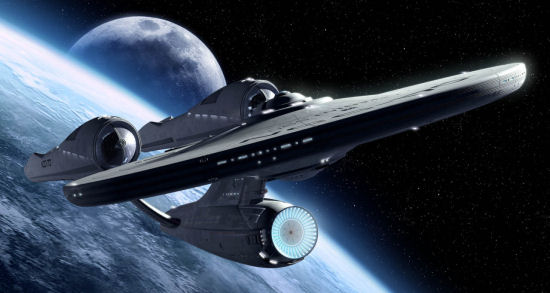 Regarding the Enterprise, they should have just used the outlines of the ship from Star Trek: The Motion Picture, since the minor design changes in the new film only detract slightly rather than enhance it. The engine nacelles seem a bit silly in proportion and attachment to the hull. But it is close enough to get a pass and clearly Abrams wanted a noticeably larger ship. It is ironic, however, that the larger scale of the new Enterprise is dwarfed by the villain’s immense vessel.
The new engine room may be a better approximation of the realities of fusion reactors, but seemed more like a brewery redress than a starship interior. The more industrial look is fine, but the rooms were too cavernous and my impression of the floors was they seemed more like concrete slabs than deck plates. But I very much like the redesign of the secondary hull with its many more utilitarian shuttles – that is a design change that is long overdue.
Science-wise, the early explosion of the USS Kelvin with silence after someone was blown out of the hull was a nice bit of seldom-observed accuracy for Star Trek, as were the bumpy shuttle rides. And I loved how the ship seemed to be far less able to “scan ahead” while in warp drive, better reflecting the problems of faster-than-light travel – more like a hyperspace jump than the “fast cruise” of previous outings. The ship’s multiple weapons and faster firing pace is also more realistic, but oddly less satisfying than the old slower long-duration phasers and torpedoes. Battlestar Galactica had a great take on weaponry that appears to have affected the Trek aesthetic, even though they haven’t given up on beam weapons.
I certainly think this reboot was a success, and look forward to more outings with this cast. Abrams is on board to produce the next film, although he has not committed to directing it.
UPDATE:
Don’t miss the concept art Ryan Church created in his work on this film.
2/2011 UPDATE:
The film’s production designer Scott Chambliss later acknowledged the problems with the engine room, saying budget and time issues led them to use the brewery redress. However, I was amused that the set he disliked the most was the bar, which he found too stereotypical yet worked for this teetotaler just fine.
You can see a WONDERFUL series of presentations and interviews with a half-century of Star Trek production designers at the Art Directors Guild website, which hosted Star Trek: 45 Years of Designing the Future.