Down the rabbit hole to find what came before

February 25, 2018

Granger MeadorFaithful readers of this blog will know that my largest focus over the years has been on day hikes and related photography. But I also offer healthy if less popular dollops of technology, some home repairs (which are my most longest-lived popular posts), music, a smattering of school-related politics, and occasional embedded history. The last topic is my focus here, prompted by the rabbit-hole of web-based exploration I fell into this weekend.

My interest in local history is no doubt somewhat influenced by my father’s love of the subject. He was born in Dewey, just north of Bartlesville, but spent his teens up in Independence, Kansas and eventually worked for Cities Service Gas in Oklahoma City for about 30 years. Dad is 93 at this writing, and both he and my mother are avid readers, so I was destined to become one too. I love to buy books for both of my parents, who have never embraced the Kindle e-readers like I have.

Dad loves to read history, and I remember how he created a large timeline going back thousands of years on the back of old gas pipeline blueprints. I also was influenced by the love of history that Edgar Weston, my first cousin once removed, had for the Bartlesville and Dewey area. (I’m no genealogist, so I always have to look up how we were related to get the terminology right. To be specific, Edgar was my paternal grandmother’s brother’s son.)

I still have my old History of Bartlesville and Washington County website running at bartlesvillehistory.org, and one of my popular blog posts was my web research on the old micro-midget racetrack in Bartlesville. If you are interested in the subject, the Bartlesville Area History Museum has an exhibit on Bartlesville micro-midget racing program on display from February through June 2018. They are open Monday-Friday from 10-4 and admission is free, but donations are appreciated. I’m grateful for their sharing of history and curation of the fabulous Frank Griggs photo collection, so with my enhanced income as a new full-time school administrator I decided to send in this weekend a check to become a Patron in their Friends of the BAHM program.

Local newspaper columnist Rita Thurman Barnes has a fun Facebook group, currently called Once Upon a Time in Bartlesville, which shares remembrances and inquiries about things in Bartlesville that once were but are no more. Rita has to enforce some good rules to rein in some of the crankier participants who don’t always understand that we can celebrate the past without denigrating the present, but I enjoy seeing and reading about what came before.

Hilltop Drive In (photo from elmorovivo at Cinema Treasures)

This week some photos of the old Hilltop Drive In theater off Nowata Road were posted in the group. I had never seen it, although I had long known where it was because it was shown on old USGS maps of Bartlesville, and I knew the Examiner-Enterprise building built in the 1990s was on the western half of the old drive in’s lot. I suppose my interest was also aroused because just a week earlier I had been sitting in a studio at the E-E, right about where the screen of the drive in was once located, sharing with the public about Chromebooks. That geophysical connection led me down the rabbit hole.

Earlier, in a comment on a post on the old Penn theater, Kyle Baker had shared a link to  Cinema Treasures, which documents current and past movie houses. So I used that site to see what the old Hilltop looked like and to learn that the screen tower was a pre-fab wooden construction that was erected in only five days. I’ve seen plenty of nostalgia about drive-ins in various movies over the years, but drive-ins were passé by the time I was driving age.

That could have been the end of that dive into history, but then someone now living out of town posted a photo of an old Ben Franklin five-and-dime store and Foodland grocery with the Hilltop Drive-In visible in the background. They asked if the Ben Franklin/Foodland building was still there. Folks speculated the Foodland was now Tumbleweeds Steakhouse and the Ben Franklin store was now a series of smaller stores, but were not certain if the building was actually the same.

The Ben Franklin & Foodland stores once west of the Hilltop Drive In

That perked my interest, as I figured historic aerial photography could provide an answer. So I went web surfing and found a 1971 aerial photo showing the Hilltop Drive-In and the stores to the west. I paid a monthly subscription fee and an added photo fee to an online service to acquire a good shot to share with everyone. (The free aerial photo sources from the government are, as you might expect, quite diverse, somewhat awkward to use, and limited. As always, you get what you pay for in our capitalist society, and I was willing to pony up for a good shot.)

The Hilltop Drive In back in 1971, with the Foodland and Ben Franklin buildings to the west

When I compared that to a modern-day aerial shot, I could confirm that the buildings are probably the same. When I moved to Bartlesville in 1989, they were the big and dusty Walls clearance store. Later it was subdivided and the front façade on the north was thoroughly remodeled.

The same area today

I shared those photos in my comments on the post over on Facebook, and included a street view of the buildings, as they look now, for the out-of-towner.

The Foodland and Ben Franklin buildings today

So a tiny tidbit of local history was explored a bit more. But now I had paid for a month’s access to watermarked 1971 aerial photos, with an added fee to get individual shots I could actually share. No use letting that subscription go to waste, right?

So I looked up the quarter-acre that Meador Manor was built on back in 1981. I wanted to see how the area looked in 1971.

Our quarter-acre lot was at the northern end of a field back in 1971

Well, it was a bit of the north end of a field. Wendy and I live in the sixth addition to Arrowhead Acres, and I was surprised to find that the original loop that was the start of the development was already complete by 1971. It was also fun to see how much smaller Tri County Tech, which is just east of Arrowhead Acres, was back then.

The same area in 2018

Next I targeted the house I lived in back in Oklahoma City from 6th-12th grade. I knew that the Windsor Hills neighborhood had developed in the 1960s on what had been a golf course. The aerial imagery for OKC I could access went back farther than it did for Bartlesville, so I was able to figure out that the house sits on the eastern half of what was once the fairway to the northwesternmost hole of the Meridian Golf Club.

The golf course that became Windsor Hills in OKC

Floyd Farley designed many golf courses around OKC

On down the rabbit hole I went. I searched for golf course references in OKC and figured out that was the Meridian Golf Club, which golf pro Floyd Farley had designed as his first golf course back in 1941. He built the course on land he leased from the Classen Fruit Farm. (You can see the remains of a pear orchard on the western edge of the course.) Of the course he said, “Everybody liked it; it was a natural. I hardly moved any dirt to build it, and the bulldozer bill was only $2,000. It was just a natural piece of ground, but everybody liked it so well and thought I was responsible for it that people started hiring me to build them a golf course. So that’s how I got started.”

Farley was drafted into army during World War II. After his discharge he returned to golf, turning from being a golf pro to designing courses full-time. He subleased the Meridian course, which he owned until 1961 and it became the Windsor Hills neighborhood. Floyd Farley passed away in 2005, having designed over 40 golf courses over six decades, with almost 20 of them in the Oklahoma City area.

OKC developer Anton Classen

Hmmm…the Classen Fruit Farm? That led me even farther down this historical rabbit hole. Surely that was a reference to Anton H. Classen, the land speculator who bought up farmland around Oklahoma City in its early days and developed many housing projects, whose name lives on in the form of Classen Boulevard and Northwest Classen High School.

I knew that Classen had built up streetcar lines to help his developments, and that one line had extended from downtown to almost 23rd and Meridian, at the southeast corner of Windsor Hills. I’ve had fun driving the boulevards winding from my old neighborhood to downtown. If you pay attention to the street layout and the wider boulevards and curves, you can follow the streets quite easily along the old streetcar route, even though no visible remains are present.

An Oklahoma City streetcar

Oklahoma City is spending a lot of dough to revive a small rail streetcar system downtown. This amuses me, given how there was once a major streetcar system throughout the city, with interurban lines linking it all the way to Guthrie, El Reno, and Norman. What goes around comes around!

I found a neat online map of the old lines on the web with an article on the old streetcar lines.

The streetcar lines were often used by housing developers to offer easy commuting to jobs downtown, with amusement parks planted at the end of some lines to drum up business on weekends. Belle Isle Lake was built in north central OKC by Classen and John Shartel with a powerplant to power the streetcar and interurban system. Eventually an amusement park was built there, but it was long gone before I was born. Maybe some of you have shopped in that area, which is now home to Penn Square Mall and Belle Isle Station.

This particular rabbit hole thus circles back, in my mind, to Bartlesville. A few weeks back a former teacher asked me about the interurban in Bartlesville. I sent her to my Bartlesville history website, where I had briefly noted:

The Bartlesville interurban

In 1908 the Bartlesville Interurban Railway opened, expanding by 1915 to operate two loops with 10.1 miles of trolley track connecting the zinc smelters with the rest of Bartlesville and Dewey. Stops included Dewey, Tuxedo, National Zinc Co., Bartlesville Zinc Co., Star Smelting Co., and Interurban Park. A round trip cost about 20 cents and took 45 minutes on the north loop, with half-hour service on the south loop. The terminal, brick power house, and car barn were at Fourth and Comanche. The line, like so many others, was wiped out by auto interests and closed in 1920. Visible remains include the angled Interurban Drive in the Tuxedo area of Bartlesville, with the old line route extending across modern-day Robinwood Park and leading to some old bridge pilings on the Caney River nearby.

I also shared with her that Phillips Petroleum was once part of a conspiracy to kill off the old interurbans and bus lines nationwide in order to boost automobiles and thus petroleum sales. Phillips was one of the companies convicted in 1949 of conspiring with General Motors, Goodyear, Firestone, Standard Oil, and Mack Trucks to monopolize bus sales and related products. The fines were minimal, and it is arguable if the various streetcars and interurbans would have survived anyway given that their owners often did not capitalize them sufficiently nor invest enough in their upkeep. Plus the much greater convenience and enthusiasm for the automobile was a major reason only a few old streetcar lines remained intact over the decades, such as the famous cable cars in hilly San Francisco and the old streetcars of New Orleans, including a streetcar line named Desire.

And so we dig our way up out of this hole, re-emerging into present day Bartlesville. I’ll close this ping-pong history exploration with a shot of the old interurban pilings on the Caney River south of the bridge on Frank Phillips Boulevard and the old interurban foundations found near the Pathfinder Parkway.

I hope you enjoyed this dig to explore what came before. Maybe you have some digging of your own that will interest you. When people ask me what era I wish I were living in, I always say TODAY. That maximizes the history there is to explore and, with the world wide web, makes armchair exploration of it incredibly easy and rewarding. Happy digging!

Concrete foundations of the old interurban line near the Pathfinder Parkway

Interurban bridge pilings on the Caney River near Frank Phillips Boulevard

Posted in history, nostalgia, photos, random | 18 Comments

Listening as one of my digital clouds evaporates

December 22, 2017

The forthcoming demise of Amazon’s Music Storage service, limiting my access on its streaming services to songs it has licensed, prompted me to assess my approach to digital music. The rapid pace of the digital world’s evolution makes it powerful and responsive, but also makes digital services and devices quite ephemeral.

In my experience, there is considerable value in retaining access and control of one’s digital data amidst the churn of devices and services. So the growth of cloud-based storage and streaming services poses a challenge. While they offer distinct advantages over the decades-old reliance on standalone applications and local data files on our personal devices, even the largest cloud services are vulnerable to temporary service outages as well as permanent shuttering, and they seldom play well together.

Downloading vs. streaming music

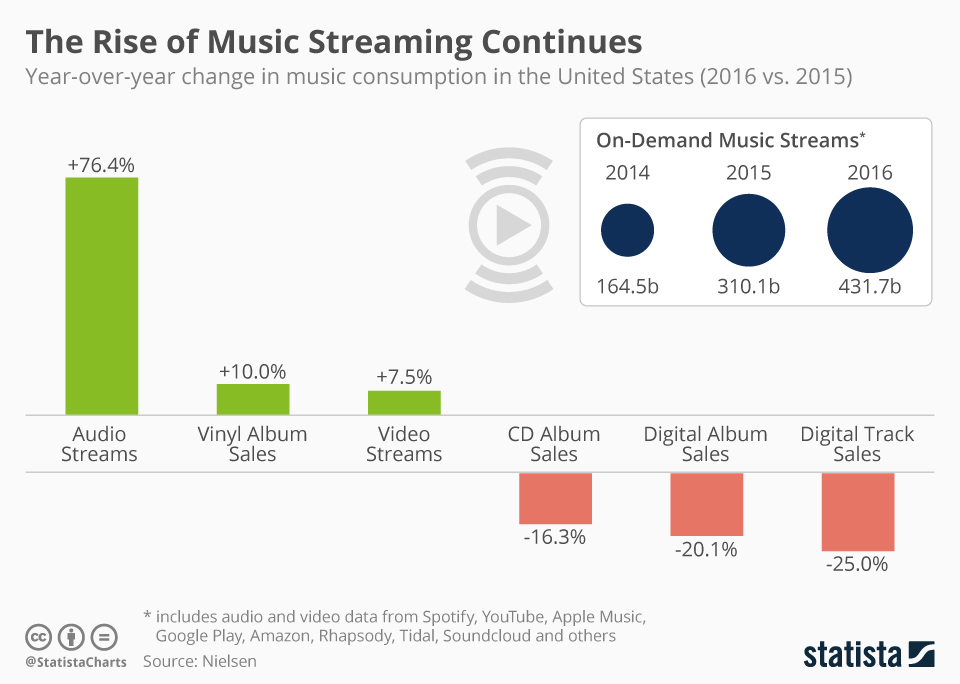
It is hardly surprising that the demographics for streaming music skew younger than those for downloading it. The fall 2016 AudioCensus by MusicWatch showed that of the people who routinely use on-demand streaming services, 35% are between 13 and 24 years of age. In comparison, only 26% of regular download purchasers are 13 to 24 years of age.

Younger people rely more on streaming music; while older folks rely more on downloading

Now over 50% of all music revenue in the U.S. comes from streaming, and YouTube currently accounts for 25% of all music streaming. Anecdotally, while I turn to YouTube for music merely to access obscure tracks not available on other paid streaming or download services, Wendy uses it routinely.

For the over 15,000 songs in my iTunes Music Library, I paid for every one that I could, via iTunes or Amazon or by ripping them from purchased CDs. The only unpaid tracks in my library are ones that were simply not available for licensed downloading, leading me to extract the audio from a YouTube video or the like to ensure I had a local copy for long-term continuous access and retention.

This increasingly unusual behavior  is a personal habit borne of both necessity and convenience. I have curated my iTunes library and playlists since I bought my first iPod in 2004, when streaming music was impractical. iTunes remains the most convenient way for me to quickly access music on my desktop computer, Apple TV, and iPhone. Plus I never want my music to “disappear” when someone fails to negotiate a licensing deal, shutters a service, or internet service is unavailable. But my method of accessing digital music is increasingly unpopular.

Streaming music is destroying music downloads

One digital cloud evaporated in a year

I am among the 1 in 3 music downloaders who also have music streaming accounts. I pay $10/month for Google Play Music, although I actually just use that account to get the ad-free YouTube Red service. I also subscribe to Amazon Music Unlimited for $79/year to make that large streaming music library available on the Echo devices at Meador Manor. But I never use Google Play Music, and I seldom use the Amazon Music apps in Windows or on my mobile devices, as they are even slower and clunkier than Apple’s deservedly maligned iTunes.

In April 2017 the frustrations with the inadequate music search on the Echo devices led me to pay for Amazon Music Storage for $25/year. I then uploaded over 12,000 of my songs to Amazon so that I could search that smaller library on an Echo, making it much more likely it would play the track I really wanted.

But now that will end after only a year of use, with me unable to renew my Amazon Music Storage subscription when it expires. No doubt Amazon calculated that it was better for its bottom line and its ecosystem of devices and services to kill that service, despite the inconvenience to folks like me.

What next?

I’m used to companies like Google and Amazon shuttering services I rely upon, forcing me to adapt. Apple could one day falter as well. I view this as an unwelcome but inevitable by-product of evolving technologies and free-market competition. But it also reinforces my 13-year habit of buying my music in iTunes, ensuring I have a local copy that should always be accessible.

But now rumors swirl that Apple could stop selling music downloads in 2019. The download model I’ve relied on since 2004 may be doomed. So in another year I may need to re-assess my approach to digital music. While streaming services will no doubt continue to improve in their usability and the extent of their collections, I’m leery of relying on the cloud.

Clouds can be beautiful and comforting, or impressive and terrifying. But in the end they always evaporate.

12/28/2017 UPDATE: Two trustworthy former students, Daniel Quick and Brian Taylor, independently urged me to try using the Plex media server, something I had heard about but only briefly explored a few years ago. Prompted by their recommendations, I’ve now installed its server software on my Windows 10 desktop and have Plex apps installed on my iPhone, iPad, and Apple TV. I splurged on a lifetime subscription to Plex Pass to ensure I would not encounter any limitations. Next I need to link it up with Alexa. Then I get to start building new habits on accessing my media around the manor.

Posted in music, technology | 3 Comments

Bringing a new Harmony to our home theater

November 21, 2017

My purchase of a new OLED television and then a new AV receiver meant it was time to revisit the remote control situation at Meador Manor. And, as usual, that meant spending time and money on a new solution to an an old problem.

The old universal remote control

Logitech Harmony 880 Remote

In 2007  I purchased a $128 Logitech Harmony 880 Remote Control to operate my system. That universal programmable remote, with its programmable display keys, allowed me to just press one button to turn on the television and receiver, along with any other devices, set each to the appropriate inputs, and control the system. Thus it allowed me to avoid relying on five different remote controls, although I still needed a dedicated Voice Remote to use the Amazon Fire TV Stick, since it relied on radio rather than the infrared signals the Harmony 880 could produce. As I changed out devices over the past decade, I would hook the remote up to my old MacBook Air laptop to reprogram it, customizing various options and buttons. I had to replace its rechargeable battery pack once over the years.

Teaching an old dog new tricks

I painstakingly reprogrammed the Harmony 880 when I installed the new television and AV receiver. That meant hooking it via USB to my old MacBook Air, which has the outdated programming software on it, to change out devices and adjust activity settings. I also had to aim the new television remote at one end of the Harmony in order to teach it various command codes, since the old database for that remote no longer kept up with the latest components.

However, no matter how much tweaking I did, I could never get it to reliably power on the devices, set them to the appropriate inputs, and get the sound set the way I wanted. It kept getting one or more of the variables out of sync. The old remote could actually control each device, but it couldn’t reliably track system status and sequencing.

What next?

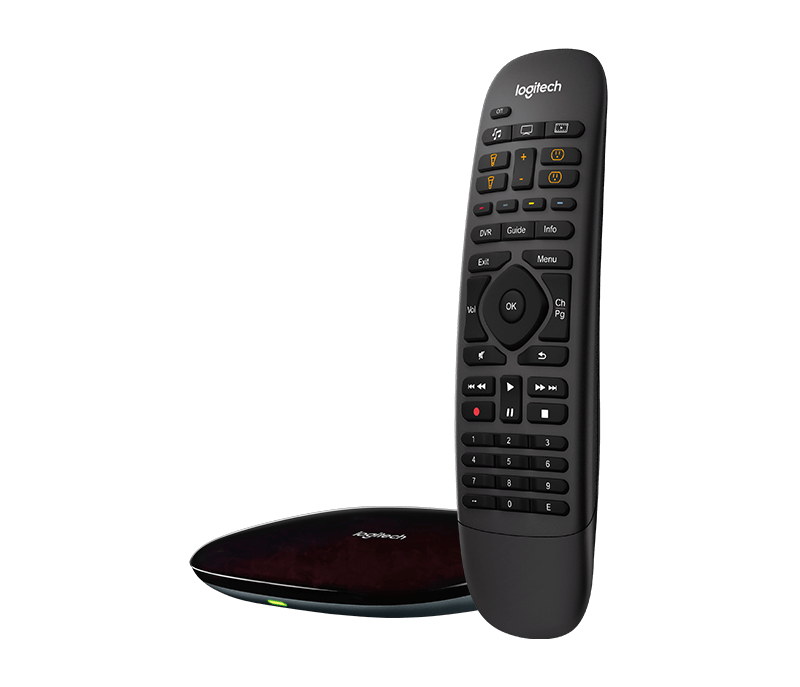
The new Harmony Companion with its hub

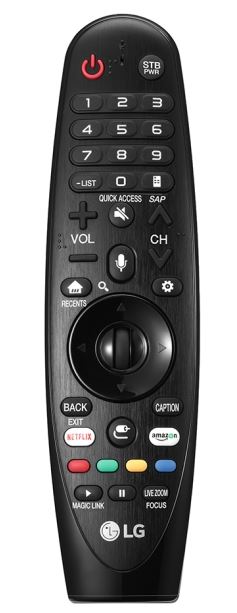
After spending a lot on the new television, receiver, and Apple TV 4K, I wasn’t in the mood to spend a fortune on a really fancy universal remote. But I also couldn’t merely rely on the LG Magic Remote that came with the television. While the HDMI-CEC connection gave it control of the receiver, it still could not control the Blu-Ray player, Apple TV, or Sony VCR.

I found that Logitech now offers, at the same $130 price point as my Harmony 880 in 2007, a two-piece Harmony Companion remote control system. It consists of a powered hub and a handheld unit which, unlike the old single-piece 880, doesn’t have a screen.

I decided that could be a worthwhile tradeoff since that means the Companion’s handheld unit can reportedly can run off its CR 2032 lithium cell for months, since it has no screen to power and only communicates with the plugged-in hub. That sounded nice, compared to having to remember to set the older and bulkier 880 remote into a charging station every week or so. And for some years I’ve had to jiggle and press it to get it to actually connect and charge. So I bought a $130 Companion remote system rather than dropping $300 to get the Harmony Elite, which sports a programmable screen on its handheld unit.

The separate hub plugs into AC power and sits in my cabinet on top of the Blu-Ray player. It blasts IR signals out into the room, which bounce off everything and reflect to control the television, receiver, Blu-Ray player, Apple TV 4K, and old VCR. The system includes a wired IR blaster you can also connect and place strategically if you need to place the hub itself in a closed cabinet.

Setup

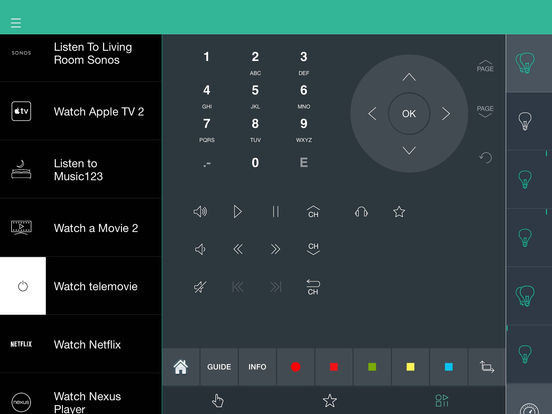
The hub also handles WiFi and Bluetooth signals, so I was able to program the system wirelessly with a Harmony app on my iPad, rather than having to connect it via a USB cable to a computer like I had to do with the 880. The Harmony app is available for both iOS and Android tablets and smartphones.

It was simple to plug in the hub and use the iPad app to connect it to WiFi. Programming it to identify my devices was as simple as inputting the manufacturer and model of each one. However, I found that it could not control the old Sony SLV-N81 VCR except to power it on and off. I couldn’t complain too bitterly, since that VCR dates back to 2001. I used the iPad app to manually teach the system the basic commands by selecting a button on the Harmony remote to be programmed and then pressing the matching button on the VCR’s own remote while aiming it at the top of the hub, repeating the process for each command.

So now I had the new remote able to control the television, receiver, Apple TV, Blu-Ray player, and VCR. The next step was to add “activities” like I had with the old 880. You can have plenty of different activities and individual device control via the Harmony app, but the dedicated handheld unit can only support six activities. So I set up:

  • Watching a movie with the TV’s Amazon app
  • Using a different Smart TV app, such as YouTube
  • Watching broadcast television
  • Watching a disc in the Blu-Ray player
  • Using the Apple TV 4K
  • Watching a videotape in the VCR

Harmony 880 vs. the Harmony Companion

Three buttons on the remote trigger the specific activities via short and long presses. I do miss the ability to select a device for manual control while in the midst of an activity, something the 880 could do, but I’ll learn to grab my iPhone or iPad for that when needed. And I was happy to be able to install the Harmony app on Wendy’s iPad, since that will make controlling the system less cryptic for her with its labeled activities.

The Harmony app on an iPad

I was able to set up the various activities, and by adding a few delays and extra commands here and there I was able to get everything to work well. I was gratified to find I again had single-remote control over everything in the system, able to press a single button to begin or end various activities.

There are also six Smart Home buttons on the remote which are labeled for use with Philips Hue bulbs, programmable outlets, and the like. So I could theoretically put some of my Hue bulbs in the living room lamps and have them automatically adjust for various activities, or use a programmable outlet to control a lamp.

Our home automation consists of Amazon Echos in the kitchen, office, and bedroom, one Philips Hue bulb in the lamp on my nightstand, and an old wired programmable thermostat. Wendy has made it clear that she’s reached her limit on home automation, so I haven’t added any more Hue bulbs nor programmable outlets. Consequently, we have no use for the Harmony Companion’s Smart Home features.

The bottom line

If you want to control a system of devices from different manufacturers with a single remote control, the Logitech Harmony Companion will do the job if you also have access to a tablet or smartphone.

Posted in HDTV, technology | Leave a comment

Updating our AV receiver

November 21, 2017

My previous post documented the new OLED television I purchased in October 2017 for $1,600. Since the television is actually one component of a basic home theater system, before completing that purchase I thought about what additional hardware upgrades might be needed. First I considered how to get content onto the set.

  • Broadcast television: We don’t have cable TV, but our chimney-mounted antenna pulls in various HDTV broadcast stations from Tulsa. Of course these signals are only 1080p resolution at best, with no wider color gamut or high dynamic range.
  • Television apps: The set comes with its own YouTube, Amazon, Netflix, Google Play Movies & TV, Hulu, Sling, and LG Channel Plus apps. We already have subscriptions to the first two services.
  • Amazon streaming: The old TV required use of a 1st generation Amazon Fire TV stick and a Voice Remote, which we often used for renting or watching streaming movies via Amazon Prime. We could use it to access Amazon Music Unlimited, although we mostly employ Echo devices around Manor for the latter. The new set’s built-in Amazon video app, which I think will support UHD with HDR 10, rendered the old Fire TV stick  superfluous and didn’t require that we invest in a new Fire TV with 4K Ultra HD.
  • Apple streaming: We weren’t so lucky with the 4th generation Apple TV which Wendy and I use to share YouTube and website videos via Airplay to television, and on which we occasionally rent a movie from iTunes. It still worked fine, of course, but I spent $199 on a just-released Apple TV 4K with 64 GB of storage so that we can enjoy rented iTunes movies with Dolby Vision’s higher dynamic range and wider color gamut.
  • Google streaming: I have 1st and 2nd generation Chromecasts, but wound up never using them even though I pay for Google Play Music. That subscription is just a cheap way to get the ad-free YouTube Red service. Since the television has its own Google Play Movies & TV app and YouTube app, I won’t bother with a new Chromecast Ultra, especially since I can use Amazon or Apple for streaming movies.
  • Optical discWhen I sold off my collection of over 350 CDs back in 2010, I also sold off a few dozen DVDs. But I still have a collection of DVDs and Blu Ray discs, mostly music concerts and oddball television series one cannot reliably access via streaming services, along with favorite movies with added features like commentaries and documentaries not currently available via streaming services. So I considered purchasing a new UHD Blu-Ray player to replace my regular 2008 Sony BDP-S350 player, which cannot support higher dynamic range, wider color gamut, or 4K resolution. But the UHD Blu-Ray product category is immature and the disc options limited, so I’m waiting to see if anything comes along to make that upgrade worthwhile.

So I got off easy on input devices, only choosing to upgrade the Apple TV. The TV also had plenty of HDMI inputs and a great remote control, allowing me to make do with my 2003 Panasonic SA-HE100S audiovisual receiver. But, having upgraded the picture so greatly, I thought it was time to see what I could do to improve the sound without spending too much more.

The old receiver and surround sound speakers

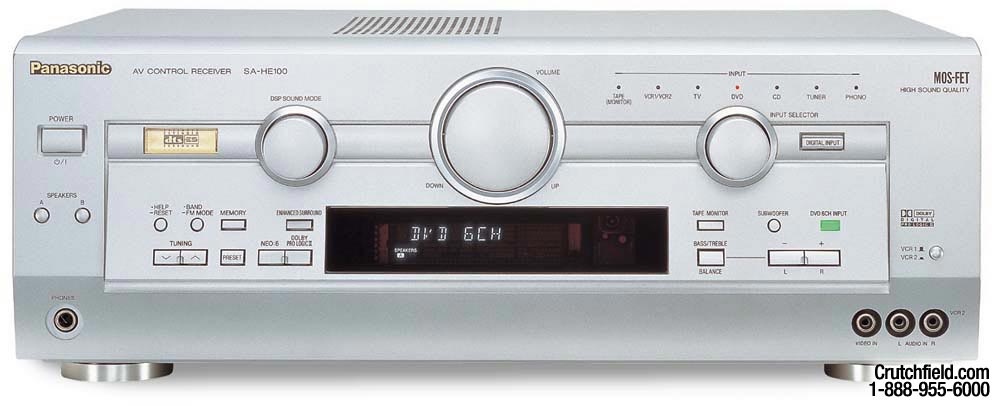
The old Panasonic receiver

Back in 2003 my Panasonic SA-HE100S receiver cost me $300. So it predated the HDMI standard now most commonly used in home theater systems, instead relying on optical audio and RCA stereo inputs and outputs. It was old enough to sport presets for things no longer part of most home theaters, such as a compact disc (CD) player and multiple videocassettee recorders (VCR). However, I still have an old VCR in my system,  which I use on weekday mornings to play aerobic workout tapes I recorded in the mid 1990s.
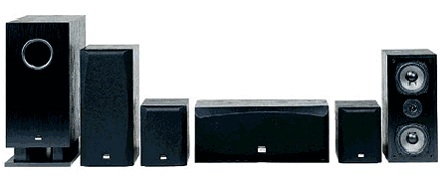
Back in 2003 I hooked my then-new receiver up to a new $300 Onkyo SKS-HT500 home theater speaker system. The speakers are 5.1, meaning there are left, center, and right speakers along the monitor wall, left and right surround speakers, and a subwoofer that is so large it doubles as a lamp table. The surround speakers are not ideally placed; one sits several feet away on the mantle above your head when you watch a movie on the couch, and the other is on the floor right beside the other end of the couch.

I’m not interested in shifting them to unsightly locations that would provide better sound, and I simply don’t care about overhead sound from Dolby Atmos and similar systems. My old receiver had no automatic calibration to balance the surround speakers nor equalize them for optimum sound. So the few available speaker settings were just manually adjusted back in 2003 and never adjusted again, except for my occasionally tweaking the gain on the subwoofer.

The Onkyo speaker system, unchanged from 2003


Making do for awhile

My old receiver actually still worked okay with the new television, despite its antiquated inputs and controls. I initially used the television as the HDMI hub and sent its output audio to the receiver via a digital optical cable.

I did notice that the playback sound for my Apple TV was not in sync with the picture. I had to modify the “AV Sync Adjustment” setting in the Sound menu of the television, by trial and error, to adjust the audio timing to restore synchronization.

However, I noticed that my old receiver was sometimes playing in stereo when I expected it to use its Dolby Pro Logic II or DTS-ES surround sound. And even after reprogramming, my Logitech Harmony 880 universal remote was having trouble getting the television and receiver to both sync up to the correct settings and inputs. Those issues and a passing comment from Wendy on how the receiver seemed dated were enough to prompt to go shopping for a new one.

The new receiver

Given that I wasn’t going to spend the money to replace my basic surround sound speakers, I saw no reason to break the bank on the new receiver. But I did want something that would be fairly easy to use, could serve as the HDMI hub for the Apple TV and Blu-Ray player, supposedly supported pass-through of high dynamic range and wider color gamuts, and could automatically calibrate my surround sound speakers.

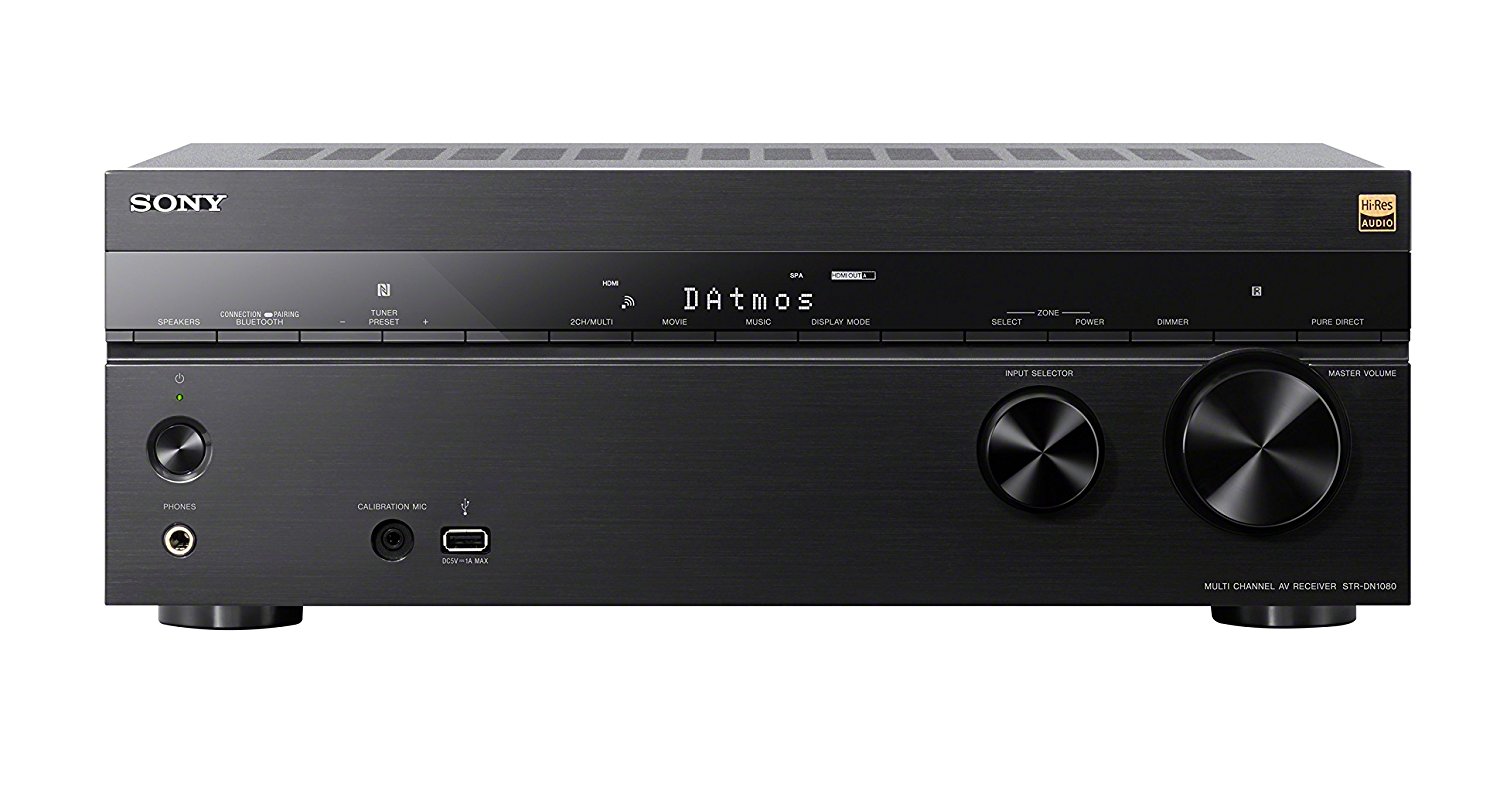
After considering the various online reviews and recommendations from CNET and other trusted sites, I opted for a Sony STR-DN 1080 receiver, which cost me $598. I’m chagrined to note that Black Friday sales have currently brought it down to $400. Ouch!

My new receiver is a Sony STR-DN1080

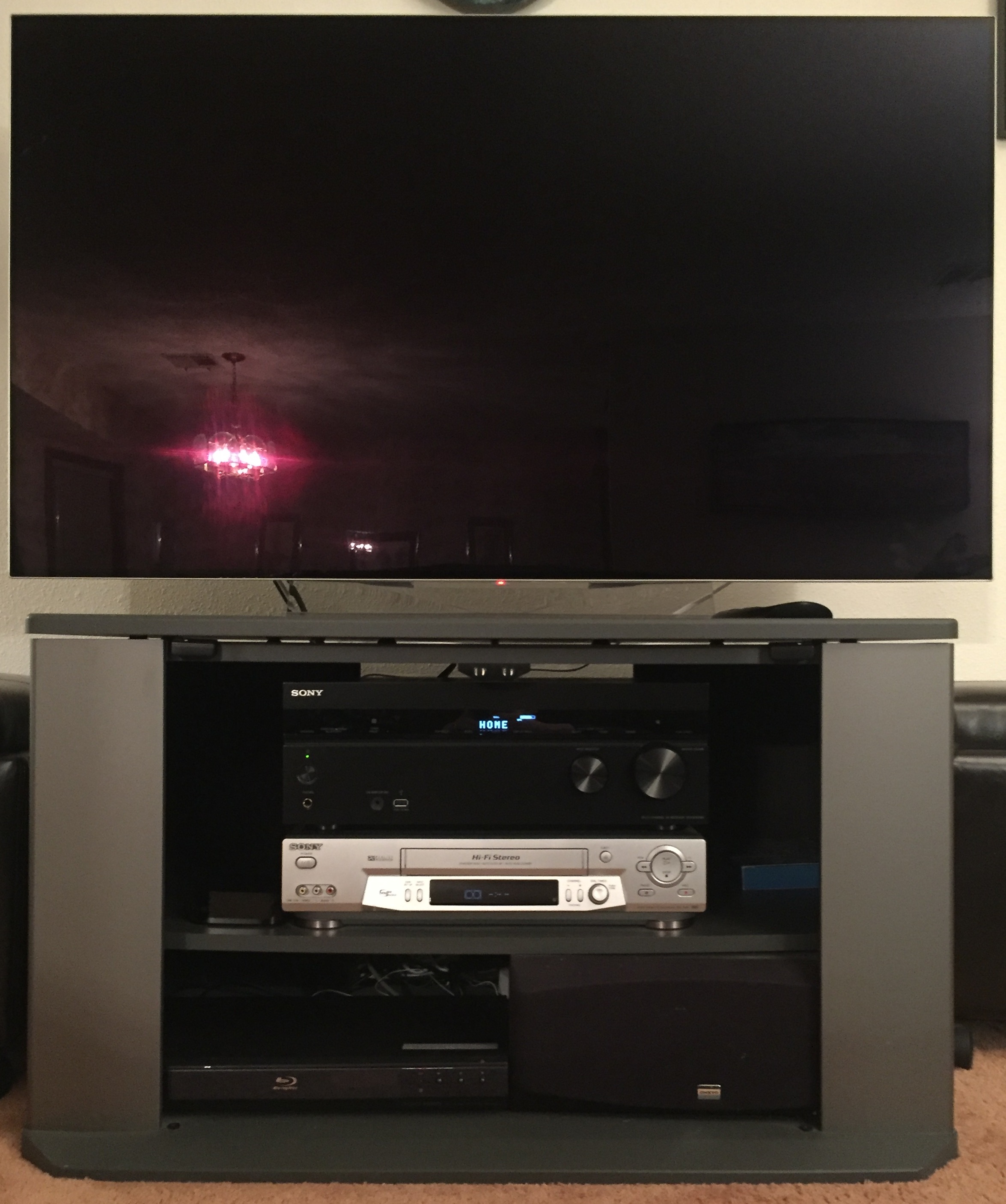
The new receiver sports a minimalist appearance, helping it fade away in the cabinet below the television. Unfortunately, the old silver Sony VCR in there still stands out.

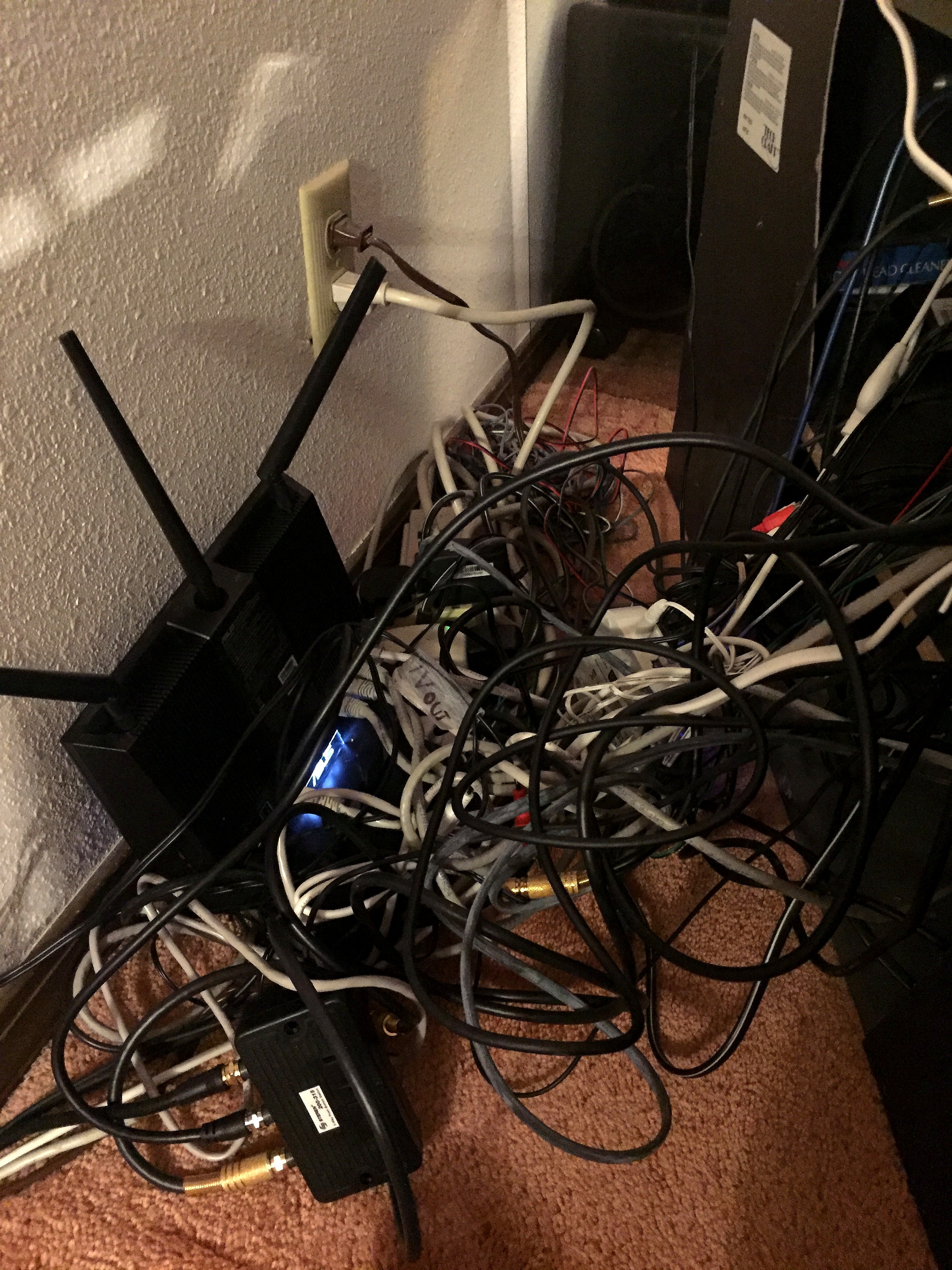
A tangled mess

When the new receiver arrived, I pulled the television cabinet away from the wall, exposing my WiFi router, which was perched atop a tangle of wiring. I actually had fun untangling things and discovering that I was able to eliminate quite a few outmoded cables.

Cables for the long-missing TiVo were removed, and I replaced various older and longer HDMI cables with some short ones I bought which were definitely HDMI 2.0-compliant. Both the television and the receiver had one HDMI port with ARC, which standards for Audio Return Channel. This lets you connect the two with a single HDMI cable and pass sound either way, from the TV to the receiver or vice versa. More importantly, this port supports HDMI-CEC or Consumer Electronics Control, where one device can control the power, volume, and the like of the other.

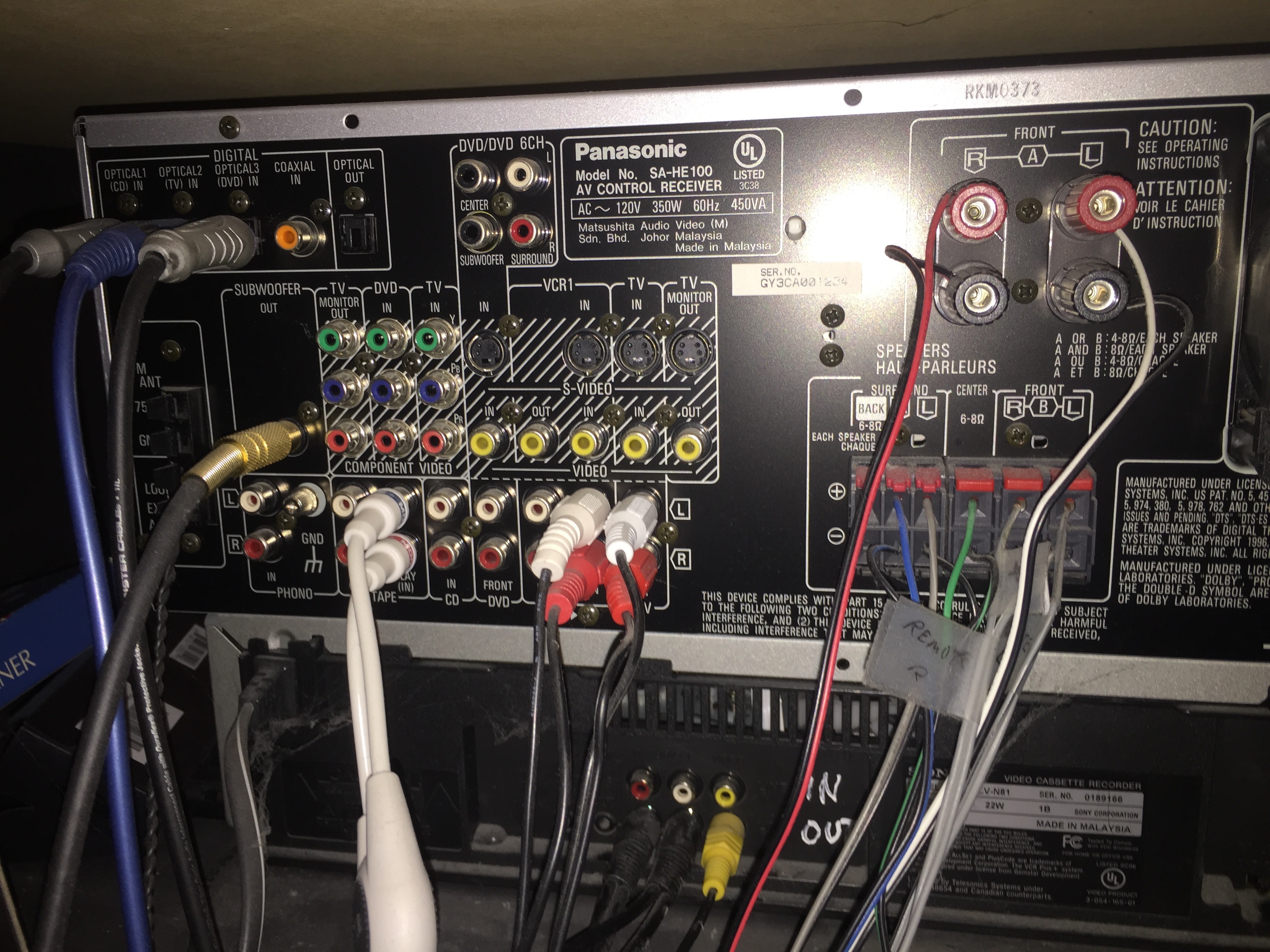
The wiring of the old receiver

Making our lives more interesting, each manufacturer has its own brand name for HDMI-CEC; LG calls it SimpLink. So I made sure I set the television to “Audio Out (Optical/HDMI ARC)” and navigated its settings menus to enable LG SimpLink. Then I made sure I enabled “HDMI Control” in the receiver. That let me retire all of the digital optical cables plugged into the old receiver.

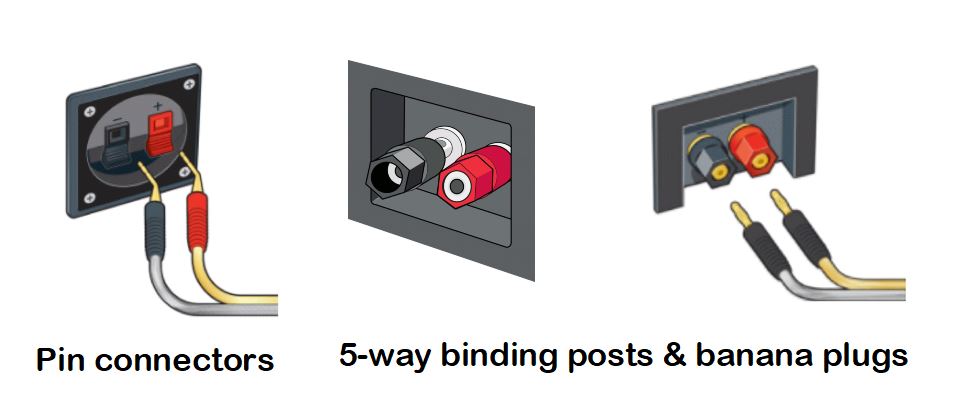
Pin connectors vs. binding posts

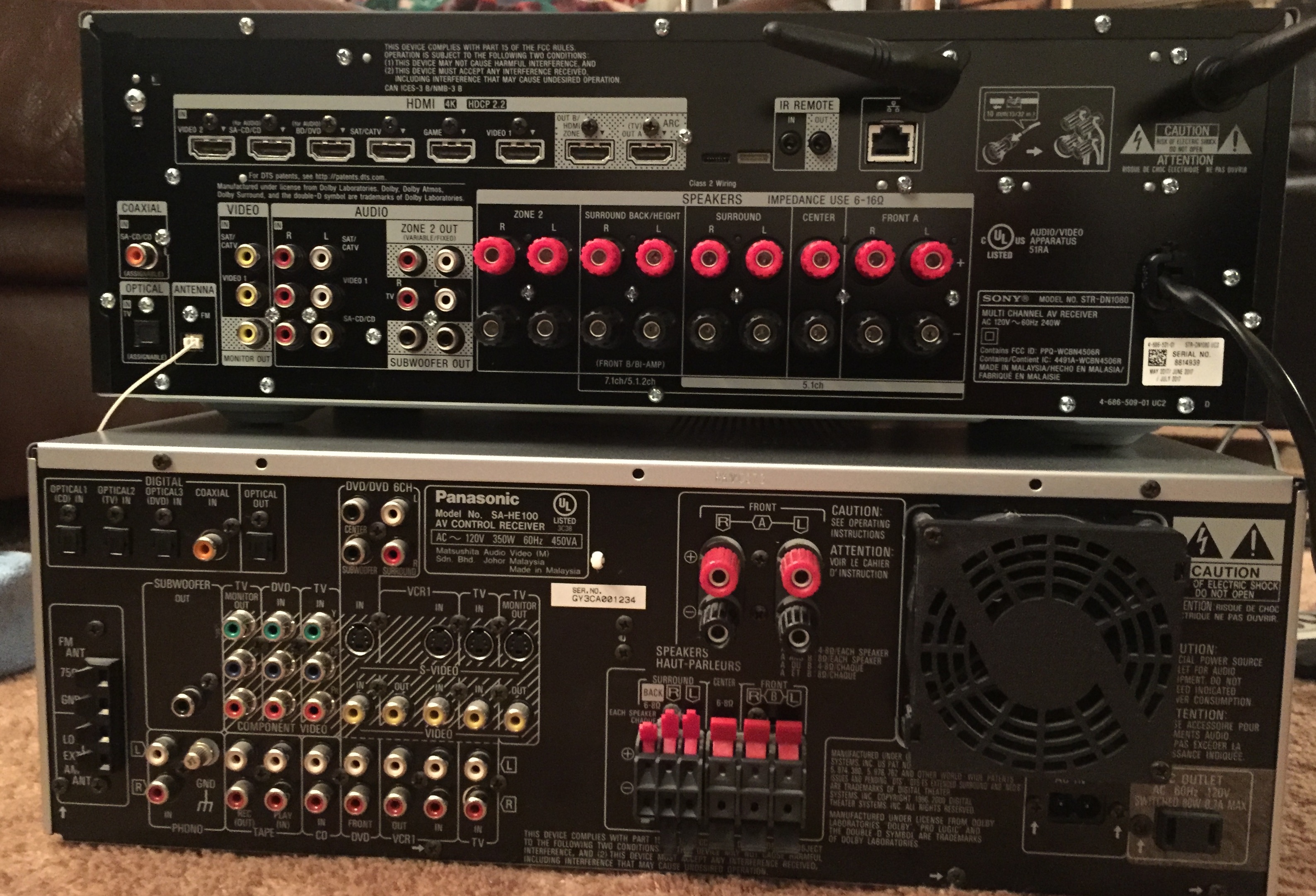
My old surround speakers terminated in stripped speaker wires hooked into pin connectors and some binding posts. I wish I could have instead just used banana plugs to connect the speakers, as that is so much easier and the new receiver had a full set of 5-way binding posts. But I wasn’t about to try and solder banana plugs onto the old wires. Instead I just suffered and painstakingly threaded 14 different wires into various posts, being careful to heed the old labels I had attached to each one 14 years ago to track the + and – terminals on each of the five surround speakers and the two remote speakers in the office. I needed the signals to go to the correct speakers and avoid phasing problems.

Subwoofers, for whatever reason, still use RCA-style connectors, so that was the one speaker that was easy to switch to the new receiver. If you are ever puzzled by the myriad connector types (there are over a dozen different ones on my two receivers), Crutchfield has a nice illustrated guide to them.

Comparing the connections on my new receiver (top) and the old one (bottom)

The new receiver supports up to seven speakers and two subwoofers in various configurations. I’m using a 5.1-2 setup of five surround speakers, a subwoofer, and two remote speakers. But I could give up on the remote speakers and reconfigure those channels for a) two upward-firing Dolby Atmos speakers which would bounce sound off the ceiling, b) two ceiling-mounted speakers, or c) back left and right surround speakers. However, I’m unlikely to ever upgrade the speaker system for any of those options or a second subwoofer.

I hooked in the radio antenna, but I did not bother to hook my old VCR in. There is a 75-ohm coaxial cable going from it to a switchbox that can connect it or the outdoor antenna to the television. I don’t listen to my old aerobics videotapes during my workouts, instead listening to podcasts on Bluetooth headphones connected to my iPad. But if I ever want to listen to a tape, the television can send the audio signal to the receiver for me through the HDMI-ARC cable. The Apple TV 4K and Blu Ray player hooked into the receiver with HDMI, leaving many HDMI ports free on both the receiver and the television for any future devices.

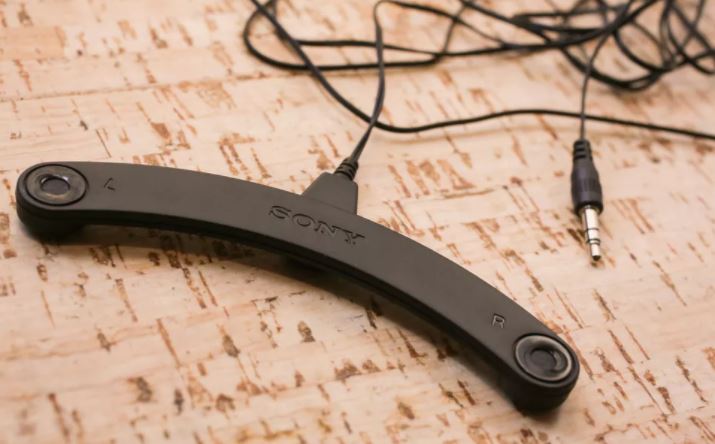
The little calibration microphone

I plugged in the little calibration microphone in the front of the receiver and held it where we sit to watch movies while the system ran a calibration. It didn’t take long, creating a variety of odd sounds to decide how to adjust each surround speaker and the subwoofer. Everything sounds fine to my ears, which are anything but golden.

I completed most of the setup on the receiver, confirming it could playback sound from the various devices and switch video as needed. Both it and the television can pair to Bluetooth headphones, so I can avoid annoying Wendy, whose hearing is far more sensitive than mine.

The receiver also has WiFi, so when either of us turns on AirPlay with our iPads or iPhones, the TV and receiver turn on and tune that in automatically, which seems a tad creepy but is convenient.

After installing the receiver, I did a firmware update that reportedly added Dolby Vision HDR passthrough, something my Apple TV 4K would require. I installed HDMI 2.0-compliant cables and ran the Dolby Vision HDR setup on the Apple TV 4K, but it failed. Tweaking settings on the receiver did not help. So I unhooked the Apple TV 4K from the receiver and plugged it directly into a spare HDMI port on the television. That got Dolby Vision to work. So the only device I’m currently feeding through the receiver to reach the television is the Blu-Ray player.

The bottom line

The new receiver under the new television and atop the old VCR

Everything now seems to be working fine. Upgrading the receiver was another expensive hassle, but now the speakers are supposedly calibrated, and the television and receiver work in perfect harmony in controlling each other.

Speaking of harmony, since 2007 I had used a Logitech Harmony 880 universal remote with my home theater. As various devices came and went, I was able to reprogram it with my old MacBook Air to operate almost everything with one remote, although I still had to use a Voice Remote for the old Amazon Fire TV stick. The new LG television solved that issue, and its Magic Remote is fun to use, but is unable to control the Apple TV 4K or the Blu Ray player, let alone the old Sony VCR. Long tweaking sessions could never get the old Harmony 880 remote to properly set up the inputs and muting on the newer devices for different sources.

So in my next post I’ll detail my experience in replacing the Harmony 880 with a new Harmony Companion universal remote.

Posted in HDTV, movie, technology | Leave a comment

Oh, LED!

November 19, 2017

The Black Friday 2017 shopping season is almost here, and if you’re thinking about a new television, there’s one I can recommend based on recent experience. I splurged on a 55″ LG OLED television last month, which I was able to get at Black Friday-level pricing.

I should note that I can’t boast that Meador Manor has a true home theater. Unlike some rich folks, we don’t have an elaborate home theater room with a big expensive screen, projector, surround sound, fancy seats, or lighting. We just have an entry-level surround sound system in our living room, hooked up to a television that sits on a stand. We mostly stream movies from Amazon or iTunes, share YouTube videos via Airplay, and have a regular Blu-Ray player. But, nonetheless, our new television is pretty impressive.

Currently you can buy the same television for “only” $1,500, but if you’re like me, you need some good reasons to plunk down that sort of cash! So I’ll outline for you what I had before, why I chose this unit, my initial impressions, and the additional forthcoming upgrades it has prompted.

What to look for in a new television

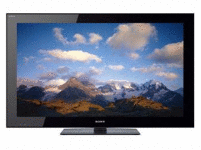
My 40″ Sony LCD TV

In 2010 I upgraded from a 30″ HDTV cathode ray tube television television to a 40″ Sony KDL-40HX701 LCD television that cost $800. I’ve been very happy with that television, but it is considered small by today’s home theater standards, and it can’t support the higher resolution, higher dynamic range, and wider color gamut that have become available for some movies in recent years.

Mind you, Wendy and I rely on our iPads for most of our video watching, only turning on the big system to share a movie or a video clip with each other and for my weekday morning workouts to old aerobics videotapes. Meador Manor has not had cable TV service since 2008, when I switched to internet-only service. While I do have an antenna I mounted on the chimney back in 1995, and it pulls in many HDTV broadcast channels from Tulsa, we almost never tune those in.

So why in the world did I just spring for a new television that cost me $1,600, and is still $1,500 at Black Friday prices? As usual these days, the answers are acronyms: HDR and OLED and DCI P3; but I didn’t buy it for its other major abbreviation: 4K UHD. Below I’ll make some sense of this blizzard of acronyms and their meanings for my older Sony Bravia KDLHX701 and the new LG OLED55B7A television.


Display type (important): LCD vs. OLED

Old Sony set: Its pixels work by having placing a thin-film-transistor liquid-crystal display (LCD) in front of a cold cathode fluorescent lamp. So it creates darker areas, including its attempt to display black, when its liquid crystals are energized and untwist, so that far less light passes through two perpendicular polarizing layers. The color is provided with red, green, and blue filters. Some light always leaks through, so “black” on these sets is a dark gray, limiting its contrast.

oled-and-lcd

New LG set: Its pixels are organic light-emitting diodes (OLED) which directly emit light when energized in what is called electroluminescence. The different colors come from organic compounds in the diodes that produce yellow (i.e. red and green) light or blue light. Color filters allow these to be manipulated to produce red, green, blue, or white light. Since each pixel is self-illuminated, when one is turned off you get a true black with incredible contrast. This creates a much more pleasing image, even though OLEDs cannot reach the highest brightness levels some LCD sets can produce. My new set reaches 1,000 nits of brightness in its highlights, which is quite good.


Dynamic range (important): SDR vs. HDR

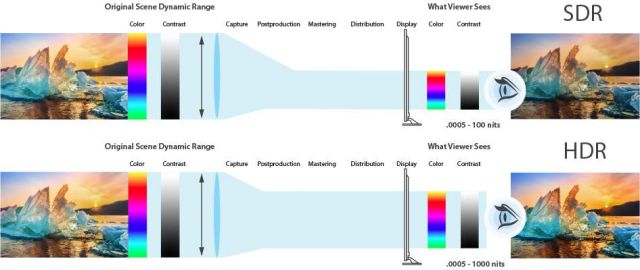
Old Sony set: Its backlit LCD produces standard dynamic range (SDR) images, meaning it has a typical brightest-to-darkest ratio for its pixels.

aja-sdr-hdr-chart.jpg

New LG set: Its OLED technology gives it high dynamic range (HDR), so there is a greater difference between its brightest and darkest pixels. It supports both the HDR10 Media Profile and Dolby Vision HDR standards, which are the two most common standards for transmitting high dynamic range information in a video signal. Supporting both standards allows me to not worry about that latest format war.


Color gamut (important): Rec. 709 vs. DCI P3

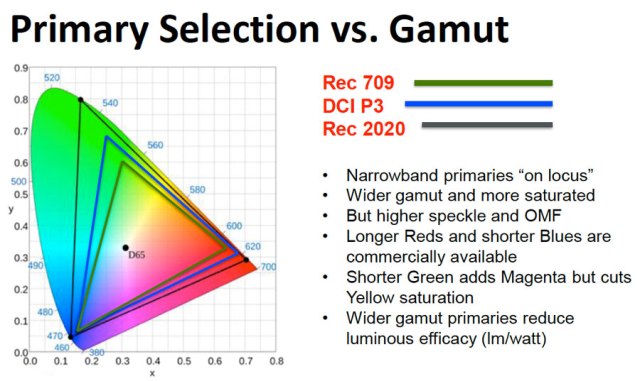
Color gamut refers to the range of colors a set can produce. Older HD televisions like my Sony set provide the range of colors in the Rec. 709 standard, but newer sets can offer a broader range of colors, which is also called a “wider color gamut”. My new set covers 99% of the larger DCI P3 color space standard for digital movie projection, so that’s good enough. Someday we’ll have sets that cover the even larger “Rec 2020” color space, but there’s no telling when that will be.

17662543dab6fdc0b7


Resolution (unimportant): 1080p HD vs. 4K UHD

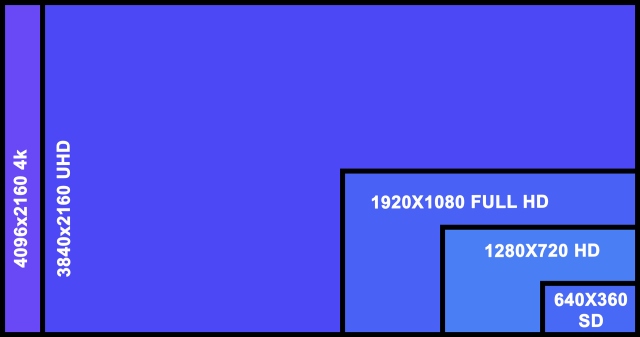
Old Sony set: Its 40″ diagonal screen has 1920 x 1080 pixels, which is the top resolution of standard high-definition (HD) television.  As for how it builds up each image and how often that is refreshed, it can show typical high-definition videos with 1080 progressive scan lines with 24 frames per second for most movies (actually displayed at 60 frames per second via a duplication process called 3:2 pull-down) or 60 progressive frames per second for videos, while also supporting the lower-level HD resolution of 720 progressive scan lines and the old-style NTSC television signal’s 480 scan lines which interlaces half of them at 60 frames per second for an effective 30 full frames per second.

UHD-4K-HD-SD-resolution-comparison.png

New LG set: Its 55″ diagonal screen has 3840 x 2160 pixels and can show ultra-high-definition videos with 2160 progressive scan lines. It scales up the older lower-resolution standards as needed.

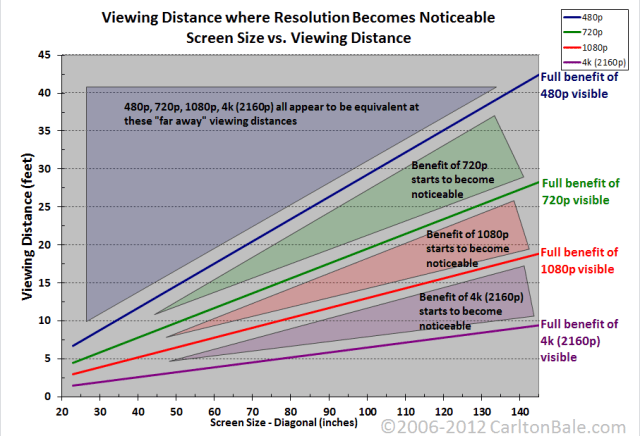
Whereas switching from standard definition to high definition was important for a sharper picture, this change is NOT.  At a normal viewing distance from any reasonably sized television, our eyes simply cannot perceive the increased resolution. At Meador Manor, we sit eight feet from the screen. So we would have to upgrade to a screen size of 80″ or more to actually perceive a difference between HDTV’s 1080p and UHD’s “4K” resolution of 2160p.

Screen size and viewing distances

So you really shouldn’t buy a television just for 4K resolution and certainly should not ever waste money on an expensive 8K set. Cameras are the same way, where the number of megapixels is now generally so high you don’t need to worry about it. Computers went through this sort of shift long ago: we used to be able to tell a computer would be faster because it had a higher clock frequency (various megahertz and then gigahertz numbers), but that has stalled out and now you have to think about how many cores are in a chip and how a solid state drive is the key to fast performance.

The bottom line? If you already have a large LCD HDTV, don’t upgrade unless you get a set that supports HDR and wider color gamuts, and you should shift from LCD to OLED technology to really get a visual bang-for-your-buck.

The initial experience with our new 55″ LG OLED TV

The big new OLED TV arrived a couple of weeks ago. I knew it would be incredibly thin, except for the lower portion with the electronics, but it was still startling to compare it to the older LCD television. However, since we don’t mount our TV on the wall, the thinness is not a feature we really care about, while the reduced weight was certainly nice for moving it about.

Hooking up the system components was easy, even though my old audio receiver lacked HDMI ports, since I could use optical audio out from the TV to the receiver and the TV itself had plenty of HDMI ports for the Blu-Ray player, Apple TV, and more. It has built-in support for Amazon Prime video, so I didn’t need to plug in my older Amazon Fire TV Stick, and I replaced my 4th-gen Apple TV box with a new Apple TV 4K box for $199 to ensure any iTunes movies we rented would be the best available.

My new 55″ LG OLED TV

Example images from various sources

To try and illustrate the imagery the set can provide, I set a tripod on the couch with my Canon EOS Rebel T6 digital SLR camera and used a Canon EF 24-105mm f/4L IS II USM lens to take some shots during the day with daylight streaming in from open blinds on the left side of the view. The TV actually looks better in person than it does in the shots, since the camera picks up pixellation that is not perceived by the human eye when actually viewing the set, and its own sensor interacts with the incoming light differently from human vision.

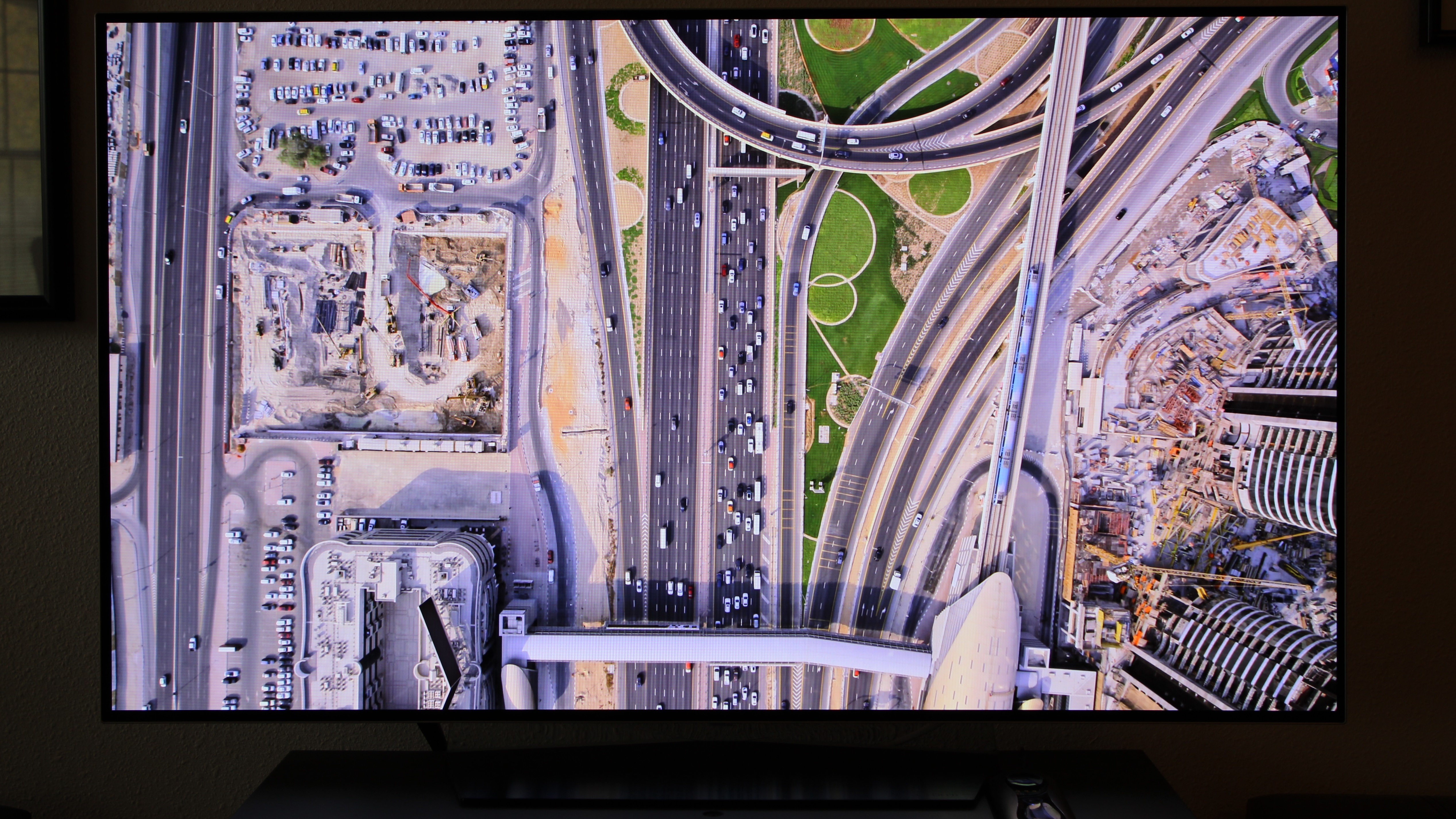
My first views were of 4K HDR screensaver videos on the Apple TV 4K, which were stunning for both Wendy and me. The extra resolution doesn’t matter for watching something from the couch, but 4K is so high-res you can get within a couple of feet from the screen and not see any pixels. The high dynamic range and wide color gamut of the OLED set means it finally lives up to the hype about seeming like a window looking out on the world, given the limitations of the human eye.

Apple TV 4K Screensaver

You can try viewing one of the Apple TV 4K screensavers on a computer monitor using YouTube, but you have to be sure to click the settings gear icon at lower right, pick Quality, and select the 2160p 4K version, and of course the monitor or device you watch it on may not actually reach 4K resolution. Notably, the YouTube versions do NOT support high dynamic range.

I loaded up a preview of The Martian on the Apple TV 4K, which claimed to be streaming in both 4K and with HDR. I tried to capture a shot showing how HDR allows for very bright and very dark imagery in the same shot, without blowing out all of the highlights or losing the shadow details. Note that this is an effects shot, so it was NOT actually rendered in 4K resolution.

iTunes preview of The Martian in 4K HDR

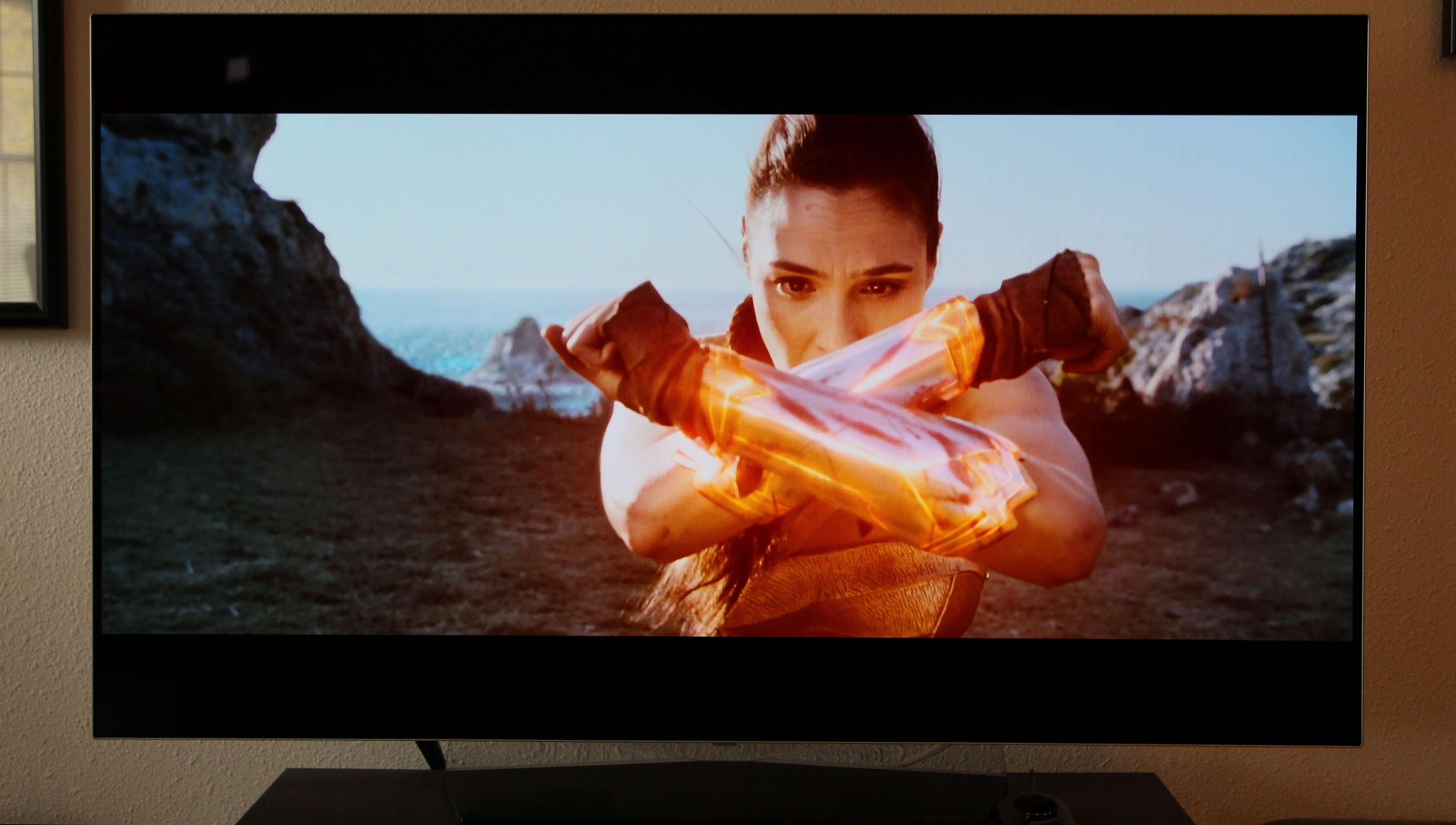
Amazon video is built-in to this LG television, so I got a shot from the 4K preview of Wonder Woman from that. However, the video and effects in that film were not true 4K. Again, the banding you’ll see in the shot below is not perceivable when you view it in person.

Amazon Wonder Woman preview in 4K

The TV upscales lower-resolution signals, so I connected the chimney-mounted antenna I erected back in 1995 and pulled in a 1080p HDTV broadcast from a Tulsa station. It looked great.

Over-the-air HDTV broadcast

So what about a simply terrible legacy video source? The unit has to deal with that each weekday morning when I play back an episode of Everyday Workout from one of my quarter-century-old videotapes. From 1993 to 1997 I recorded episodes off the Lifetime cable channel onto VHS tapes, cramming 10 or more episodes onto each tape by using the low-quality EP/SLP mode that recorded six hours of video per tape.

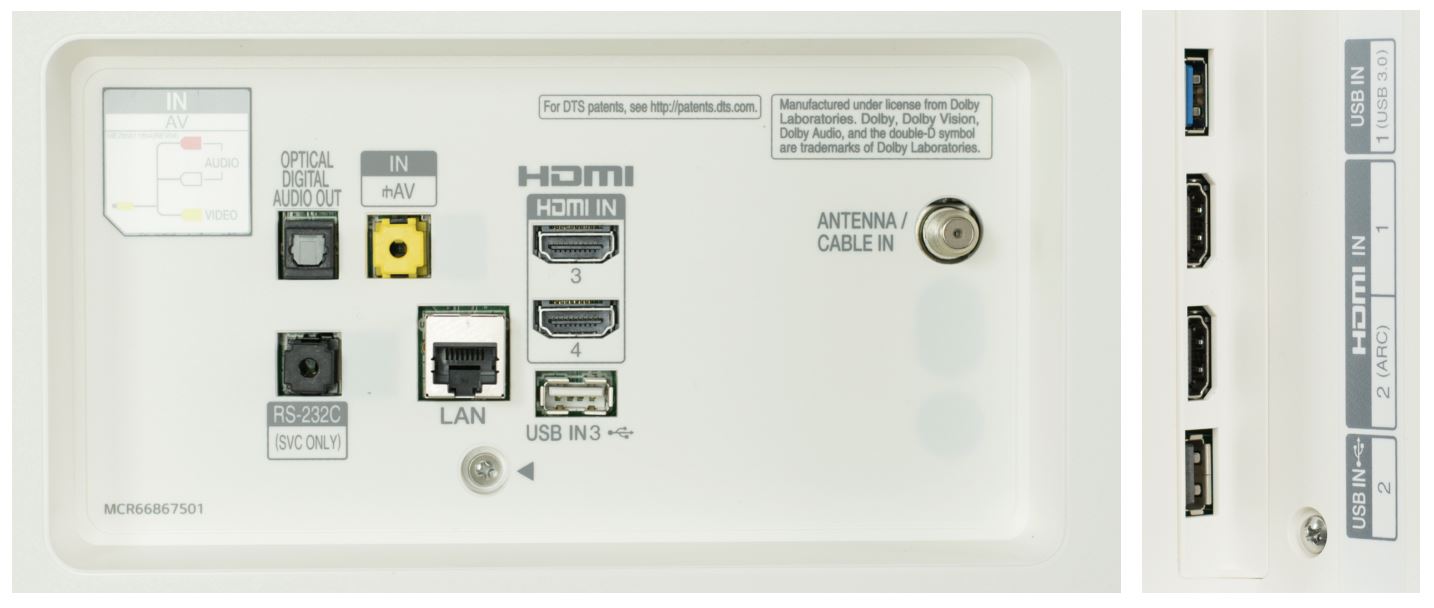
Inputs on the new TV

At first I tried the weird combination dongle that came with the TV to connect my VCR’s composite video cable and RCA stereo audio cables into a single yellow port on the back of the TV. The sound worked, but the video would not show up, no matter what settings I adjusted.

So I gave up and ran a 75-ohm coaxial cable from the VCR’s output into the matching Antenna/Cable In port on the television. That worked great, but I also needed to connect the outside aerial to that same TV input, since my old VCR can’t understand modern broadcast HDTV signals. Using a cheap splitter in reverse to connect both sources into the television yielded a picture, but with terrific interference. A cheap hardware coax A/B isolation switch solved that problem, with me punching one button to connect to the VCR and another to connect to the antenna.

1993 VHS EP/SLP recording playback

As one would expect, the image from the old videotape was extremely soft. After all, when upscaling a VHS tape, the TV is taking an input with an effective resolution of 333 x 480 pixels at best and scaling that up to 3840 x 2160 pixels. In this case things were even worse since the source tape was recorded in the worst-quality mode. So I was impressed by how well the TV plays back marginal legacy sources, and my morning workout videos look better than ever.

Actually using the thing

The webOS 3.5 Smart TV software for selecting content and services is pretty handy and easy to use with the included Magic Remote. The remote is gyroscopic, so you just wave it around to move the cursor, and it supports voice commands. You select sources, from Live TV to a connected device to online streaming services, by pressing a button and picking a blade icon from a scrolling set at the bottom of the screen. There is a promotional video that illustrates the interface.

LG Magic Remote

The remote offers only partial control of the audio receiver and doesn’t control the Blu-Ray player or Apple TV, so if you have a surround sound receiver and other devices, you will either need to use multiple remotes or try using an expensive universal and programmable Harmony remote from Logitech or the like; more on that later.

A button on the remote lets you quickly navigate commonly used settings with the cursor, and of course you can also dive into the setup menus to burrow deeply into various obscure settings. I had to do that to deal with a picture and sound synchronization issue with the Apple TV 4K. My old audio receiver is needed for surround sound, but it lacks any HDMI ports. So I had to feed the Apple TV’s HDMI output to the TV and then send the audio from the TV to the receiver via digital optical cable. That pathway delayed the audio output, so I had to manually adjust a delay setting in the TV menu system, using trial-and-error, to get the picture and sound to synchronize. I was certainly glad the set included the ability to fix this sort of problem.

Our first movie on the new television

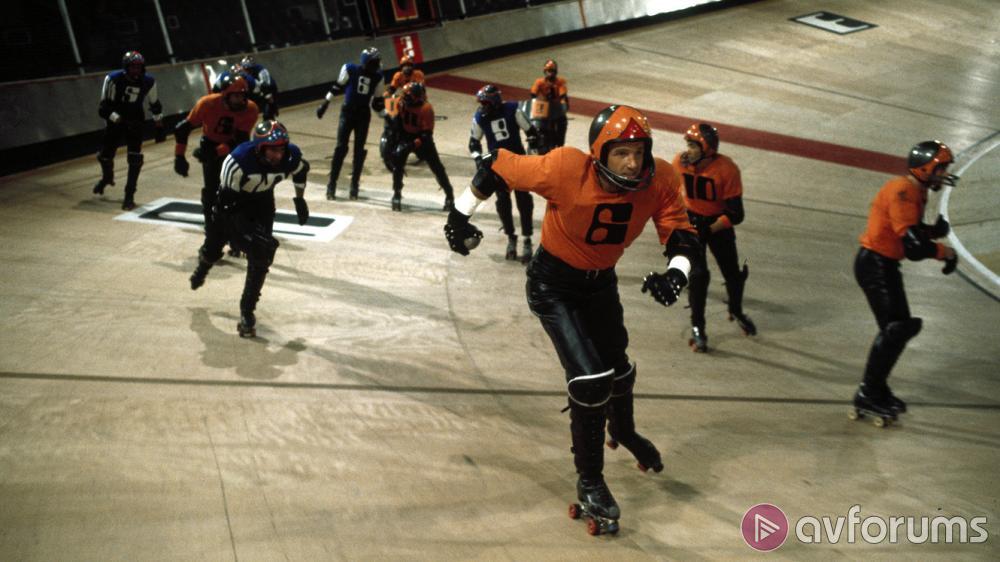
The first movie Wendy and I watched on the new television was not a modern 4K HDR movie. Instead, we continued to draw from long lists of movies each of us has compiled, alternating between each others’ lists for our movie nights. This time it was time to pull something from my list. Her list had yielded The Hurt Locker last time, which was pretty violent and intense. So I retaliated by picking the violent but very dated and oddly paced Rollerball, a 1975 Norman Jewison science fiction dystopia that fascinated me in my youth. It certainly wasn’t in 4K or HDR or the like, but I was still surprised on how good it looked on the new television.

We streamed a HD version from iTunes that probably originated from the movie’s Blu-Ray reissue. The picture was so sharp and clear that it looked more like what I associate with television soap operas than the grainy and fuzzy film transfer I recalled from watching it on old broadcast TV and on VHS or DVD. I was startled to see for the first time the wood grain on the ramps in the arena, and the closeups of the garish eye make-up on the females in the movie were disturbingly clear.

1975’s Rollerball

Given my experience with old sources, I’m confident that new movies shot in HDR and wide color gamut will be truly stunning on this set, while 4K resolution won’t really matter much when you sit back to watch, but it is there if you want to get ridiculously close.

Additional upgrades to come

My 2007 Logitech Harmony 880 Remote is outdated

If I tried to use all of the remotes for the various devices in our system, I’d have five of them splayed out on the side table. But since 2007 I’ve used a Logitech Harmony 880 programmable remote control to simplify things. With my old system, I could control almost everything, except the Amazon Fire TV Stick, with the Harmony remote. One button would turn on the television, receiver, and any other needed device and set both the television and the receiver to the appropriate inputs.

Faced with the new television having to serve as the HDMI hub, I pulled out my old MacBook Air laptop and legacy Harmony software to adjust the programming on the Harmony remote, which was updated by plugging it into the laptop with a USB cable. A lot of tweaking got most things to function, but there are still glitches with the audio source and muting when switching functions.

My 2003 Panasonic audio receiver is also outdated

That and the lack of HDMI support in my old audio receiver prompted me to order a newer Harmony Companion remote control and a new Sony audio receiver. I’ll set those up and then report on them in a later post.

The bottom line

If you already have a big LCD HDTV, upgrading to an OLED television like this with HDR and a wider color gamut might be worthwhile, but don’t waste your money on a 4K LCD television that lacks those extra features. And, as always, be aware that upgrading one component in a system of devices may lead you to upgrade additional ones as well.

That’s it for now; I have a new receiver and universal remote to unpack and set up!

Posted in HDTV, movie, technology | Leave a comment