The Beautifully Sad Lana Del Rey

March 15, 2015
Pop Leibel tells a story

Pop Leibel tells a sad story

Oh yes, I remember. Carlotta, beautiful Carlotta, sad. It [the McKittrick Hotel] was hers. It was built for her many years ago…by…the name I do not remember, a rich man, powerful man.

It is not an unusual story. She came from somewhere small to the south of the city. Some say from a mission settlement. Young, yes, very young. And she was found dancing and singing in cabaret by that man. And he took her and built for her the great house in the Western Addition. And, uh, there was, there was a child, yes, that’s it, a child, a child.

I cannot tell you exactly how much time passed or how much happiness there was, but then he threw her away. He had no other children. His wife had no children. So, he kept the child and threw her away. You know, a man could do that in those days. They had the power and the freedom.

And she became the sad Carlotta, alone in the great house, walking the streets alone, her clothes becoming old and patched and dirty. And the mad Carlotta, stopping people in the streets to ask, ‘Where is my child?’ ‘Have you seen my child?’

She died…by her own hand. There are many such stories.

So relates the character of Pop Leibel, portrayed by Konstantin Shayne, in Alfred Hitchock’s magnificent film Vertigo.

sad lana

Lana Del Rey

I was reminded of his tale when listening to Lana Del Rey’s most recent album, Ultraviolence. As Caryn Ganz said in Rolling Stone, “Ultraviolence is a melancholy crawl through doomed romance, incorrigible addictions, blown American dreams.”

I love it.

Back in 2012 I highlighted Lana Del Rey’s Born To Die from the album of the same name, and later the track American from her Paradise album. I have lots of bouncy and happy music in my collection; heck, I’ve bopped along a glacier to Hanson’s Mmmbop. But I also embrace the dark and sad pathos evoked by Del Rey in her songs.

Pop Leibel’s story of the sad Carlotta echoes in Lana’s track Old Money:

Blue hydrangea, cold cash, divine,
Cashmere, cologne, and white sunshine.
Red racing cars, Sunset and Vine,
The kids were young and pretty.

Where have you been? Where did you go?
Those summer nights seem long ago,
And so is the girl you used to call,
The Queen of New York City.

But if you send for me you know I’ll come,
And if you call for me you know I’ll run.
I’ll run to you, I’ll run to you, I’ll run, run, run.
I’ll come to you, I’ll come to you, I’ll come, come, come.

Ohh-oh oh, ahh-ahahaah ah.

The power of youth is on my mind,
Sunsets, small town, I’m out of time.
Will you still love me when I shine,
From words but not from beauty?

My father’s love was always strong,
My mother’s glamour lives on and on,
Yet still inside I felt alone,
For reasons unknown to me.

But if you send for me you know I’ll come,
And if you call for me you know I’ll run.
I’ll run to you, I’ll run to you, I’ll run, run, run.
I’ll come to you, I’ll come to you, I’ll come, come, come.

Ohh-oh ohh-ohh-oh, ahh-ahahahah ah.

And if you call I’ll run, run, run
If you change your mind, I’ll come, come, come
Ohh-oh ohh-ohh-oh, ahh-ahahahah ah

Blue hydrangea, cold cash, divine,
Cashmere, cologne, and white sunshine.
Red racing cars, Sunset and Vine,
And we were young and pretty.

For Carlotta, the answer to the question, “Will you still love me when I shine from words but not from beauty?“, was “No.” We know instinctively that the answer is the same for the girl portrayed in this song, despite her desperate hope and knowledge that she would run to him if he would only send for her.

Dan Heath worked with Del Rey on many of my favorite songs of hers

Dan Heath

I shouldn’t be surprised that the track is produced by Dan Heath, who also worked with Del Rey on other favorites of mine, including American, National Anthem, and Summertime Sadness. The track opens with only piano chords and Del Rey’s voice, then brings in beautiful strings. The chorus is nicely emphasized by multitracking Del Rey.

Part of Old Money is taken from Nino Rota’s theme for Franco Zeffirelli’s 1968 film version of Romeo and Juliet. The happier take on this melody was A Time for Love, as sung by Johnny MathisAndy Williams, and other crooners. Contrast that positive, somewhat sappy, take to the melancholy desperation of Del Rey:

Listening to Lana is to look into a darkling mirror

Listening to Lana is to gaze into a darkling mirror

Listening to Lana can be like gazing into a darkling mirror. Sometimes her melancholy suits a song, as in her take on Blue Velvet, a song which will now be forever haunted by David Lynch’s movie masterpiece.

Del Rey understands parody, illustrated by her commercial for H&M, which evokes the ambiance and displays characteristic visual and audio motifs from the film-maker’s oeuvre.

But to use her on a happy song can slip into into ineffective parody, as in her take on Once Upon A Dream in Disney’s rather good Maleficent, a dark retelling of Sleeping Beauty which the studio presented a half-century later. I liked the film, but did not care for her version of Once Upon A Dream. She needed the freedom to only take themes from the song and modify the lyrics to truly make it her own, as she did in turning A Time for Love into Old Money.


The Mad Lana

There are many fine tracks on Ultraviolence, with most of the tracks produced by Black Keys frontman Dan Auerbach. I like several of the tunes they did together. But another standout for me, that Auerbach did not produce, is Money, Power, Glory. Greg Kurstin produced and co-wrote the song with Del Rey, and in it she seethes with venom and naked, nasty ambition:

You say that you wanna go
To a land that’s far away
How are we supposed to get there
With the way that we’re living today?

You talk lots about God
Freedom comes from the call
But that’s not what this bitch wants
Not what I want at all

I want money, power, and glory
I want money and all your power, all your glory
Hallelujah, I wanna take you for all that you got
Hallelujah, I’m gonna take them for all that they got

The sun also rises,
On those who fail to call
My life, it comprises
Of losses and wins and fails and falls

I can do it if you really, really like that
I know what you really want, b-b-b-b-baby
I can do it if you think you like that
You should run, boy, run

I want money, power, and glory
I want money and all your power, all your glory
Hallelujah, I wanna take you for all that you got
Hallelujah, I’m gonna take them for all that they got

Dope and diamonds, dope and diamonds, diamonds.
Dope and diamonds, dope and diamonds, that’s all that I want.
Dope and diamonds, dope and diamonds, diamonds.

I want money, power, and glory
I want money and all your power, all your glory
Hallelujah, I wanna take you for all that you got
Hallelujah, I’m gonna take them for all that they got

This song makes me think of the many sleazy televangelists and their prosperity theology. But Del Rey is having fun here, engaging in some biting satire, sarcasm, and irony for the critics who disparage her and her music and for the worryworts who anguish over the misogyny and self-destruction in her songs. She said of this song:

I was in more of a sardonic mood. Like, if all that I was actually going to be allowed to have by the media was money, loads of money, then f@#$ it … What I actually wanted was something quiet and simple: a writer’s community and respect.

She has my respect. I continue to gaze into her dark mirror, seeking the sad Carlotta, the mad Carlotta, reincarnated when Lizzie Grant became Lana Del Rey.

Posted in movie, music, video | Leave a comment

Tech Transitions Part 4: Heading into the Cloud

March 4, 2015

This is the fourth and final entry in a series of posts about my progression through technology transitions.This one tackles the transition from local to cloud storage and applications. Earlier posts dealt with the transition from fixed to mobile computing, the transition from scheduled broadcast to on-demand media and the transition from analog to digital.

I find myself relying more and more upon computer storage and services hosted on remote server farms in “the cloud“. While I still have massive amounts of data stored and accessed locally, I use the cloud to synchronize (and thus effectively backup) essential data for work and I find myself sharing data through cloud services such as Dropbox, Google Drive, and Microsoft OneDrive. I’m also using more cloud applications, ranging from the simplistic but sometimes adequate Google Drive spreadsheets and word processor to the online versions of Word, Excel, and Powerpoint through my $99/year Microsoft Office 365 Home subscription.

Storage Space

Too much stuff!

Too much stuff!

Our consumer society means that most of us keep accumulating items, veering off into collecting and hoarding on occasion. I see many folks parking their expensive cars out on the driveway since their garage is filled with junk they seldom use. I’ve managed to avoid that trap and keep my garage clear for vehicles by throwing worn things out and donating gently used items to Goodwill. But the cabinets and closets and shelves of Meador Manor are stuffed with seldom used items, and the edges of the garage are filling up too, so this summer I plan to do a massive purge.

The problem of too much little-used stuff also plagues my digital life. My desktop system in my home office now has a one-terabyte primary solid state drive along with two older one-terabyte spinning hard drives which I now use for backups. Over in the living room there is a 1.25 TB network storage drive attached to my 4th generation Apple Airport Extreme router, along with a 0.5 TB external drive attached to my old Tivo HD digital video recorder. Whenever I have a big chunk of data files which I really don’t think I’ll ever need, such as television series which I purchased on iTunes and don’t plan to re-watch, I shove that over onto the network drive. I know that someday that big spinning drive will crash, but I probably won’t miss it when it goes. I originally bought that network drive to access files via my 3rd generation MacBook Air, but I seldom use that functionality.

Here is a breakdown of the data I’m storing locally on my primary computer drive and online, ignoring the various backups and omitting software and overhead:

File type Primary Local Drive Cloud
Work documents 100 GB 89 GB (Dropbox)
Photographs 150 GB 43 GB (Flickr)
Audio files 160 GB
Video files 180 GB
I love the Dropbox cloud storage service

I love the Dropbox cloud storage service

I only infrequently backup my primary drive to one of its spinning cousins in the desktop computer, and backup about twice a year to a portable drive which I store offsite. That isn’t the frequency of backup which professionals recommend, but was enough for me back when I was running two local hard drives in a RAID 1 mirrored setup. I eventually abandoned RAID 1 because system support for it was problematic, but I switched to solid state, which should be quite reliable and immune to crashes.

But the cloud is what truly eases my concern about adequate backups. All of my crucial documents are stored in my Dropbox cloud account. I spend $99/year for that service, plus an additional $39/year for their “packrat service” that preserves every previous version of a file. Dropbox started out with less capacity, but now my account allows for a full terabyte of storage. I can have specific Dropbox directories synchronized to any desktop or laptop computer as needed for convenience, and I can access any file on Dropbox via the web browser or app on any desktop, laptop, tablet, or smart phone.

Limited upload bandwidth has kept me from syncing everything onto Dropbox

Limited upload bandwidth has kept me from syncing everything onto Dropbox

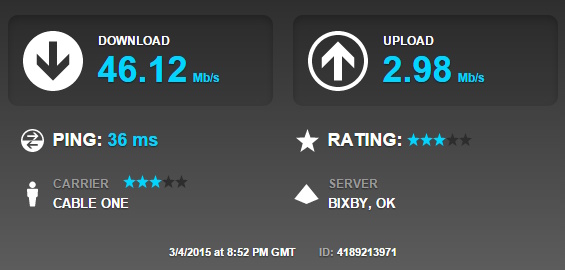
Thus you may wonder why I don’t simply shift everything I’m storing locally onto Dropbox. Bandwidth is one reason: my CableOne home internet connection’s upload bandwidth is only three megabits/second, plus there is a soft bandwidth cap of 300 GB of data transfer per month on my account. I use between 50 and 100 GB per month already, mostly downloads at 50 megabits/second for home video streaming of movies and podcasts, plus internet surfing. So it would be problematic to try and upload another 700 GB of data to my Dropbox unless I spread that out over several months.

I have considered shifting my audio files onto Dropbox, but those thousands of audio files are managed via the cumbersome iTunes, so shifting their storage location would cause some hiccups and trigger a long rebuild of the iTunes media library. Plus, the theoretical upload time would be about five days and overhead will make it still longer. However, the cloud helps me out in this area even without using Dropbox. Any MP3 files I purchase from Apple’s iTunes or from Amazon are always available in their respective cloud libraries, and I pay $25/year for iTunes Match so that all of my iTunes music, including the many songs I ripped years ago from my former huge collection of CDs, are available in the cloud. My infrequent local and offsite drive backups are sufficient to protect the old ripped MP3 files in my collection. I don’t worry much about my video files, either, because that collection seldom changes much. I’m relying more these days upon streaming video from Amazon for movies, and any movie I really want to hang onto I already own on Blu-Ray or DVD.

Finally, my photographs used to take up much more space, but I now use JPEGmini to optimize their compression, almost halving their size. All of my edited photographs are already on the online Flickr service up in the cloud, so I’m not worried about the infrequent local backups for them, either. Overall, the cloud has brought me a great deal of convenience and peace of mind on data storage and backup. While I’ve never lost any data over the decades, I have suffered through many disk crashes, and I’m very glad to now have solid state local storage plus cloud storage.

Computing in the Cloud

drive

Google Drive is a great free service

Google has long been associated with cloud services. I have used Google Docs, now re-branded and expanded as Google Drive, for many years. We’ve kept our science department curriculum maps there for convenient access and editing, and I’ve long maintained a spreadsheet about my day hikes using that service. I maintain a number of websites using Google Sites, since it is easy to update and customize without going overboard, and I’ve long enjoyed making custom Google Maps.

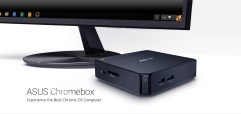
An Asus Chromebox has been a great machine for my mother

An Asus Chromebox has been a great machine for my mother

Google’s extensive cloud services have even made it possible for it to market Chromebooks and the lesser-known Chromeboxes. These units are really not much more than a web browser, but with cloud services from Google, Microsoft, Dropbox, and others, that is good enough to do a lot of basic computing tasks. Their huge advantages are low costs and maintenance. A decent Chromebook laptop only costs a few hundred bucks, and I bought an Asus Chromebox for my mother for only about $175. I hooked it up to her existing monitor, keyboard, and mouse, and she now happily does her web surfing, email, word processing, and spreadsheets on that simple unit. Her Google account includes 100 GB or more of storage on Google Drive, compensating for the extremely limited local storage on the Chromebox, which is used for buffering and offline access.

What is particularly nice about her using a Chromebox is that she is now virtually invulnerable to viruses and malware. Her last desktop machine, a refurbished Dell unit, was heavily infected by malware, which prompted me to consider the Chromebox as an alternative platform for her computing needs. Even if she somehow managed to get malware onto her Chromebox, which doesn’t seem likely, it is simple to wipe the system clean and start over, because all of her settings and files are always up in the cloud. That means I can access her files as needed, from Bartlesville or anywhere else, by simply logging into the appropriate service with her credentials. Since she is effectively using a web browser to do almost everything, I can see in my browser pretty much what she sees via her Chromebox, making it easy to troubleshoot and help her out with any issues. All of this is so much easier than trying to use Windows Remote Assistance to take over her computer remotely or paying for an expensive service like GoToMyPC.

Microsoft OneDrive is now quite compelling

Microsoft OneDrive is now quite compelling

Mom uses the free Microsoft OneDrive service, rather than Google Drive, for her productivity software needs. She was already using the traditional desktop versions of Word and Excel, and OneDrive gives her access to online versions of those applications, which do everything she needs, and includes a free 15 GB of storage. I’ve been paying $99/year for Dropbox for both her files and the ones generated by my father on his Windows 7 desktop machine, but they only have 4 GB of files on there. So when their Dropbox plan expires, I will just shift everything onto their free OneDrive and/or Google Drive accounts.

I’m actively using both my free school cloud-only version of Microsoft Office 365 along with home version, with its downloadable local Office 2013 applications. The service is well integrated with Windows and makes sharing PowerPoints and other documents a breeze. If I only used Word for word processing, I’d be tempted to just do everything in OneDrive and consider dropping Dropbox, but I still use WordPerfect for most of my student handouts (I greatly prefer its interface and model of word processing to that of Word), and I need to experiment to see if OneDrive would work easily with WordPerfect. Plus I like the Dropbox apps on my iPad and iPhone and the extensive integration of Dropbox with a variety of iOS apps, and I haven’t experimented to see how well OneDrive works on those platforms. Finally, Microsoft has re-branded and re-jiggered its cloud services so many times (Windows Live Folders became Windows Live Skydrive became Skydrive became OneDrive) that I want to be sure they’ve settled down into a steady and reliable mode before shifting my allegiance.

The Future

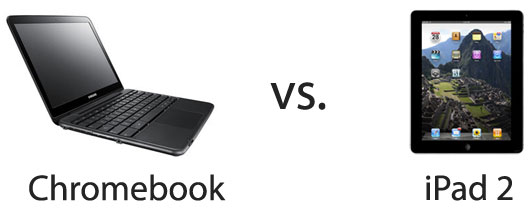
Chromebooks and Chromeboxes make more sense for schools than iPads

With our limited resources, Chromebooks and Chromeboxes make more sense for our local schools than do iPads

A Chromebox or Chromebook can do most things a student needs to do at school, so I am very glad our district is finally piloting some Chromebooks next school year. I hope we can shift to using Chromebooks and Chromeboxes in most classrooms and non-dedicated laboratories in the coming years. They would be far less expensive in capital costs and maintenance burden, although I expect we’ll still need traditional Windows machines for the business computing labs and science labs which use probeware. The biggest challenge may be training teachers to use cloud services instead of traditional desktop applications, but I expect students won’t have much trouble with that. If our district is ever going to reach the 1:1 student:computer ratio to revolutionize instruction, Chromebooks seem the best way to get there. We simply can’t afford that many iPads, and from what I’ve seen, managing iPads in the school setting can be difficult, time-consuming, and frustrating.

I'll probably eventually replace my MacBook Air with a cheap Chromebook

I’ll probably eventually replace my MacBook Air with a cheap Chromebook

As for my own personal use, I love the iPad for use around the house, but I don’t find it as useful or compelling for meetings. I no longer use my MacBook Air much, and as it ages into obsolescence I am likely to replace it with a cheap Chromebook. That would be far less expensive and the maintenance-free aspect is very compelling. I can’t imagine not having a desktop machine for my work at school and at home, but my increasing reliance on cloud services means it will be that much easier to use a Chromebook for meetings and presentations.

< Tech Transitions, Part 3: Fixed to Mobile Computing

Posted in technology | Leave a comment

Tech Transitions Part 3: Fixed to Mobile Computing

February 19, 2015

This is the penultimate entry in a series of posts about my progression through technology transitions, with comparisons to broader trends across the country.This one tackles the transition from fixed to mobile computing. Earlier posts dealt with the transition from scheduled broadcast to on-demand media and the transition from analog to digital.

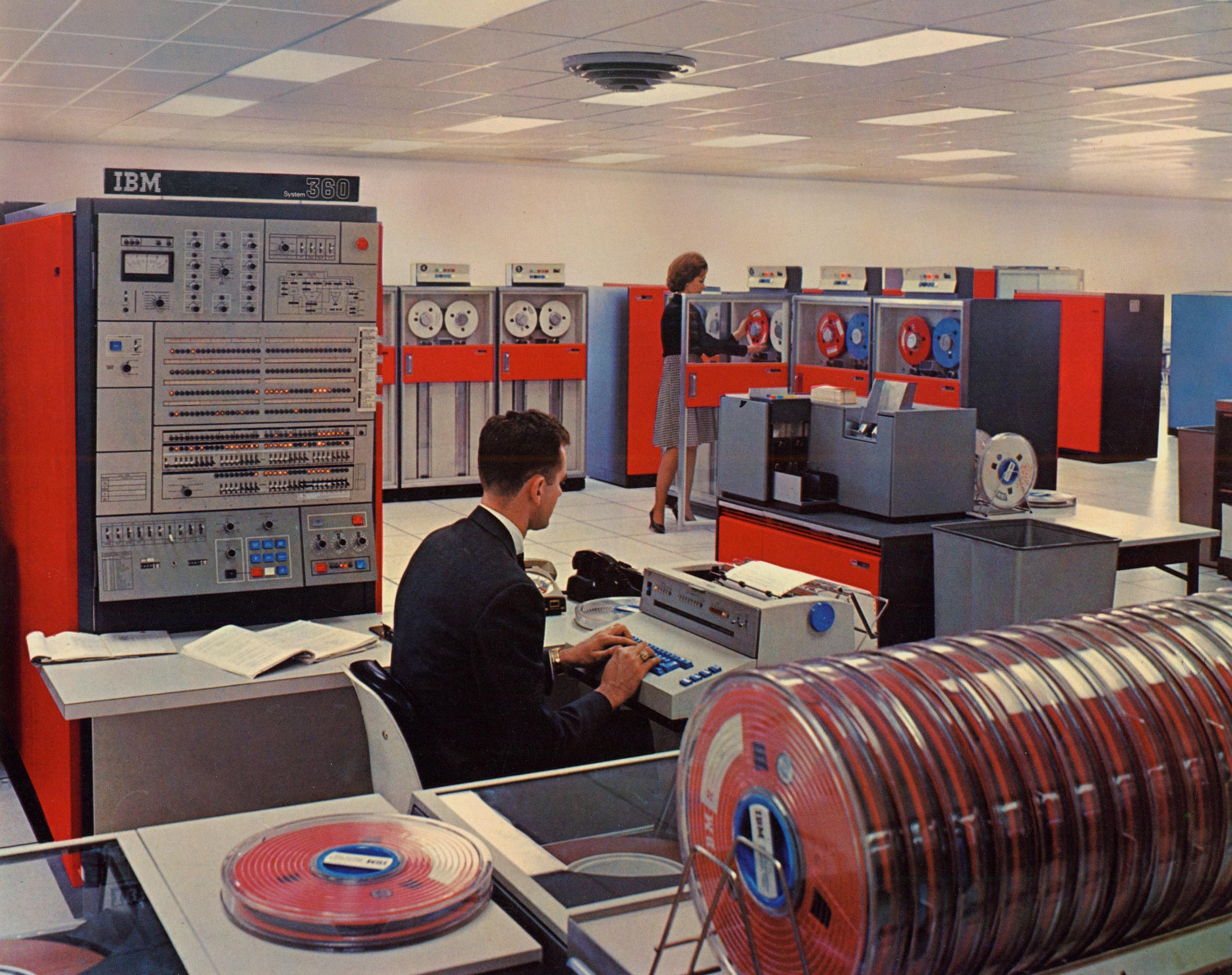
BIG IRON

The IBM System/360 Mainframe from the 1960s

The IBM System/360 Mainframe from the 1960s

The cabinet-sized and larger mainframe computers of yesteryear earned their nickname of Big Iron. They never moved and were often tended by a priesthood of COBOL programmers. The behemoths began to shrink in the 1970s with the advent of the mini-computer, but into the late 1980s I was interacting with various University of Oklahoma’s mainframes through dumb terminals, seldom actually seeing the hulking units behind the scenes. I worked at Scholars Programs and remember when the boss switched from a dBase III database stored on a personal computer to one on a university mainframe. The mainframe could easily handle large data sets, but it was inflexible in its programming and input and output design. There was the advantage of being able to access the database from multiple terminals, but that advantage disappeared as personal computer networks arose.

The personal computer revolution had begun in the 1970s, and they were far more mobile; sometimes I would haul around what came to be called desktop systems. And It didn’t take long for laptop computers to appear, although I didn’t own one for almost 20 years after my first desktop system. We still have BIG IRON these days, but more in the form of server farms operating cloud services accessed by a variety of desktop, laptop, smart phones, and tablets.

I went mobile 30 years ago, but not with a laptop

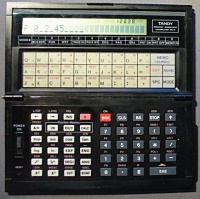
1984/1988: Tandy PC-5 & PC-6

1984/1988: Tandy PC-5 & PC-6

I used my first desktop computer in 1978, and six years later I bought my first mobile computer for $120 ($275 in 2014 dollars, adjusted for inflation). It wasn’t a laptop, but instead a souped-up calculator: the Tandy Pocket Scientific Computer PC-5, programmable in BASIC, sold by Radio Shack and a clone of a Casio machine. It only had a single-line text display, but you could program in complex computations and even some primitive games.

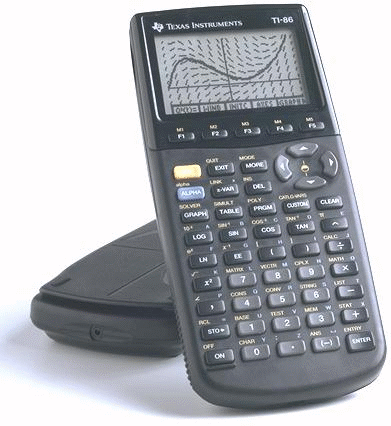
The TI-86

The TI-86

I used that calculator and a successor model until 1998, when I replaced them with TI-86 graphing calculators, which also had a version of BASIC. Over the years I’ve worn out three different TI-86 units and have stuck with them, despite their age, because I can’t transfer their BASIC code to newer models. I use them to do the complex calculations on student labs when I am grading, and am grateful for their portability. I have bought some newer models, but I keep going back to the old 86. In fact, as I edit this post, I just finished coding some simple BASIC code on a TI-86 I bought on eBay, since my copy of one old lab program wouldn’t migrate off a failing unit. The TI-86 is dead! Long live the TI-86!

Laptop computers

I didn’t purchase a laptop computer until 1997, finally lured into paying for the luxury of a fully capable computer when on the road and at work. A laptop computer was a requirement in my master’s degree program in 1999, and I was grateful I had already invested in that first laptop ($1,900 in 2014 dollars).

Technology always races ahead. The table below shows the progression of the various laptop machines I have purchased for myself:

Year Computer Cost Then (and in 2014 dollars) Weight RAM Storage
1997 Toshiba Satellite Pro 430CDT $1,300 ($1,900) 7.4 lb 48 MB 1.26 GB
2005 Averatec 3270-EE1 $950 ($1,150) 4.5 lb 512 MB 60 GB
2008 Asus Eee PC 1000H $464 ($510) 3.2 lb 1 GB 160 GB
2010 Apple MacBook Air $1,420 ($1,530) 2.4 lb 4 GB 128 GB

Notice the continual decline in weight and increase in RAM. Storage capacity dipped a bit at the end, but I was switching from hard drives to my first solid state drive, with a performance and price premium. My use of laptop computers actually peaked in the early 2000s because my main machine at school was a laptop computer for some time, although I almost never moved it, and my use of truly mobile laptops peaked in the late 2000s, when I was making frequent solo hiking trips and would use the laptop to process photos and post to this blog. The biggest project I ever burdened a laptop with was in the early 2010s, when I edited a bunch of video on my Apple MacBook Air to help a colleague craft a state Teacher of the Year video from multiple interviews. I was amazed at how capable the tiny computer truly was, even with a more limited processor, because of its tremendously fast solid state storage.

Smart phones

A smart phone is a leap downward in size and weight from a laptop, and I remember the excitement eight years ago, in January 2007, as I watched Steve Jobs’ justifiably famous keynote where he said Apple would be introducing a widescreen MP3 player with touch controls, a mobile phone, and an internet communications device, repeating that again and again until the realization dawned that those were all aspects of a single computing device: the iPhone.

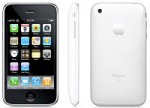
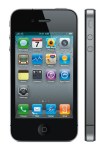
I had owned limited-function cell phones for some time, and waited until the second generation of iPhones to buy one in the summer of 2008. I’ve bought a new iPhone every two years since then:

Year iPhone Model Screen Size (diagonal inches) Storage
2008 3G 3.5″ 16 GB
2010 4G 3.5″ 32 GB
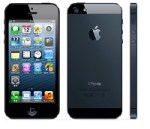
2012 5 4 64 GB
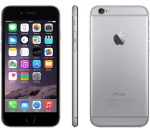
2014 6 4.7″ 128 GB

Here we see increasing storage size as well over time, but unlike my shrinking laptops, my iPhones keep getting larger screens, for which I’m grateful since that helps with my presbyopia.

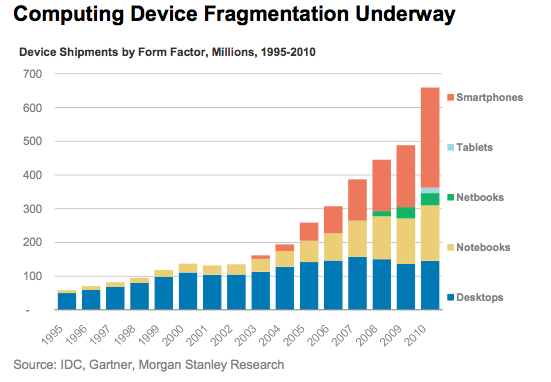
Apple, of course, didn’t make the first smart phone. But its breakthrough interface and design, followed later by Google’s Android phones, helped spur a huge rise in smart phone sales. Note in the chart below how desktop sales flattened as folks adopted laptops (notebooks) and then smart phones:

Computing device sales, 1995-2010

Computing device sales, 1995-2010

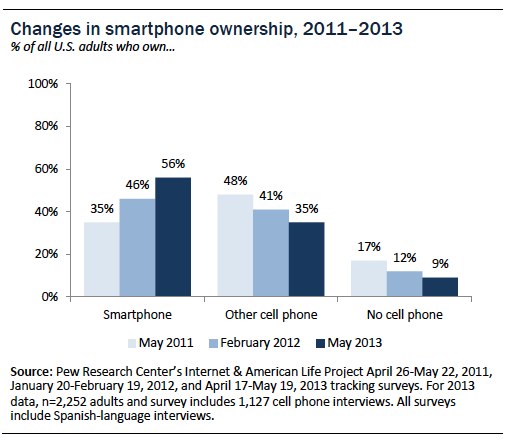
The use of smart phones continued to grow until they dominated other cell phones types by 2013:

Smart phones now dominate over other cell phone types

Smart phones now dominate over other cell phone types

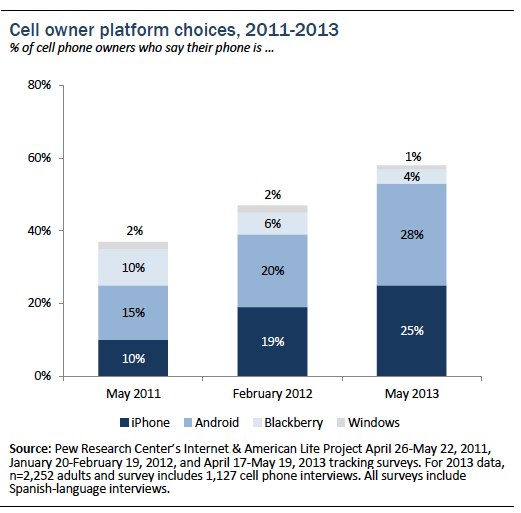
I’m in good company in my preference for Apple’s iPhone, and its market penetration is remarkable. Consider that only a few models of iPhone rank right up there with countless models of Android phones:

Smart phone operating systems

Smart phone operating systems

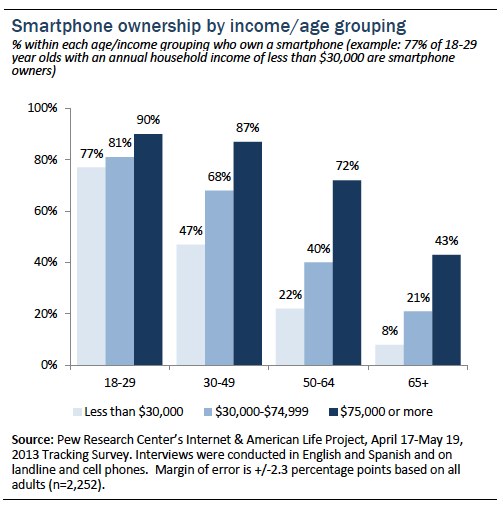
And though we see the typical generational differences in smart phone use, notice how all age groups are rapidly adopting them:

Smart phone ownership by age group

Smart phone ownership by age group

Tablets

But these days my most frequent mobile computer use might well be my iPad tablet computer. After my first iPhones, I was increasingly interested in a large-screen version of a similar device. But the devices on sale were too limited and I longed for Apple to step into that market. When they finally did that in 2010, I immediately sold off a bunch of old media to get the funds to buy the first version of the iPad. I later bought an iPad 2, then a 3rd generation iPad, and now use that 3rd generation model at school while at home I use an iPad Air 2. Over the generations, the screen size has remained stable at 9.7 inches, with me eschewing the iPad Mini’s 7.9 inch screen when that series of tablets launched in 2012.

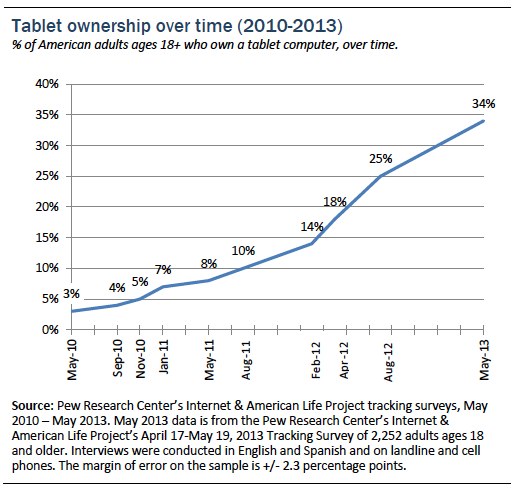
Tablet computers have taken the public by storm; in only three years the percentage of U.S. adults who owned a tablet computer shot up from 3% to 34%:

Tablet Ownership

Tablet Ownership

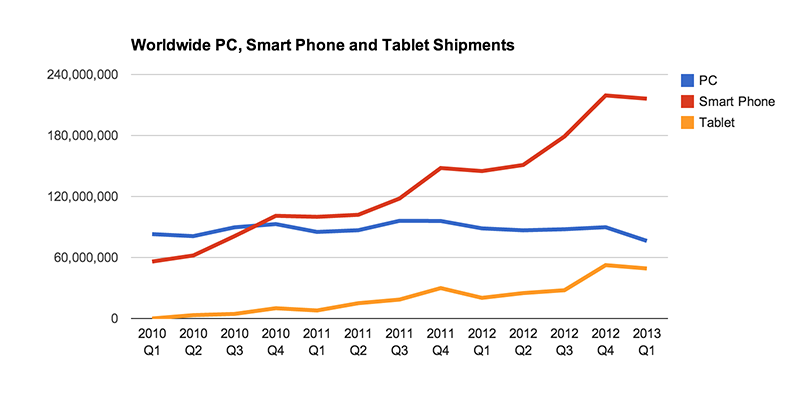
Worldwide, smart phone adoption is still surging ahead, while the more expensive tablets are unstandably less popular but still growing at an admirable pace, while the traditional personal computers, a category lumping together desktops and laptops, is in decline:

Computing device sales in the early 2010s

Computing device sales in the early 2010s

vector.jpg

My desktop computer is 5 years old and still going strong

The very nature of mobile computing, with greater device wear and tear, means I replace my mobile devices more frequently than my desktop or laptop. At this writing, I’ve owned my latest tablet for about a month, and while my phone is only 6 months old, my MacBook Air laptop is over four years old, and my Windows desktop is over five years old. In fact, while I’ve owned my current desktop I’ve bought four generations of tablet computers and three generations of smart phones. And my desktop computer, enhanced with a huge solid state disk and after a power supply repair, is still going strong and shows no need for replacement.

Due to the nature of my work and my photography and website development hobbies, I will need both desktop and laptop computers for the foreseeable future, but I can see why some people can make do with just an iPad or even just a smart phone. I’m more skeptical, however, or wearable computers such as the “smart watches” now appearing on the scene. First there was the Pebble, then various Android Wear devices, and next month we can expect the Apple Watch to go on sale. I don’t have sufficient income to justify buying a smart watch that will be obsolete in a couple of years; I already spend quite enough on regular replacements of my iPhone, iPad, and Kindle devices. But it will be interesting to see people putting the new smart watches to use. Back in 2004, a student’s iPod convinced me to purchase one, and I never regretted that decision. We shall see if and when I succumb to replacing my trusty old Timex with something smarter.

The final entry in this series on technology transitions addresses the transition from local storage to the cloud.

Tech Transitions, Part 4: Heading into the Cloud >

< Tech Transitions, Part 2: Scheduled Broadcast to On-Demand Media

Posted in technology | Leave a comment

Tenkiller Trail Trials

February 7, 2015

The first Saturday in early February 2015 was a warm day with a high around 70 degrees Fahrenheit. That convinced Wendy and me to make a 270 mile daytrip to Tenkiller Ferry Lake to hike a couple of short trails on its northern and southern ends. I first visited Lake Tenkiller in quest of hiking trails back in May 2010, only to be rebuffed by the overgrown Gum Springs trail at the eponymous state park and disappointed by the paved trail through the park. Wendy and I visited the area in early November, driving along the northeastern shore of the lake as part of a Tahlequah daytrip, and promised ourselves to return later to hike three short trails scattered along the lake shore. We’d hit two of those three trails on this outing, eager for new trails neither of us had ever hiked.

Tenkiller Trip (click map for slideshow)

We left Bartlesville around 10 a.m. and stopped 55 miles down the road at the Full Moon Cafe in Broken Arrow for lunch. The food was fine, but the waitress was fairly hopeless. She did offer to compensate with a free dessert, but we passed, not needing an unnecessary dessert to weigh us down on uncertain trails. Another 70 miles of driving took us southeastward down the all-too-familiar but thankfully speedy Muskogee turnpike and across to Lake Tenkiller, passing the enormous Greenleaf Nursery as we wound our way around to the Standing Rock area on the lake’s northeast shore.

Remnant of the Standing Rock Nature Trail

Lake nature trails in Oklahoma are often poorly maintained, and Tenkiller is no exception. A 1988 article claims:

Spectacular stone formations, huge boulders and frequent glimpses of the lake can be seen along the 1 1/4-miles Standing Rock Nature Trail. This path is made up of two loops, each with two segments: Big Pine and Three Sisters on the first loop, and Big Cedar and Hi-Knob on the second.

And the Tulsa Audubon Society mentions the Standing Rock Nature Trail trail in its entry on Lake Tenkiller. But Wendy and I found no signs or marked parking areas or trailheads, only a wide spot off the road at its intersection with Whippoorwill, where a freshly bulldozed utility right-of-way led due west down to the lake shore. I found a dim trail leading directly southwest, which was sufficient for us to lace up our boots and head out. We’d only find a trace of the promised trails.

Standing Rock area tracks

Wendy find a geocache

The trail soon led by several large boulders projecting out of the soil; I don’t know if they are the eponymous standing rocks or not. The dim trail led onward, with a view of the lake through the trees, until the trail began a very steep descent to the water. As we carefully made our way down, sharp-eyed Wendy spotted a plastic box tucked under a ledge. It was a geocache; I last stumbled onto one years ago. This one was in good shape, with a notebook to log our visit and various tchotchkes. I deposited a gold dollar, while Wendy donated a little packet of fizzy rocks candy and a DumDum sucker. This cache has been in place since 2007, although its notebook log only had a few entries from recent years. We returned the cache to the ledge and I camouflaged it with some stones and pieces of bark.

Treacherous bluff

It was treacherous making our way down the eroded bluff to the shoreline, and I slid partway and Wendy skinned up one hand on an unexpected slide. As we were bandaging her hand, the wind blew off my hat, flipping it into the water of a small cove. I had to immerse my boots and lower legs to wade out and retrieve my trusty Tilley, so I spent the rest of the day squishing around in my boots.

Fossil imprints

Some fishermen were nearby, drifting along the shore, with a couple of powerboats out on the lake. The rock we were treading on had thick cracking layers we could pry apart with our bare hands. We carefully made our way upslope, and I bushwhacked about, hoping to find another segment of trail, but nothing turned up. Meanwhile, Wendy was finding rocks with embedded crystals and fossil imprints. Bushwhacking turned up no more trail segments as we made our way back to the car.

End of the trail

Curious, we then followed the bulldozed pathway leading due west down to the shore, discovering that it was an AT&T fiber optic cable right-of-way. Two fiber optic lines emerged from the soil and headed down into the lake. The fishermen who had been near us before at the end of the old trail were making their way along the shore. We climbed back up to the car and headed off for another trail. A map from 1982 shows a small nature trail loop a bit east of our initial hike, so maybe some more trail remnants are there, leading down to the end of the cove where my hat went for a float, and I wonder if a loop once climbed the knob hill southeast of where we hiked. When we return to Tenkiller for the Buzzard Roost trail we might poke around this area some more.

Overlook/Island View Nature Trail

Looking at the hours of daylight left, we saved the Buzzard Roost trail at Cato Creek for a return trip. We drove almost 20 miles down the eastern shore of the lake to cross the dam and park our car at the nearby Overlook Park. A trail there is often called the Overlook Trail, but it is marked at the trailhead as the Island View Nature Trail. It was promised to lead along the lake shore northwest to the United Methodist Boys Ranch, a group home for foster children. The Corps website says that a second leg of the trail is under construction toward the Strayhorn Landing campground, but we found that to be out of date.

Overlook/Island View trail track

Bluff

From the overlook we could glimpse the dam and a couple of islands. We found the trailhead and soon passed a bluff, but it offered a limited view of the lake below. Occasionally along the trail we could see through the winter-bared trees the lake and its islands, but the views would be largely blocked in summer.

Maintained trail

After the earlier hike along an abandoned trail, it was nice to be on a maintained trail which had decent stream crossings, including wooden bridges that show signs of both wear and maintenance. One longer bridge even had hand rails with recent repairs; the Student Conservation Association did some great maintenance on this section of trail back in 2012.

We eventually reached a fork; the right branch looked less travelled, and we took it first. Soon we reached a failed bridge, where Wendy was a damsel in distress, and I pretended I was Gandalf from The Lord of the Rings, breaking the bridge at Khazad-Dum.

Damsel in distress

The trail on the other side of the bridge was much fainter, but could still be made out by its linear depression and occasional rock curbs. We passed flotsam deposited by high waters, and the trail eventually petered out where it approached a private home with its own tennis and basketball courts, with a large boat anchored nearby. We saw some large moss-covered rocks along the bluff and a large vine which had once coiled around a now-destroyed tree. Its coils resembled a snake gorging on a meal. Sharp-eyed Wendy found a rock with a heart-shaped hole.

Mossy rocks

We returned to the fork and followed the maintained trail up to the Boys Ranch trailhead. Wendy readily admits she has a poor sense of direction and was crestfallen when we reached the parking area and she realized it was the far end of the trail, not the trailhead where we had parked. We hiked under four miles this day, but steep elevation changes, faint trails, and some bushwhacking took their toll. We were both glad when we returned to the car; the winter weather has prevented us from hiking as much as we would like and our endurance has eroded.

We drove back to Tulsa for dinner at Chopsticks and then returned to Bartlesville. Tenkiller continues the pattern seen across Oklahoma, where lakeside trails vary considerably in their maintenance and a good fraction are abandoned. Arkansas has far more great trails, but few novel ones are left within daytrip range, and both Wendy and I face workloads which make overnight travel something limited to longer breaks. We both look forward to returning to Missouri and Arkansas for part of Spring Break; meanwhile we’ll enjoy familiar trails and the occasional novelty within daytrip range.

Click here for a slideshow from this daytrip

Posted in day hike, photos, travel | Leave a comment

Tech Transitions Part 2: Scheduled Broadcast to on-Demand Media

February 6, 2015

This is the second in a series of posts about my progression through technology transitions, with comparisons to broader trends across the country.This one tackles the transition from broadcast to on-demand media. Here’s the earlier post on the transition from analog to digital.

Cutting Cable TV

Tools to Cut Cable TV

Tools I use to cut cable TV

I gave up on cable television back in 2008 and now stream most video on-demand, catching only snippets of news and the occasional PBS show in broadcast HDTV via my chimney-mounted antenna. Folks are catching up, with video on-demand streaming growing over 49% in 2014, according to Nielsen Soundscan.

Most of the streaming video I watch consists of technology podcasts and NPR audio, plus the occasional movie I’ll rent for Wendy and me. I used Netflix DVDs and Blu-Rays for years, and still have a one-disc-at-a-time account with them so I can get movies not available for streaming and enjoy Blu-Rays which have commentaries and other features the streaming services still omit. I have used Netflix’s streaming service some, but limited selection and hiccups back when I had a slower connection (buffering…) led me to prefer pre-downloading movies from Amazon onto my venerable Tivo HD.

My old Tivo HD

My old Tivo HD

That old Tivo is starting to show its age; it now crashes every week or so, forcing me to pull and re-insert the power plug and wait a long time for it to reboot to get it to work. I have a very large hard drive attached to it to boost its storage capacity, and when I have some time I might tease out the right cables from the tangle behind the console and yank that drive off there to see if that helps. I seldom watch recorded shows anymore, so I won’t mind the loss of capacity. When the Tivo finally dies, I doubt I will replace it. If I watched television regularly, however, I’d be happy that my cable service has gone to Tivo set-up boxes with their ability to easily record, pause, and fast-forward.

Amazon's Fire TV Stick from late 2014

Amazon’s Fire TV Stick from late 2014

The aging Tivo and a balky old Apple TV led me to purchase an Amazon Fire TV Stick (normally $39, but I did a pre-order special for $19). I’ve had a Google Chromecast stick for some time, but I threw it in my travel bag, thinking I might use it on the road. Hotel internet portals made that too difficult, and I haven’t used the Chromecast more than a couple of times. I should get it out and try to use it more, comparing its performance to the Amazon stick. Amazon’s stick is quite responsive and has been streaming movies without a hitch; it also has apps to let me listen to the music I’ve bought from Amazon, watch YouTube videos, listen to podcasts, and more. The Chromecast can likely do similar things and would support whatever music I have from Google Play, but I keep and manage all of my music in iTunes. I’ve bought quite a bit of music from Amazon over the years, set to auto-import into iTunes, so having access to those songs on the Amazon Fire stick is nice.

My Apple TVs

My Apple TVs

As for the balky Apple TV, longtime readers may recall that I bought an original Apple TV back in 2007 and have been using a 2nd-generation unit since 2011. I still use it to sling video from my iPad or iPhone to the TV via the AirPlay service, and I sometime shuffle music off my desktop computer’s iTunes music library, but anymore I watch most podcasts on the iPad, and the Apple TV interface is dated and slow compared to the Amazon one. Far worse, for several months my Apple TV has begun rebooting after I start playing something. It works fine after the reboot until another session on another day, but it is a real pain to start playing something, have the unit crash and reboot, and then have to re-select what I was playing. It wasn’t worthwhile to upgrade to their 3rd-generation 2012 unit, and Apple is long overdue for an update to this product, presumably with a new interface and more support for games and apps. I’m not sure I’ll upgrade, especially if I can figure out an easy and cheap way to access my computer’s iTunes library via my Fire TV Stick or the Chromecast. I don’t want to export my huge music library to Amazon and then pay $25/year for their cloud music service for access via the Fire TV Stick since I already pay $25/year for Apple’s iTunes Match. I presume Google has a similar plan, but I’d prefer just to stream files over my home network than the internet. I may read up on on the features of the latest Roku, which is still the most popular streaming video and apps unit in the U.S., as shown below.

U.S. Market Shares for Streaming Media Devices

U.S. Market Shares for Streaming Media Devices

Still purchasing, not streaming, my audio

I’ve been buying MP3 files for years, and completely transitioned to the format back in 2010, selling over 350 CDs after making sure all of them were ripped into MP3s in my iTunes library. MP3 killed the CD, and now streaming audio is eating into MP3 sales. Comparing 2013 to 2014, album sales were down almost 15% for CDs, but after years of growth, digital album sales dropped over 9%, and digital track sales dipped about 13%. Vinyl albums actually surged 52%, but comprised less than 4% of album sales. On-demand audio streaming services like Pandora and Spotify are surging, with over 60% growth in 2014 from the prior year. Over 164 billion songs were streamed on-demand through audio and video platforms in the U.S. in 2014.

The chart below shows streaming audio services revenues as the brown-hued bases of each column, CD sales in red, vinyl that little greenish wedge in the middle, and MP3 album and single sales the purplish tops, capped off by Synchronization.

audiosales

Falling MP3 sales over the past two years worries artists, labels, and sellers like Apple, Google, and Amazon: the profit margin on CDs is larger than on MP3s and the profit margin on streaming audio is even less. The switch from MP3 purchases to streaming had led Apple to respond with iTunes Radio and by buying Beats for its streaming service. Meanwhile, streaming services like Spotify are booming, but not generating the desired profits.

I would certainly discover more new music if I used Pandora or tried Spotify or other streaming services, but that sort of thing doesn’t appeal to me when I can instead readily access my collection of over 13,800 digital audio file via iTunes on my iPhone 6, iPad Air 2, or the 2nd Generation Apple TV. My 2014 Camry makes playing MP3 files from my iPhone in the car relatively easy via its wireless Bluetooth connection and convenient controls on the steering wheel, although voice control with the car’s own system is hopeless and the phone’s Siri voice assistant is better but still too frustrating.

I have set up a Pandora account I’ve used a few times, and I’ve sampled iTunes Radio a couple of times. But when I’m planning at work I won’t use streaming services, since that is not a proper use of the school’s bandwidth or service, and my cellular data plan couldn’t afford it. At home I’m usually busy with other things and just set my music collection to random play; I’m so busy and focused that I am reluctant to use Pandora or Spotify or iTunes Radio, fearing that random unlikable songs mixed in with a few catchy new ones might be too distracting, rather than just a pleasing musical background for my work.

When I do somehow stumble onto a new song I like or someone recommends a tune, I am more likely to play it via YouTube or an iTunes sample and then, if I like it, purchase the MP3 from iTunes or Amazon. I’m just not into the radio-play model anymore, either broadcast or streaming. My new Camry came with a trial subscription to Sirius XM satellite radio with a plethora of channels, but it was like cable TV to me: too many choices to navigate and all pretty mediocre. So I seldom listened to it and did not explore its many stations much, allowing the subscription to expire at the end of the trial period. Sirius XM has hounded me ever since via email, snail mail, and, worst of all, annoying cell phone calls. I guess they got my number through the car dealer. Such jerks! I would never recommend them even if I liked their service. So in the end, I listen to NPR on the radio, not music stations, and I stream podcasts, not music, with my mobile devices.

What next?

When school work is less hectic, I’ll experiment more with the Google Chromecast to compare its capabilities and performance with my Amazon Fire TV stick. I find myself relying more upon Amazon for on-demand video than anything else, and I’ll still buy occasional Blu-Ray discs if the film is superb and the disc includes great commentaries and features like the wonderful Extended Editions of Peter Jackson’s Lord of the Rings and The Hobbit trilogies. As for music, I’m so deeply invested in Apple’s iTunes that I’m reluctant to bother with Amazon or Google’s competing services.

My next post in this irregularly scheduled series on technology transitions tackles the shift from fixed to mobile computing.

Tech Transitions Part 3: Fixed to Mobile Computing >

Tech Transitions Part 1: Analog to Digital

Posted in music, technology | Leave a comment