Mac Day 1: Mac Attack

As of April 2024, the Windows 10 operating system running my home desktop computer has less than 17 months to live. In mid-October 2025, Microsoft will cut off support for Windows 10, including critical security updates.

I cannot simply install Windows 11, as my computer dates back to 2017, and Windows 11 doesn’t support its Intel Core i7-6700 central processing unit. That CPU is still no slouch, but Microsoft chose to limit how many generations of processors it would support. I could force-install Windows 11 and probably fiddle around with drivers to get it to work, but I would then be vulnerable to instabilities or having my system disabled.

That computer will be eight years old in September 2025, and the longest I’ve ever used a desktop computer was its immediate Windows predecessor, which I used for eight years from 2009 to 2017. So I’m not upset about the situation, merely disappointed.

I loved Jerry Pournelle’s Computing at Chaos Manor in the long-defunct Byte magazine

This post documents my first day of attempting to shift at home from my Windows desktop to an Apple Mac Mini. I share this in the style of the late Jerry Pournelle’s Computing at Chaos Manor column in the long-defunct Byte magazine. He would document his struggles and failures in the hopes that others could benefit. He often wrote: We do this stuff so you won’t have to.

My Operating Systems

I have owned 13 computers that ran Windows: nine desktops and four laptops, starting with a Tandy Model 2000 back in 1985. As documented in my computer history, I also owned some Apple computers. I had a 2010 Apple Macbook Air that ran OS X, I have a Mac Mini, and I have bought six iPads. I have also bought four Chromebooks, and I used a couple of 8-bit Radio Shack Color Computers back in 1982-1985. I also experienced Unix back in the 1980s on the University of Oklahoma’s engineering computers.

This is what Windows looked like when I started using it almost 40 years ago

While I could buy a new Windows 11 computer, I’m not a huge Windows fan. I despised the early versions of Windows, sticking with the command-line DOS for most things, until Windows 95 came along. Windows 95 and 98 still had many shortcomings, and it wasn’t until Windows 2000 that I had a Windows system that was so stable that I could finally start to heal from years of blue screens of death, countless slow updates, and other Windows trauma. It was in 2000 that I finally stopped calling it Windoze.

Microsoft continued to release both fine and terrible versions of Windows, including low points that I happily avoided such as Windows Me, Windows 8, and Windows Vista. But my dependence on applications specific to Windows has waned as most of my computer usage for the past seven years has been in the cloud using the Chrome web browser or on an iPad.

I have a laptop computer at work that runs Windows 11, and it is so similar to Windows 10 that I barely notice the differences when switching between it and a Windows 10 desktop. So I wouldn’t expect to get much value from a Windows 11 machine at home.

The Obvious Alternative

The approaching death of Windows 10 revived my interest in the Mac Mini I purchased at the start of 2021. I bought it during my winter break of 2020-2021 when Wendy and I were unwilling to travel due to the COVID pandemic. My experimentation with it only lasted a few weeks, since the workload and stresses of the pandemic left me with too little time and energy to tackle learning to use the Mac Mini. So the little box sat unused below my monitor for over three years, while I relied on the massive Dell XPS desktop next to it.

I’ve had a Mac Mini sitting unused on my desk for over three years

Rather than buy another Windows desktop, I could save money by just using the Mac, so long as I don’t have to purchase a slew of new software. So I listed the standalone software applications I still use at home and their availability in macOS:

ApplicationAvailable in Windows?Available for macOS?
Chrome web browser✔✔
Thumbsplus Pro graphics viewer, organizer, and editor✔NO
Adobe Photoshop Elements 2018✔✔
SplashID Safe password manager✔✔
iTunes✔✔
CyberLink PowerDirector 365 video editor✔✔
Epson FastFoto photo scanning✔✔

Well, well, well. While ThumbsPlus has been a mainstay for me for over 20 years, the developer stopped updating it six years ago. So switching over to my Mac was quite feasible. I was never a fan of OS X, but macOS will probably continue to support my Mac Mini for three to six more years. It would be interesting to see if I could be satisfied leaving Windows behind at home and benefit from the various integrations of my Mac with my iPhone and iPad.

I’m also quite willing to try free alternatives to Adobe Photoshop Elements 2018, SplashID Safe, and CyberLink PowerDirector. Maybe I can avoid buying their macOS versions.

Reviving the Mac Mini

So I reconnected my Mac to the second HDMI input on my ultrawide monitor, hooked up an ethernet switch to hardwire both it and my Windows machine to the internet router, charged up the remote keyboard and mouse, plugged in the power, and switched the monitor over to the Mac.

Switching from my Windows desktop computer to my three-year-old Mac Mini

The Mac fired right up, and it was running macOS Big Sur Version 11.2.2 from February 2021, as illustrated by the view of Big Sur as the desktop wallpaper. I triggered Software Update, which indicated I could download macOS Sonoma 14.4.1. I had completely missed macOS 12 and 13, called Monterey and Ventura. It indicated it would take about a half-hour to download the 14 GB update.

While it was downloading, I started the Safari web browser and tried to login to WordPress to continue writing this post, but the login screen refused to let me type in my username, even though the keyboard worked fine for typing the wordpress.com URL in the browser. I had no idea of how to fix that, so I switched to the Google Chrome web browser, which worked fine. It used the Passkey capability of my iPhone to login to my Chrome profile.

I had taken the above shots of my Windows and then Mac desktops and combined them with the Pic Collage app on my iPhone. Getting shots from my iPhone to a Windows computer has always been awkward. Sometimes I send them as email attachments, sometimes I upload them to Google Drive, and sometimes I rely on the laggy iCloud sync. With the Mac, I just triggered Airdrop on the iPhone and poof, the photos were in the Downloads folder on my Mac Mini.

Apple Annoyances

Meador’s Law of the Conservation of Happiness then kicked in. After downloading most of the update file, Software Update told me the upgrade to macOS Sonoma had failed. Typically, it provided no explanation nor options. So I restarted the upgrade, which triggered a fresh download of the 14 GB file. Welcome back to the Mac, I thought. Some things will be far easier than on Windows, while others will be exercises in stumbling frustration.

A case in point is the painful experience I had recently of switching from a Series 4 Apple Watch to a Series 9. That was a frustrating hours-long process. I placed the watches close together to facilitate the switchover, but the switchover process mysteriously got hung up with no explanation. I then had to reboot the new watch and my iPhone and fight through a number of slow and confusing errors and glitches to complete the transition.

I persevered and was able to send the Series 4 in to be recycled. I do like the Series 9 better than the Series 4 because it is a bit smaller and has an always-on display mode. So I certainly don’t regret the upgrade, but it shouldn’t have been so difficult to complete.

Thus I went into switching over to my Mac at home knowing full well that there would be glitches. But it could also be fun to learn a different way of computing, with new tools for editing and organizing my photographs, and some exciting integrations of the Mac Mini with services and apps I use on my iPhone and iPad.

Thankfully, the second try to update to macOS Sonoma 14.4.1 was successful.

The Mac Mini running Sonoma

The Basics

Keyboard Shortcuts

My Mac Mini didn’t come with an Apple keyboard or mouse; I had instead purchased a wireless Clever IC-GK03 keyboard and mouse combination back in 2021. The keyboard has keys for CTRL, FN, WIN/ALT, and ALT/CMD, as it can be switched between Mac and Windows modes.

I’m using this so-called Clever keyboard and mouse with the Mac Mini

I’m used to cutting, copying, and pasting with the CTRL-X, CTRL-C, and CTRL-V keystroke combinations in Windows. I remembered from using the Macbook Air in the early 2010s that Macs use CMD-X, CMD-C, and CMD-V and the ⌘ symbol for the command key. However, the ALT/CMD keystroke combinations didn’t work, while WIN/ALT did. So I fumbled along until I could find time to download the manual for the Clever keyboard. That confirmed the keyboard was in Windows mode, and I had to press fn-Q to switch it into Mac mode.

Snapping Windows on a Mac

I use Dell Display Manager on Windows to quickly snap windows to preconfigured areas of the ultrawide monitors at work and at home, but my Dell U3417W monitor is not compatible with their Dell Display and Peripheral Manager for Macs.

In Windows, you can drag a window past the left edge of the screen to make it snap to fill the left half of the screen, and the same for the right, but I found that didn’t work on the Mac. An online tip said to hover over the green dot in the window controls and select Tile Window to Left of Screen. Well, that sort of worked, but when I tiled Chrome to the left of the screen, it minimized the window for another application, preventing me from selecting its controls to tile it to the right. So it didn’t work as expected, instead creating a Split View like Apple has for the iPad. I don’t like Split View on the iPad, but I do use it on rare occasions. I have zero interest in using it on the Mac Mini.

Holding down the OPTION key (labeled ALT ⌥ on my Clever keyboard) while hovering over the green dot changed the options to Move Window to Left Side of Screen and so on, which thankfully worked as expected.

One of the weird things about Macs to me, as a 40-year Windows user, is how the active application’s menu bar is shown at the top left on the overall desktop, rather than having menu bars within each individual window. I’ll adjust, but it will take some time.

Screenshots

I use the Snipping Tool in Windows a lot to save selected areas of the screen, and I’m used to hitting the PrtSn or print screen key to save a full screenshot to the clipboard. The internet said that the default keystroke combination to take a full screenshot on a Mac is Shift-Command-3 and a selected-area screenshot is Shift-Command-4, and you have to add CTRL to all of those if you want to send the shots to the clipboard.

Those were far too complicated and arbitrary for me, so I fiddled with the Clever keyboard and discovered that its F12 key takes a full screenshot. If you actually want it to register F12, you use the fn-F12 keystroke combination.

I customized the keyboard shortcuts for selected-area screenshots, as I would struggle with SHIFT-CMD-4 and CTRL-SHIFT-CMD-4; I changed them to SHIFT-OPTION-S and OPTION-S
The ALT or OPTION key uses the symbol for an electrical switch

To make it easy to get selected area screenshots, I edited the keyboard shortcuts on the Mac to make ALT-S save a partial screenshot to the clipboard, and SHIFT-ALT-S to save it as a file.

A native Mac user would instead call that OPTION-S and SHIFT-OPTION-S, and Apple often labels the ALT/OPTION key with ⌥. I had to look it up to realize that is supposed to represent a single pole double throw switch in an electrical circuit.

That led me to wonder about the oddball symbol for the Command key. The internet explained:

Apple’s Command key icon, ⌘, is a “looped square” that represents the abstract concept of “command”. Apple artist Susan Kare chose the symbol after Steve Jobs decided that using the Apple logo in the menu system would be an overuse. Kare found the symbol in a reference book. She chose it because “it kind of looked like a four leaf clover”.

That symbol is used in Scandinavia to denote places of interest. I’ve decided to think of it as a castle with four corner towers to help me recognize it as “command”.

What’s Next?

In future posts, I’ll document my efforts to find suitable free Mac software for organizing and editing photos, my experience with iOS-style apps on the Mac, its integration with texting, and so forth.

I’m actually having fun exploring new ways to do familiar computing tasks. Maybe all this will help someone else who is transitioning from Windows to a Mac. But in days long past I thoroughly enjoyed reading about Jerry Pournelle’s struggles with hardware and software I never expected to use myself. So perhaps some of my gentle readers will find these posts entertaining as well. Happy computing!
Posted in Mac, technology | Tagged | Leave a comment

Standard 8 Memories

For some time I have been mining my family’s photographic archive for weekly remembrances which I post on Facebook and sometimes expand into posts on this blog. There have been times that I recalled that there was an old home movie clip that would help illustrate a post, but most of those were still trapped on old 8 mm film.

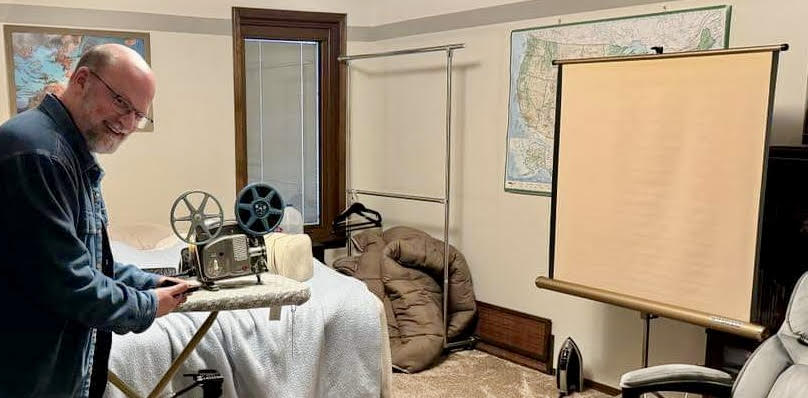
That prompted me to pull out my father’s film projector and screen and the reels of silent standard 8mm films he shot from 1961 to 1979. I had last viewed some of them 15 years earlier in Christmas 2009 when a storm left me snowbound with my parents in Oklahoma City over Winter Break.

Back then, I’d projected the films onto their old portable screen, using a digital camera to record the two films I had shot in junior high with Dad’s 1961 Kodak camera, along with a few clips from other reels he had shot. I decided I would try to digitize the remaining footage.

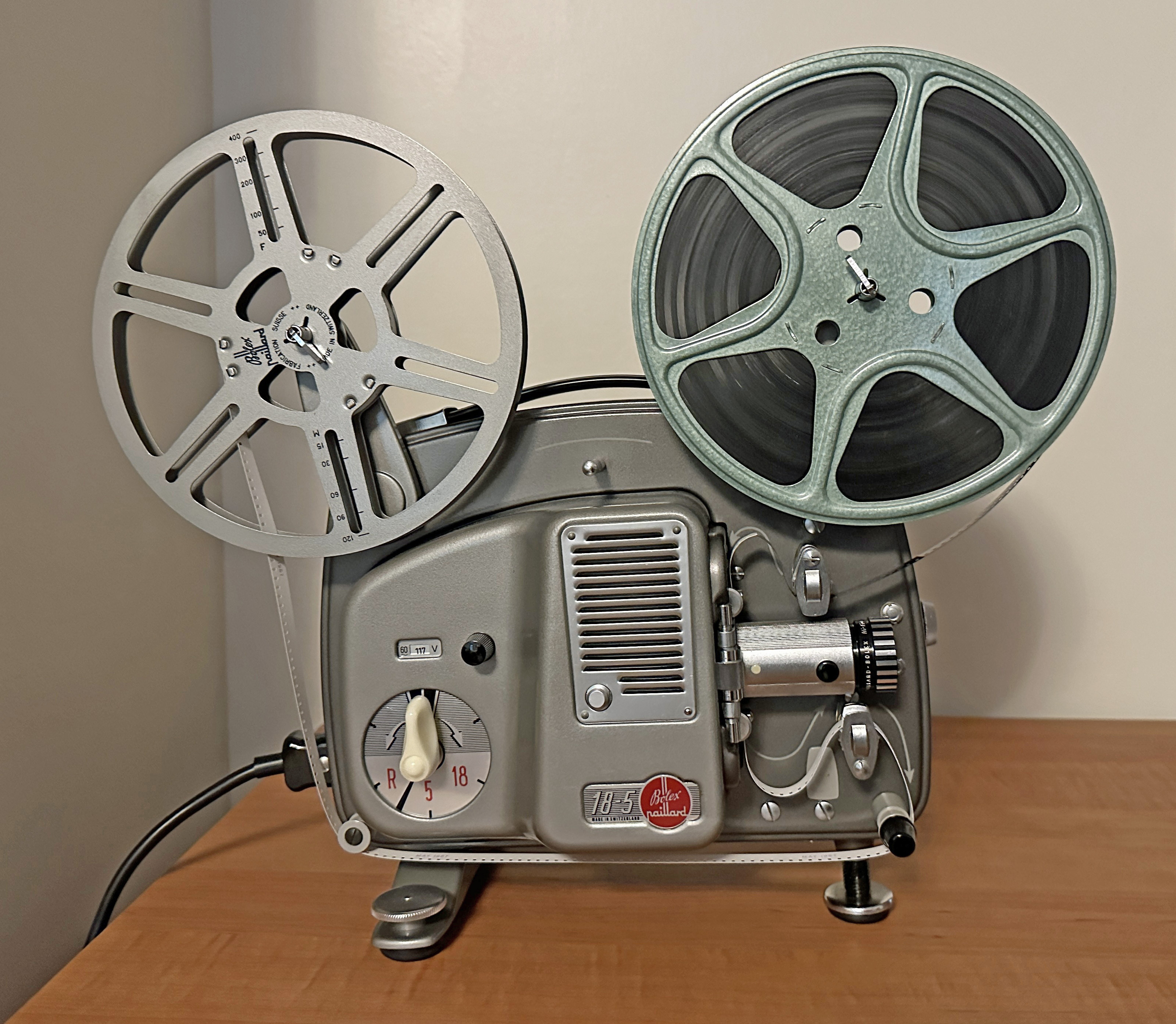
I tried using my father’s 1963 projector for the first time in 15 years

I set up the screen, put the projector on our ironing board, had a tripod ready for my iPhone, and threaded through the projector the last reel of film that my father had spliced together back in the 1970s. Wendy killed the lights, I flipped the switch, the motor ran, the film advanced, and the bulb glowed…for about a second. Then it blew out.

The Bolex

In August of 1963, three years before I came along, my father plunked down over $160, which is over $1,600 in 2024 dollars, at Pipkin Photo Service at Penn Square in Oklahoma City to purchase a Paillard Bolex 18-5 projector.

My father’s Bolex 18-5 projector from 1963

Paillard was a Swiss firm that made high-quality equipment: its cameras were used by famous directors like Steven Spielberg, Peter Jackson, Spike Lee, Ridley Scott, and David Lynch when they were starting out. That said, Dad’s little home movie projector began running slow in 1965, and my father paid Pipkin $40 to have it repaired at the factory in Switzerland.

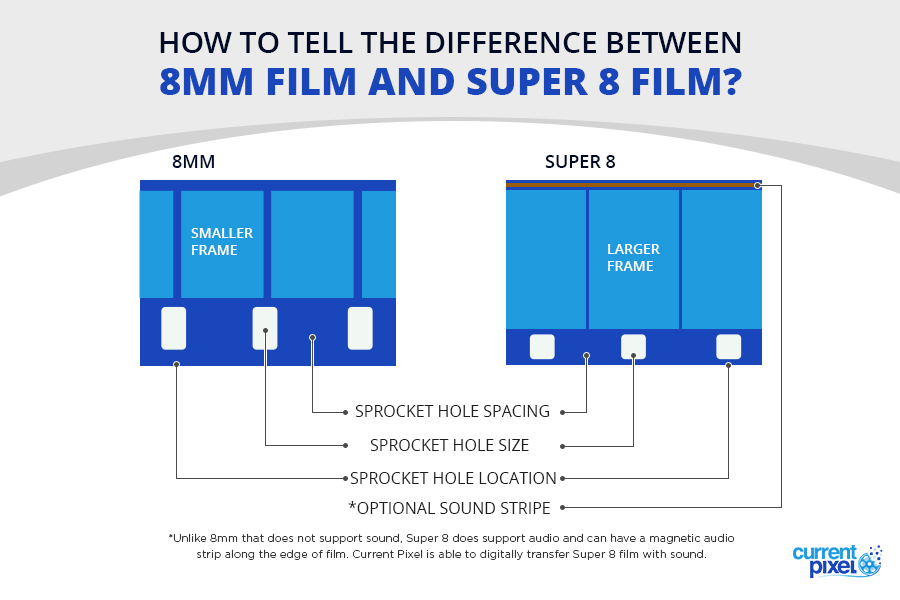
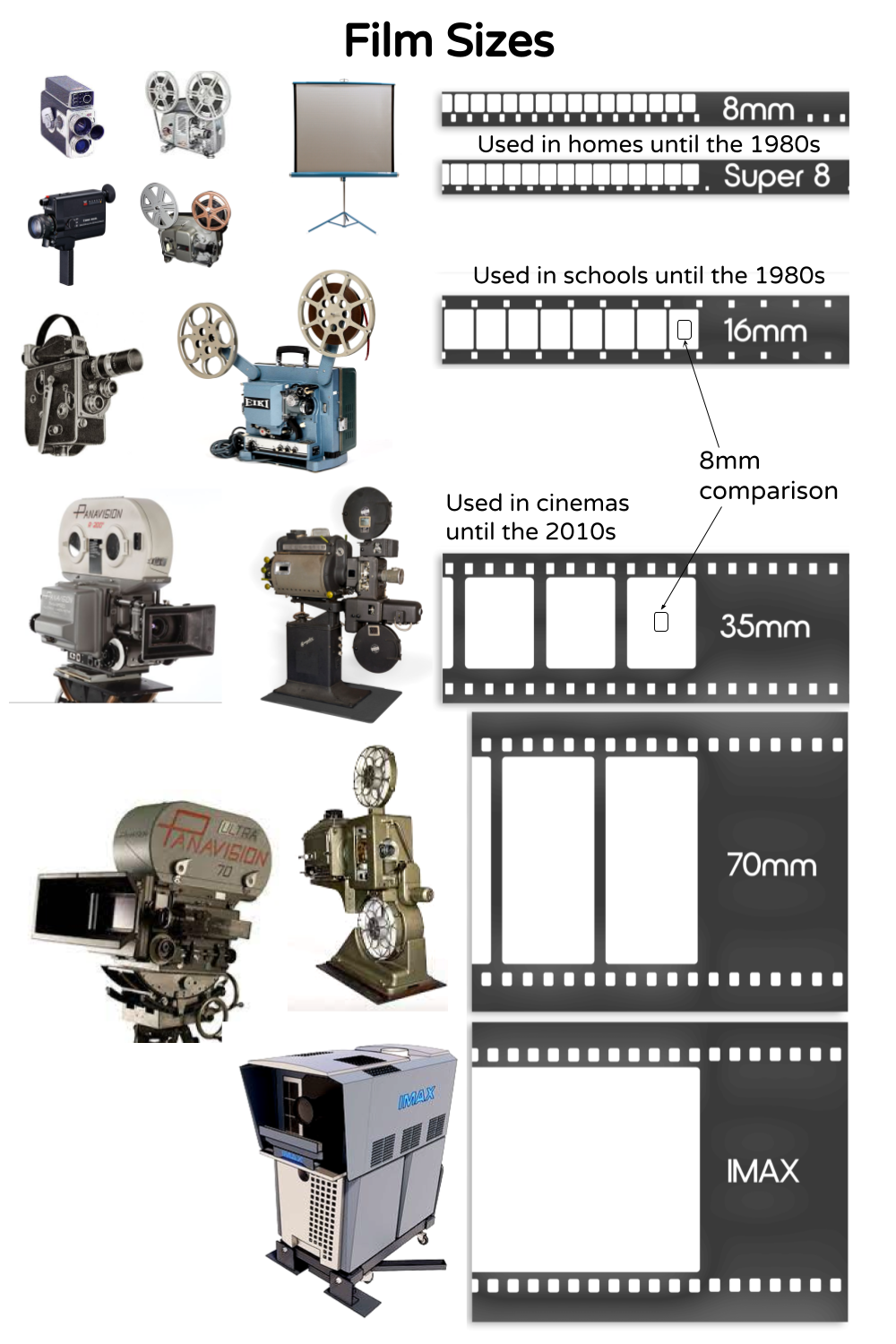
1965 is also when my father’s 1961 camera and 1963 projector were rendered obsolete, since that is when higher-quality Super 8 film became available. Its exposed area was larger and that film was loaded into the camera in cartridges, rather than having to thread it into the camera.

My father, however, never upgraded. He continued to shoot standard 8 mm film until abandoning shooting movies entirely in 1979, five years after Kodak introduced Ektasound: magnetic sound recording on Super 8 film. We would occasionally watch the old silent home movies, and he had paid another $40 in 1976 to have the projector serviced.

The last use of his Kodak camera was when I shot a few films with friends in junior high circa 1980. Decades ago, the chain drive in the projector came loose, but I was able to repair that myself. This time, the repair was simply replacing the light bulb.

The Bulb

I switched to using LED bulbs around the house over a decade ago, so replacing burned-out light bulbs is now pretty rare around Meador Manor. I winced when the one in the projector went out, recalling from childhood that it was a weird-looking thing, and replacing the bulb in a 60-year-old projector was bound to be expensive.

The 1963 projector uses a Philips 13113C/04 50-watt 8-volt lamp

The projector owner’s manual (yes, my father saved everything) indicated that I needed a Philips 13113C/04 lamp, which was an optically advanced bulb with a rear ellipsoidal reflector and hemispherical front mirror to produce a narrow beam with little light loss. It has a little chimney on top so that it won’t blacken over time; the evaporated tungsten rises upward with the heat and is deposited up there.

I was surprised to find that Walmart.com had them for sale, but they listed for $132 each. Amazon had some of the bulbs for about $100, which was still too pricey for me. I was eventually able to find an eBay listing for $65, which would do.

But it took awhile for the bulb to arrive, and in the meantime, I reconsidered my approach.

The Camera

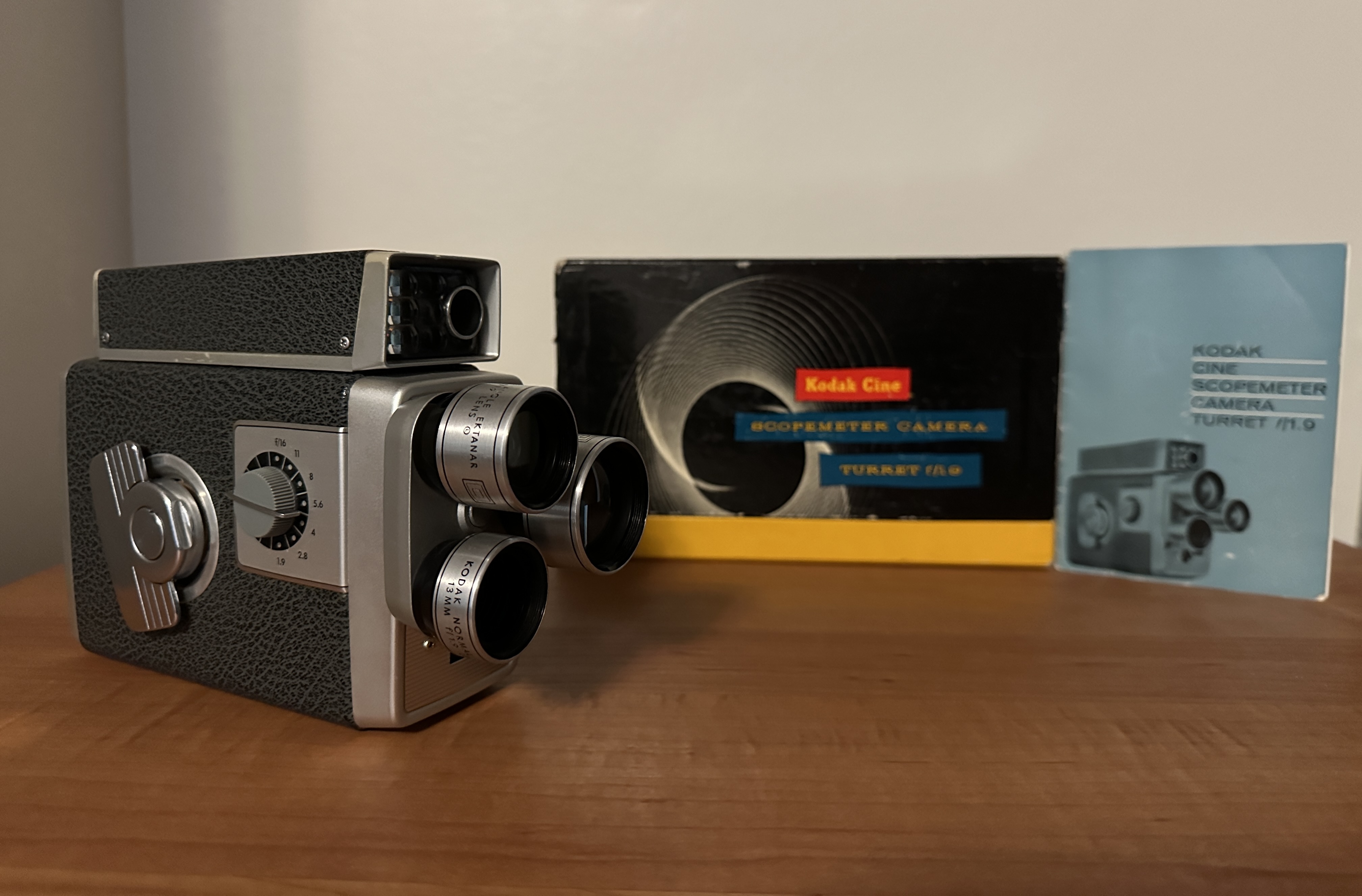
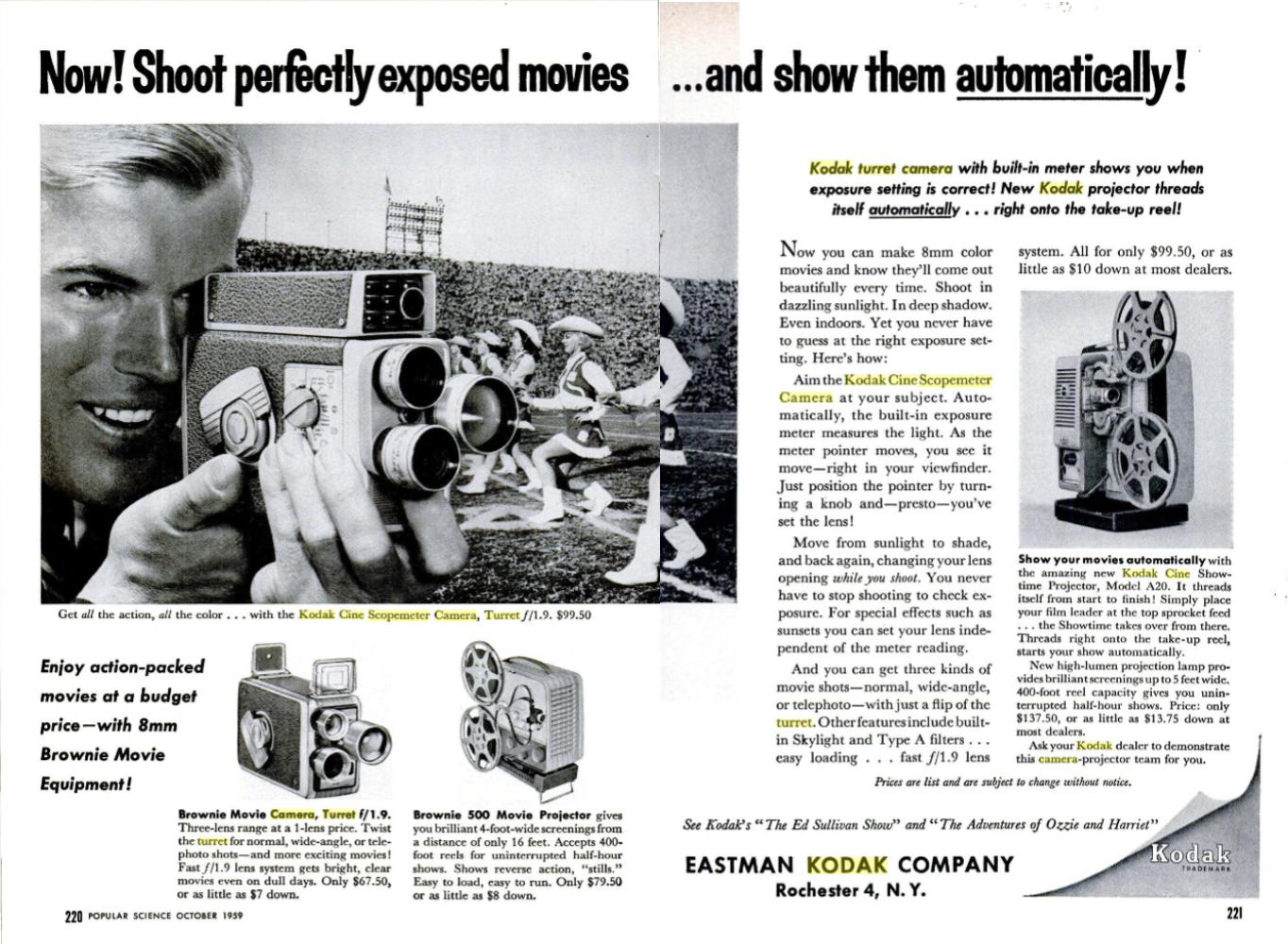
My father’s 1961 Kodak Cine Scopemeter Camera Turret f/1.9

Dad purchased his camera in December 1961, a few months after my parents were married. It was a Kodak Cine Scopemeter Turret f/1.9 which Kodak produced from 1958 to 1962. It had 6.5 mm wide-angle, 13 mm normal, and 24 mm telephoto lenses on a rotating turret, and you could shoot with no filter or use Daylight or Skylight filters for different conditions.

Dad’s camera was marketed from 1958-1962; Source

Dad’s model retailed for $100 in 1959, which would be about $1,000 in 2024 dollars. Fancier units had electric eyes to adjust the exposure, but with Dad’s you had to set an exposure index on the viewfinder box for the type of film being used and then adjust the lens opening to try and center an exposure pointer in the viewfinder.

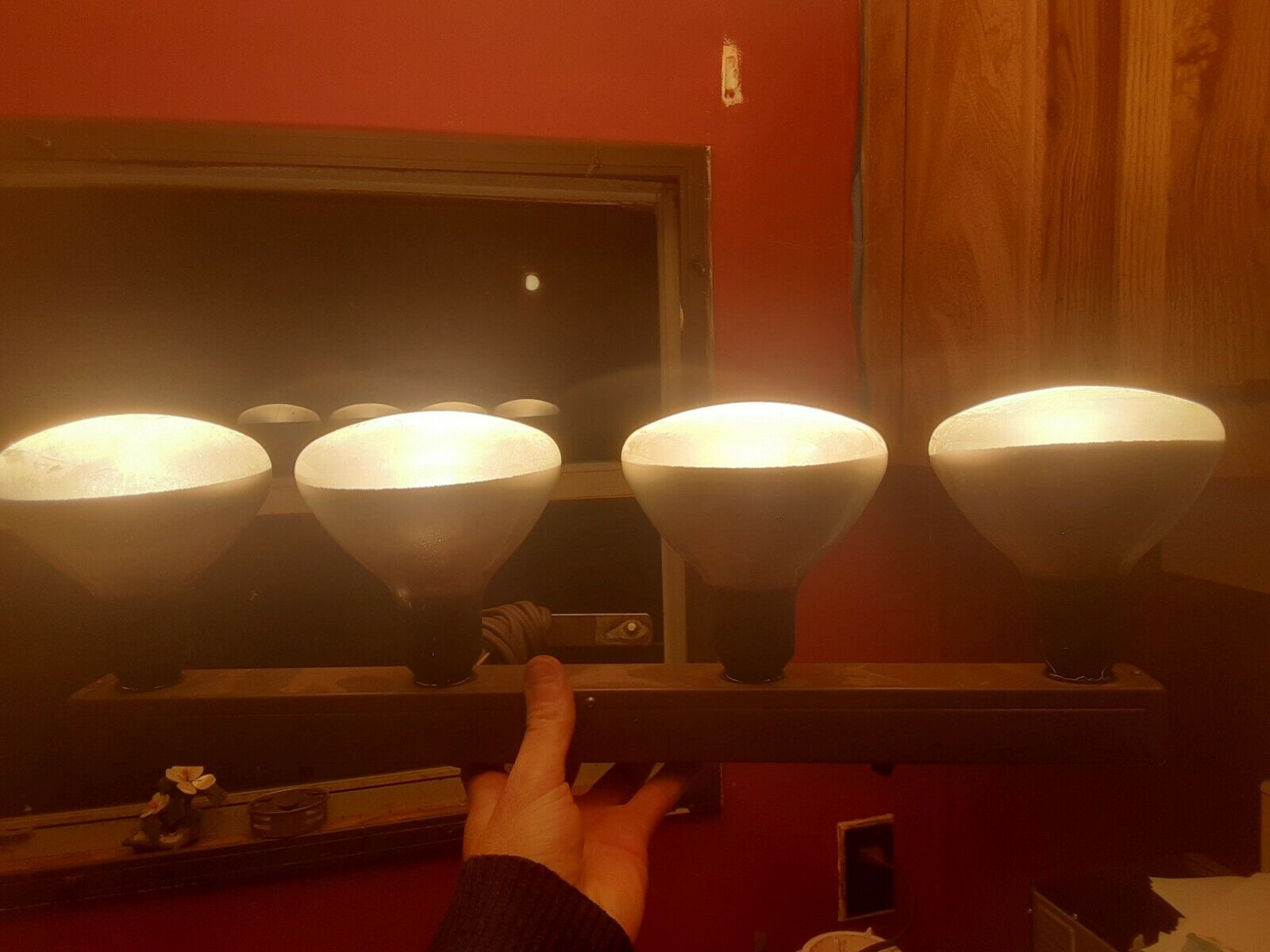
The kind of photoflood bar my father used; Source

Dad also had a four-lamp photoflood bar which had to be used when shooting indoors because the color film was so insensitive to light. It was blindingly bright if he switched on all four bulbs, and they would get very hot.

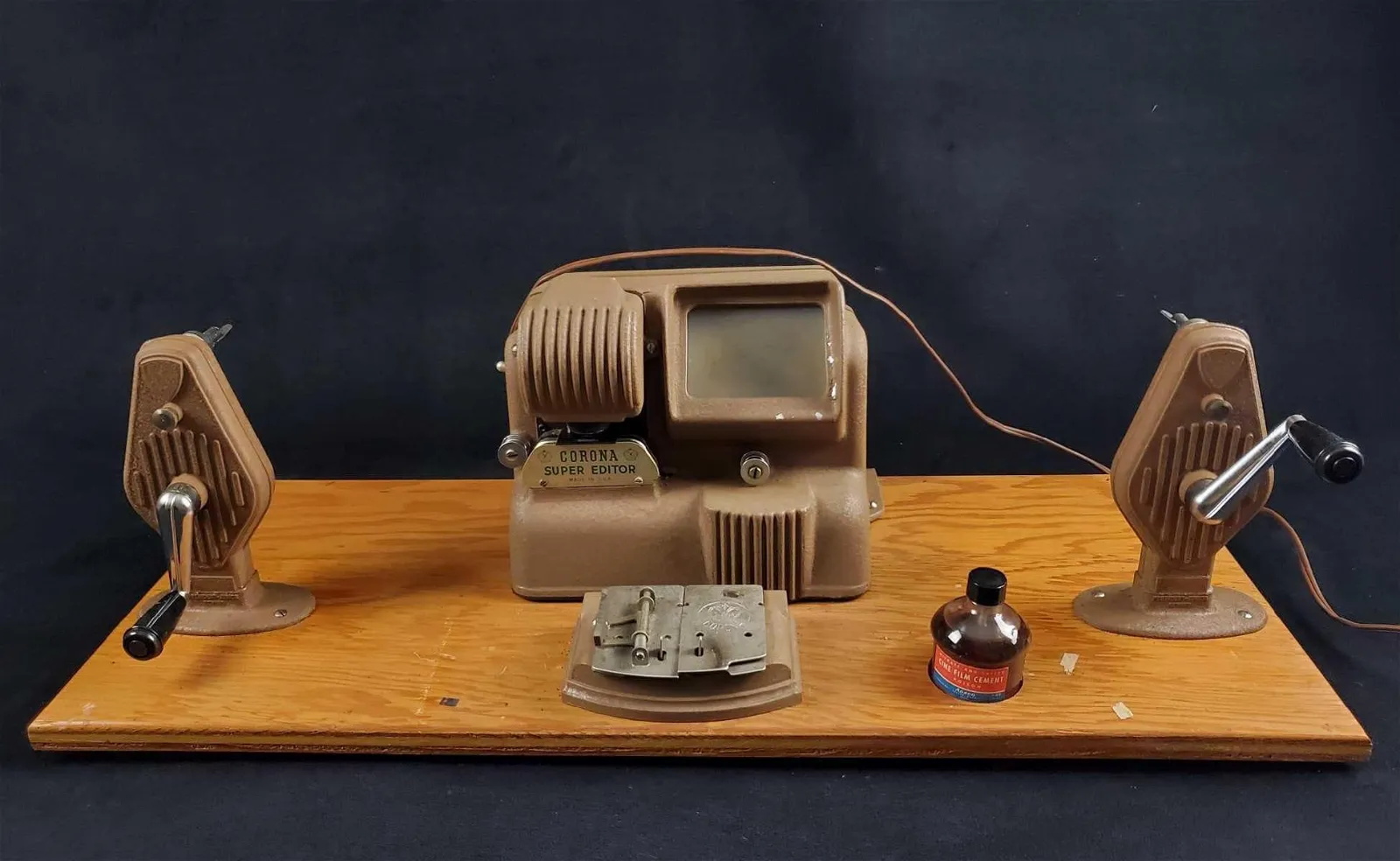
He also had mounted on a board his editing equipment, consisting of a little illuminated viewer, two hand-cranked spindles, and a splicer. Each roll of film was 25 feet. He threaded it into the camera, exposed one half of it, and then flipped the film over and ran it back through the camera to expose the other half. The film lab would slice the film down the center and process it into a 50-foot reel of film, which would yield about 2 or 3 minutes of footage.

Dad’s editing equipment looked a lot like this; Source

Dad would splice the three-inch reels together to form seven-inch reels with 26 to 29 minutes of footage. He would scribble on a piece of scrap paper what the different scenes were, and stuck those in the can with each reel.

Digitizing old movie film

I’ve digitized a LOT of old film lately. I previously shared how I invested a thousand dollars in a couple of print and film scanners, and I’ve now scanned over 20,000 photographs at work, and have started scanning my parents’ still photographs. At work, I’m currently working my way through over 50 cans of black-and-white 35mm photographic film negatives, cutting it down to 6-frame strips that I manually run through a scanner, but that approach would never work for movie film shot at 16 or more frames per second.

The size of the exposed area of an 8mm film is quite small: less than 5 by 4 millimeters. The films I watched in elementary school and junior high in the 1970s were 16mm with over four times that resolution, and the 35mm film commonly used in cinemas before 2010 had over twenty times that resolution.

So for digitizing a movie, the cheap approach is to project it the old-fashioned way and record that with a modern camera. But I knew the limitations of the projected images from the 1960s technology I had inherited, so I decided to make yet another investment. I purchased a film scanner that would digitize the old footage frame-by-frame and output a digital video file.

The Wolverine

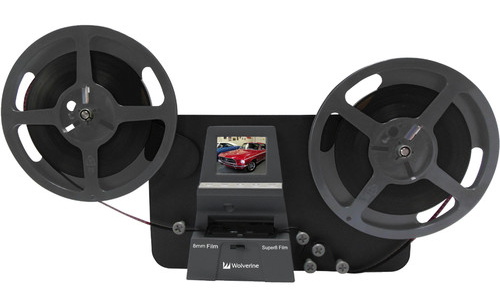
There is no clean way to say how many pixels you can resolve on a piece of film, but a rule of thumb is that you can scan 8mm film at 1K (1024×768), 16mm film at 2K (2048×1536), and 35mm film at 4K (4096×3072). So I invested $400 in a Wolverine MovieMaker-PRO that can scan standard and Super 8 movies at a resolution of 1440×1080.

A Wolverine MovieMaker-PRO

The market for such devices is limited, so they are updated infrequently. The device couldn’t handle SD memory cards with a capacity over 32 gigabytes. All of my SD cards were 128 GB, and Wendy’s was 256 GB. So I ordered a 32 GB card from Amazon for $10 before I thought to search my car.

Back when I was still taking photos with superzoom 35mm digital cameras, I kept an extra SD card in the car. Sure enough, I found an old 16 GB card in the car, slotted that into the scanner, threaded up a three-inch reel of film, and gave it a whirl.

The frame-by-frame scanning process is quite slow. It took over 30 minutes to scan a three-inch reel, and it can take about four hours to scan one of my father’s seven-inch reels. Below is a look at the digitizer in a YouTube review.

The Wolverine outputs MP4 videos that play back at 20 frames per second. My father’s projector runs at 18 frames per second, while the actual frame rate of his spring-wound Kodak Cine Scopemeter Camera from 1961 was supposed to be 16 frames per second.

So after copying a video off the SD card onto my Windows 10 computer, I use CyberLink PowerDirector 365 to slow down the output videos by 20%. I also crop the video image as needed and have the software perform noise reduction and video stabilization.

I was able to compare what the Wolverine produced with what I had shot the cheap way back in 2009 by capturing the output of the original projector. Here is the 2009 transfer:

Here is the edit of the 2024 scan:

The dramatic improvement in the clarity, steadiness, and color of the digitized films led me to abandon using the 1963 Bolex projector for anything except rewinding. Getting the scanned film back onto the original seven-inch film reels using the Wolverine unit would be painfully slow, while the Bolex makes short work of that. I did replace the bulb in the projector, but I never switched it on, just rewinding the films with the bulb off.

In a month I scanned and edited two three-inch reels and six seven-inch reels of film, with only two seven-inch reels and a three-inch reel remaining. So it won’t be long before everything is in my digital archive, and I can return the old film and the equipment to storage.

Some clips I have already shared online are of specialty interest. I posted eight minutes of planes landing or taking off at Love Field in Dallas in 1965:

I also shared glimpses of downtown Atlanta and Stone Mountain in 1969:

I’ve given up my copyright on those two sets of visuals so they are in the worldwide public domain, although the royalty-free music I licensed for the videos is still copyrighted. Much of the material I have digitized is only of personal interest, although the gentle readers of this blog will see a few digitized clips pop up in future posts.

Posted in history, movie, nostalgia, technology, video | 1 Comment

Cable Cut (and Restoration)

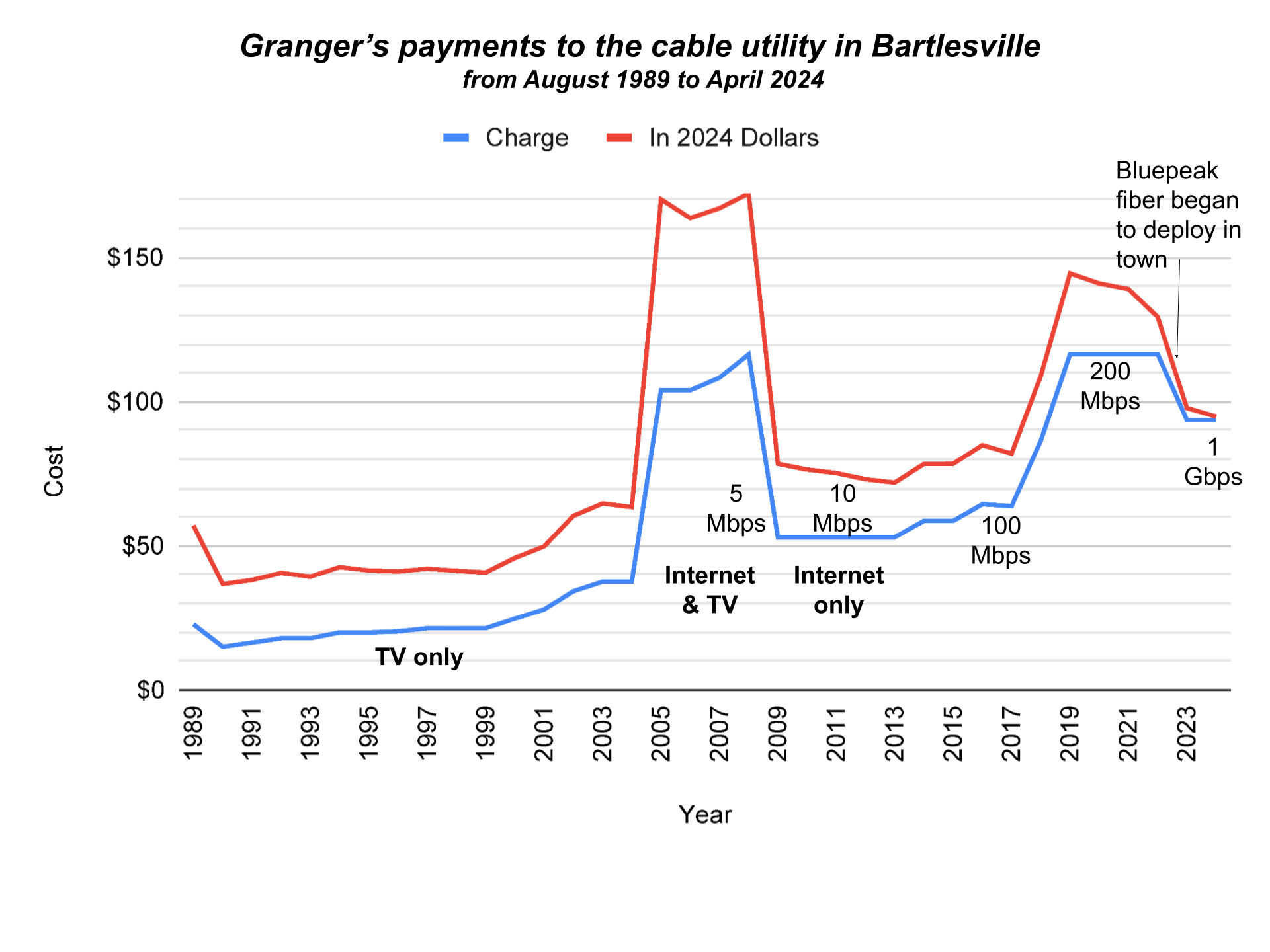
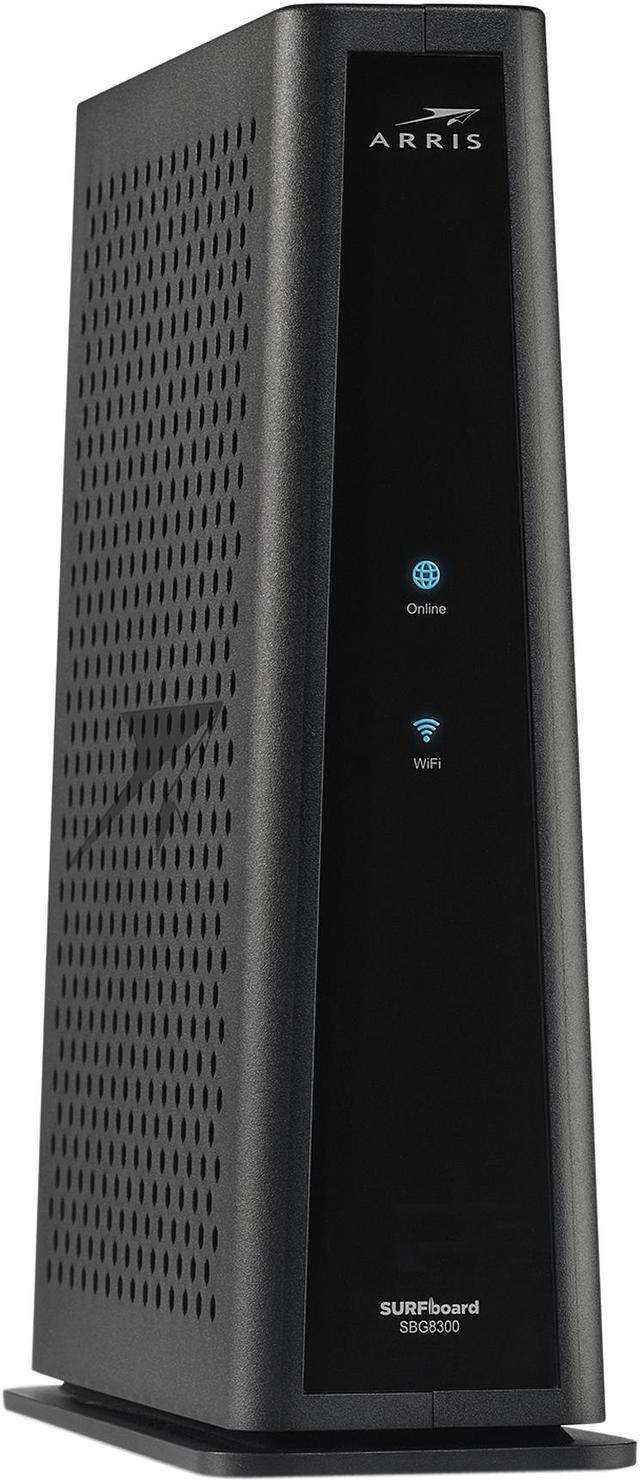
I ended a 35-year-long relationship today. Bartlesville’s cable utility provided me with television service for almost 20 years from August 1989 to January 2008, back when it was Donrey Cablevision and later CableOne. Then I cut the television service, but I kept using the coaxial cable since in December 2004 I had switched from a Digital Subscriber Line from AT&T to a cable modem for internet service. So I had a Bartlesville cable account from August 1989 to April 2024.

Bartlesville in the 1970s was where and when I first saw cable television. My parents and I would visit Frank and Alice Rice just down the street from Sooner High. Frank proudly demonstrated how they had many channels, including one with local weather and news, while in Oklahoma City at the time we only had a handful of broadcast television channels. He mentioned that there was a television studio downtown, and I eventually realized there had been one in the school district media center, part of the building where I was working 40 years later, although by my time there, the TV studio was long gone. As a kid, I thought Bartlesville was a pretty progressive place!

I was in junior high when houses in our OKC neighborhood began sprouting little microwave antennas for the Home Box Office pay television service. My parents weren’t big movie watchers, so they wouldn’t splurge for that, but in 1980, cable television finally launched in the capital city. I convinced them to get it, and that is how I got to watch MTV music television in high school on my 13″ color Zenith television in my bedroom. Yes, I know that my habit of specifying that it was a color set reveals my age; until 1973 or so, we only had black-and-white televisions in our home.

When I moved to Bartlesville in August 1989, I promptly signed up for cable TV service for my apartment at The Village. It cost $15 per month at the time, which would be equivalent to $38 in 2024. When I moved in August 1990 to a rent house, I shifted my cable service and during the four years I lived there the cost gradually increased from $16.45 to $19.95.

The cost of basic cable kept gradually increasing, even after adjusting for inflation. By 2005, it had increased 50% above the inflation rate. Meanwhile, in 2001 I stopped using a 56K modem for dialup internet access by adding a Digital Subscriber Line from AT&T to my landline telephone service. Later the cable company started offering faster internet service, so in 2005 my cable bill exploded as I added internet service on top of basic cable.

I turned in my cable modem today

In 2008 I ditched the basic cable television service, which slashed my bill by more than half. At that point, the cable modem service was 5 Mbps, or 200 times slower than what it would deliver by 2022, but at least 5 Mbps was 17 times faster than my 300 baud modem in the early 1980s.

In 2011, I was annoyed to discover that CableOne had been offering 10 Mbps service for the same price as my legacy 5 Mbps for some time without telling me. They only upgraded my service when I called about it. That predatory behavior, similar to how AT&T long mistreated its customers, left a sour taste.

However, the delivered internet speed later increased by a factor of 10 to 100 Mbps with only minor cost increases after adjusting for inflation. In late 2017 I opted to upgrade to 200 Mbps service, which was an 80% cost increase. By then, Wendy and I were married, and we were both relying on the internet for much of our entertainment.

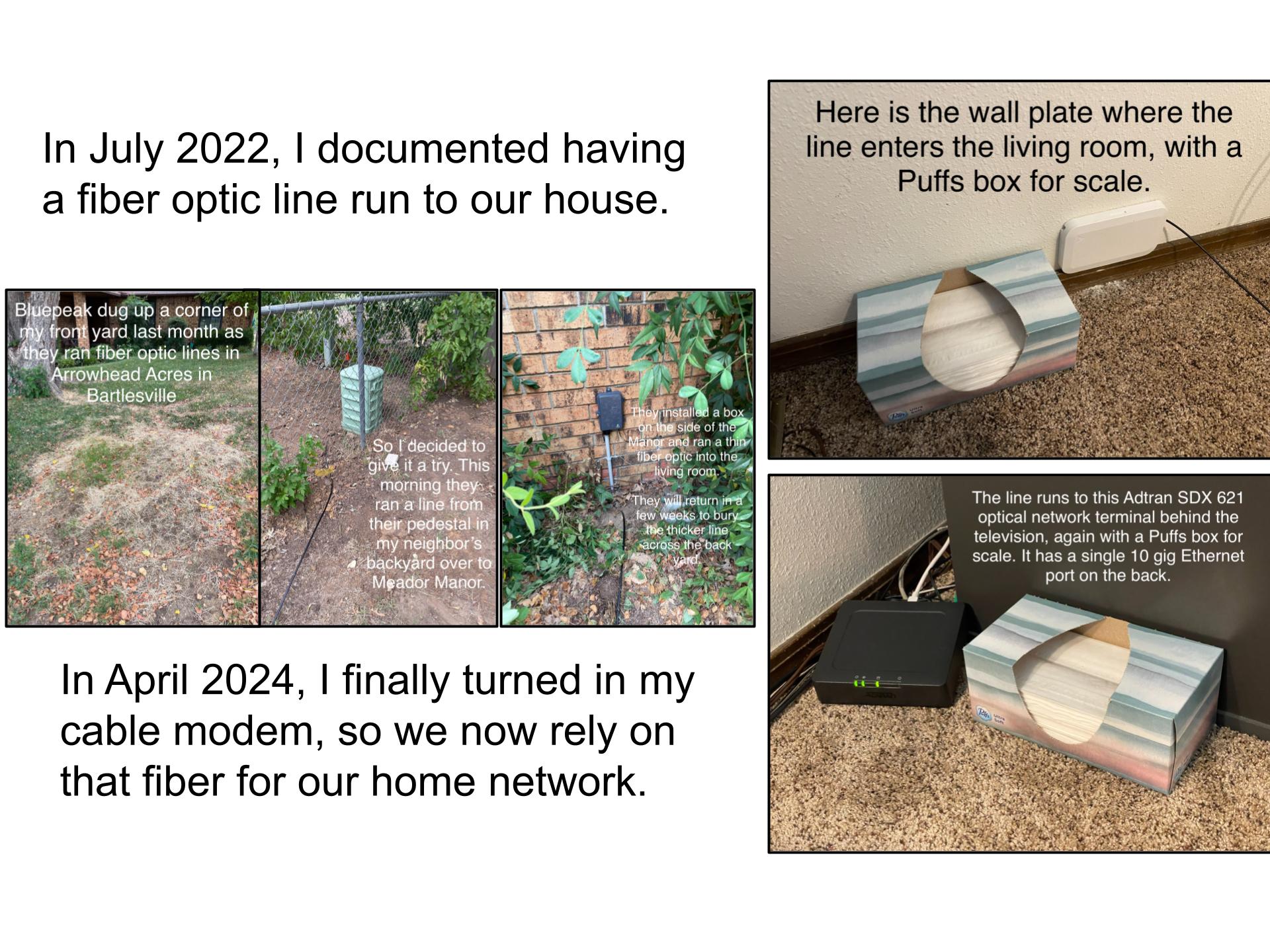
The pricing on my internet service remained stable for four years, even as CableOne rebranded as Sparklight. But in 2022, when Bluepeak began deploying a fiber optic internet service in town, that competitive pressure led Sparklight to offer 1 Gbps service for only 2/3 of what it had been charging for 200 Mbps service.

I upgraded, but the handwriting was on the wall. As soon as Bluepeak reached our neighborhood, I had them install a fiber optic line.

That has cost $60/month for 1 Gbps service since July 2022. I kept the cable modem operating since Bluepeak had some hours-long outages early on with little or no notice. I had reckoned they would have some hiccups as they built out their network. There were a few times either Bluepeak’s fiber or Sparklight’s coaxial cable would stop working, and I simply switched which one was feeding into the Eero mesh system that came with my Bluepeak service.

In recent months Bluepeak has been sending me a text each time service was interrupted and later restored, and we had relied on it exclusively for several months with no major issues. So I finally felt comfortable terminating Sparklight’s 1 Gbps cable modem service, which was costing me $94 per month.

Overall, I spent over $23,000 on cable services over the past 35 years, or almost $34,000 in 2024 dollars after adjusting for inflation. That averages out to $81 per month in 2024 dollars. I’ll enjoy seeing what I pay for home internet service drop from $154/month to $60/month.

Then again, we’re also paying for two iPhones and an Apple Watch, which each have cellular service…but how my phone services evolved is thankfully beyond the scope of this post!


LATER UPDATES

Posted in technology | 1 Comment

Battery Life

Over five years ago, I purchased an Apple Watch Series 4. Since I don’t always have my cell phone with me, I bought the model with cellular phone capability for $530. I’ve only used that Dick Tracy capability a few times, but it has been nice to have. I mostly use the watch to know the time and date (duh), but I do like seeing my next appointment, getting 2-Step Verification text codes on it, checking the weather, and setting an occasional timer. I find its exercise reminders annoying, but I know I should heed its advice when it nags about me sitting for too long. I also like how it taps my wrist to signal me to turn left or right when using Apple Maps to walk or drive to destinations when I’m at a conference in an unfamiliar city.

This week the device would no longer reliably hold its charge. 5½ years of charging cycles had taken their toll on its lithium-ion battery. The Li-ion batteries in my iPhones have typically started to fail after three years. I extended the life of one phone for a few years by slipping it into an Apple Smart Battery Case. I have grown used to replacing my phones every 2-3 years and my iPads every 3-4 years, and perhaps I’ll be on a 5-year cycle on my Apple Watches.

I could have sent the watch in to Apple for a battery swap, but it has no always-on mode like the current Apple Watch Series 9. I first encountered the low-power always-on mode on my iPhone 14 Pro, and I decided it would be nice to no longer have to wriggle my wrist or tap the watch when it failed to detect my interest in reading the display.

So I spent $500 on a new Series 9 unit, with 0% interest 12-month financing via Apple Pay. I again opted for cellular phone capability, but I saved some money by purchasing the smaller model. Both the 41 millimeter and 45 millimeter versions will fit my wrist, and my 44 millimeter Series 4 watch was occasionally a bit bulky for some long sleeves. Since my use of the watch touchscreen is mostly limited to tapping to set a timer, I don’t think I’ll mind the smaller tap targets. My watch was too old and scratched to get much on a trade-in, but Apple will recycle it for free.

Battery life is something we have had to deal with throughout our own lifespans. When I was a youngster, some of our flashlights and my toys had Eveready zinc-carbon dry cells. They had a black cat leaping through a 9, but I never found that zinc-carbon batteries had nine lives, including the “heavy duty” ones.

So once I could afford alkaline dry cells, I opted for those. We usually bought Duracells, which looked good, although I would also buy Energizer alkaline cells from Eveready, even though the bunny in their ads could be annoying.

The pedant in me is a bit annoyed that each of the dry cells shown here is labeled as a battery, when they are really single dry cells. Traditional lead-acid car batteries can legitimately claim that moniker, since they are an actual battery of six wet cells, while the only alkaline batteries we purchase that are truly batteries, and not merely cells, are the 9-volt ones. I used to show my physics students some dissected 9-volt batteries so they could see how they were batteries of six 1.5-volt dry cells in series.

At least 9-volt batteries really ARE batteries of dry cells

In the old days, high school physics labs were equipped with Variac transformers at the front so that the teacher could adjust the voltage of a direct current output at each lab station. There were once rooms at both College High and Sooner High in Bartlesville so equipped, but none of the three labs I taught in at Bartlesville High School featured those antiquated units.

So back when I taught high school physics, I invested in a bunch of rechargeable D cells with chargers. I used those in introductory electrical circuits labs so that students could learn how to wire up series and parallel sources and discover their effects on current and voltage. Once students had mastered those concepts, they switched over to using variable-voltage direct current power supplies, and I was happy if we could venture far enough into electromagnetic induction for them to learn how transformers work.

I used rechargeable D cells and variable power supplies when teaching physics

Years ago, I tried using rechargeable cells at home, but found them too inconvenient, and their lower voltage sometimes had annoying side effects with flashlights that were dimmer than expected, etc. In recent years, I have bought Amazon Basics AA and AAA dry cells, which worked okay and were cheaper than the name brands. I purchased some plastic ammunition boxes to keep the cells in. That way, if one leaks, the rest might be spared.

The most expensive battery I have purchased was for my EGO electric lawn mower. The 56-volt 5.0 amp-hour Li-ion battery that came with the mower lacked enough capacity to mow the entire yard, so I spent over $700 on a 10 Ah one. That did the trick, and I’ve used the smaller, lighter 5 Ah battery for an EGO electric chainsaw I purchased as well as a string trimmer.

This sucker wasn’t cheap

My current gasoline-powered car is a decade old, so in a few years I will probably be purchasing a truly enormous battery in a plug-in gas-electric hybrid automobile. They say that electric vehicle battery packs last five to ten years, so given my life expectancy I might squeeze in a few such purchases before I encounter a more personal lifespan limit.

Posted in technology | 1 Comment

Divided Loyalties

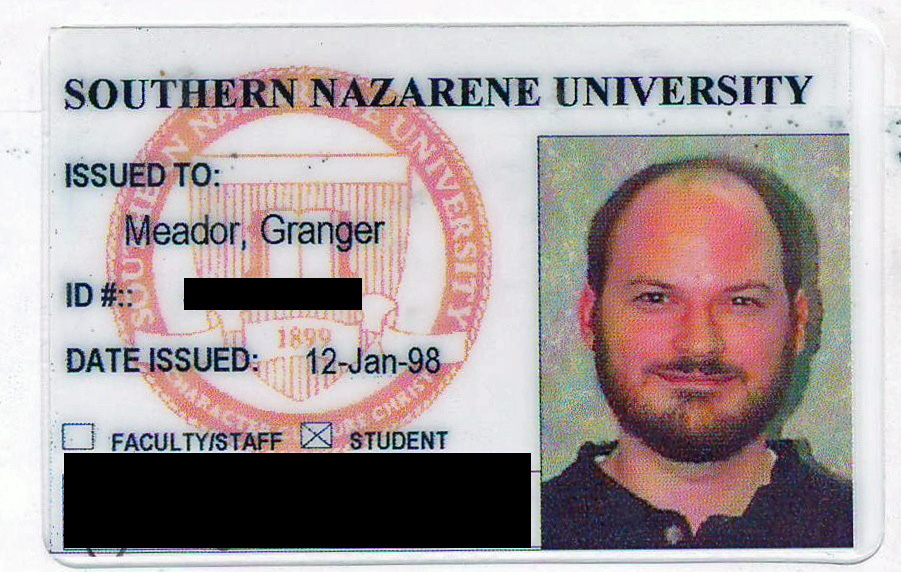
Sooners or Cowboys? In Oklahoma, one is often expected to take one side or the other in the rivalry between its two largest institutions of higher education: the University of Oklahoma (OU) and Oklahoma State University (OSU). I am bemused when asked which team I support. I earned 162 credits and a bachelor’s degree at OU, but I also earned a dozen graduate credits at OSU and 36 graduate credits and a master’s degree at the small private Southern Nazarene University.

So I consider myself a Sooner, but I can also lay claim to having been a Cowboy and part of the Crimson Storm. If one goes back to grade schools, I was also a Patriot, a Trojan, and a Colt at various Putnam City schools in Oklahoma City and Bethany. I posted last week about my undergraduate coursework, so in this post I’ll shift to the last 51 of the 210 college credits I earned: my post-graduate work.

That began in 1992, three years after I moved to Bartlesville. OSU and Phillips Petroleum partnered to convert a former science lecture hall at Bartlesville High School, where I taught physics, into a compressed video room with two large monitors, speakers, multiple microphones, and video cameras. That allowed OSU to offer interactive graduate courses to teachers via an audiovisual feed with Stillwater.

I was never interested in becoming a school principal, but OSU offered a program to earn a master’s degree in curriculum and instruction. I could see myself one day transitioning to curricular administration, and having a graduate degree would mean a slight bump in my paltry pay, so I enrolled.

Bartlesville Supt. Scroggins, Phillips CEO Wayne Allen, and OSU President John Campbell dedicated a compressed video classroom at Bartlesville High School in 1992

I enjoyed an educational statistics course via compressed video, which had lasting value in allowing me to assist students with analyzing science fair project results for statistical significance. After that, Fred Wood, the dean of my alma mater, the OU College of Education, offered an excellent in-person course in professional development. I was delighted in how he practiced what he preached, ensuring that he made extensive use in each class of the very techniques we were learning.

But then I suffered through a couple of terrible courses taught over compressed video by an arrogant OSU professor. I learned very little from the jargon-laden deconstructionist drivel he assigned. Alan Sokal, who famously hoaxed a journal that espoused deconstructionism and postmodern philosophy, would have had a field day with the journals we had to consult.

My UCAT ID card from 1993

I had logged onto the early internet throughout the previous decade via the engineering computer system at the University of Oklahoma, but in the early 1990s the world wide web was still in its infancy. So our research materials were still analog.

I had to get an identification card at the University Center of Tulsa (UCAT), which back then was a joint operation by OU, OSU, Northeastern, and Langston. I would drive down to Tulsa some weekends to access journals stored on microfiche for my graduate class research.

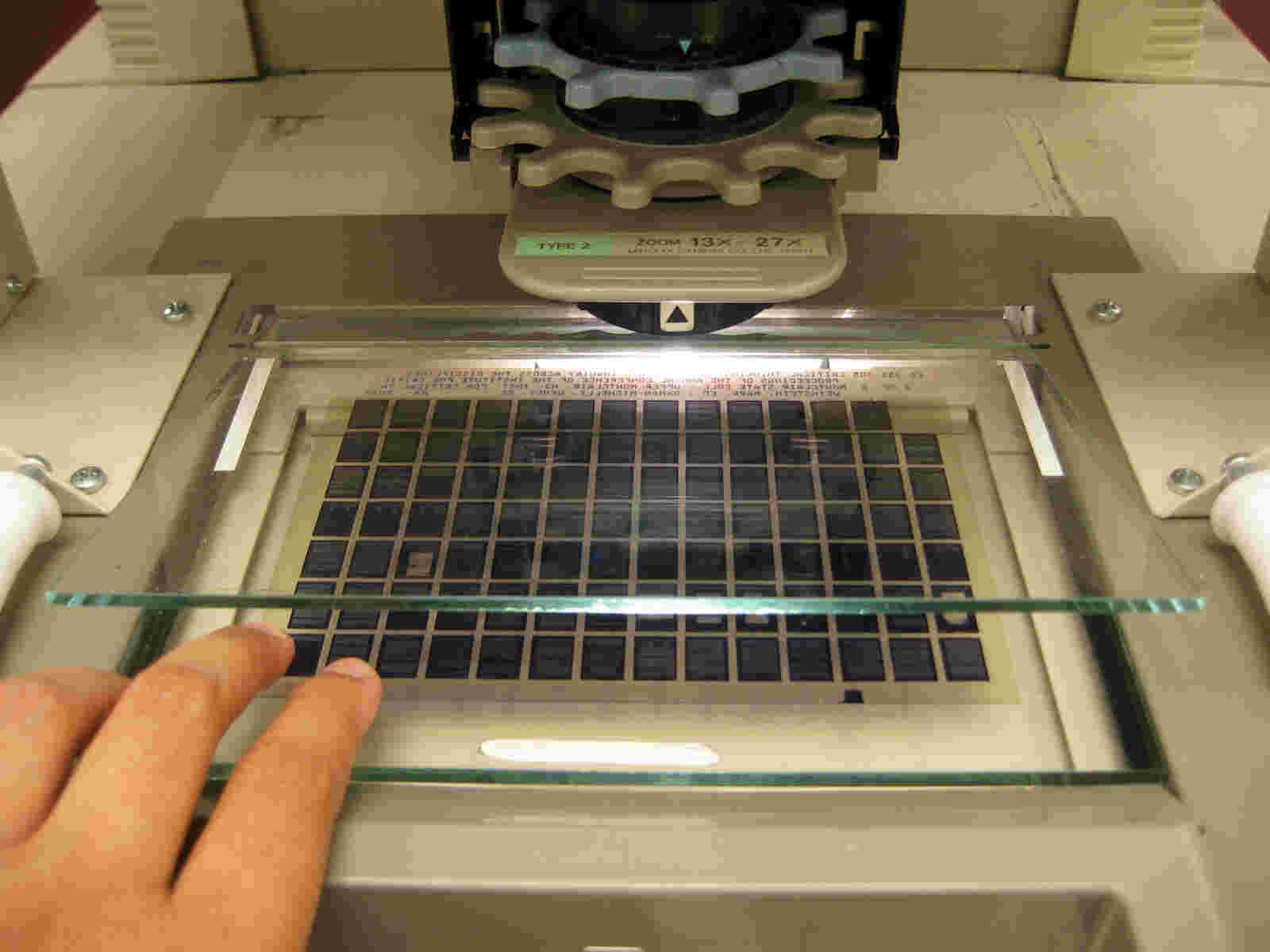
Microfiche stored tiny photographic images of journals on film cards, which you loaded into a magnifying viewer. If you needed a copy, you could pay by the page for smelly wet reproductions from a wet electrophotographic process.

The only lasting benefit I got from those two courses was that for one class the professor insisted that we go out and rent the 1990 Christian Slater film Pump Up the Volume. That introduced me to Everybody Knows by Leonard Cohen, and I became a lifelong fan of The Godfather of Gloom.

My next course was on children’s literature and was so uninspiring that I dropped out, having discovered that OSU’s College of Education had lost its NCATE accreditation. I had earned 12 graduate credits via OSU and 3 via OU, but I wasn’t interested in any more from them.

I finally earned my master’s in the late 1990s

Later in the 1990s, Southern Nazarene University (SNU) started offering condensed graduate courses where you could drive down to Tulsa for a three-hour class once per week, write papers on the weekend, and earn a master’s degree in educational leadership in two years. They included all of the journal material you would need in three-ring binders, instead of you having to hunt things down on microfiche. Nowadays, of course, all the material would be provided online. But then, although they required that you have a laptop computer, the program actually made almost no use of the technology.

I got more out of that program than my earlier graduate work, and I earned a master’s degree and school principal certification, but I still had no intention of becoming a building administrator. I just wanted the experience to help me in my leadership of the science department and for the salary boost a master’s degree would bring. However, since I stayed in the classroom rather than becoming an administrator, the pay boost was so small that it took over a decade to earn enough extra to pay for the degree from the private university, even after parlaying my earlier 15 graduate credits into an additional salary boost.

My 51 hours of graduate work was thus split up as 36 at SNU, 12 at OSU, and 3 from OU. I jokingly say that I have a master’s degree in education leadership and half of another in curriculum and instruction. Eventually some of that helped me in the administrative role I assumed after leaving the classroom, in which I direct my school district’s technology and communication efforts.

Why Choose Sides?

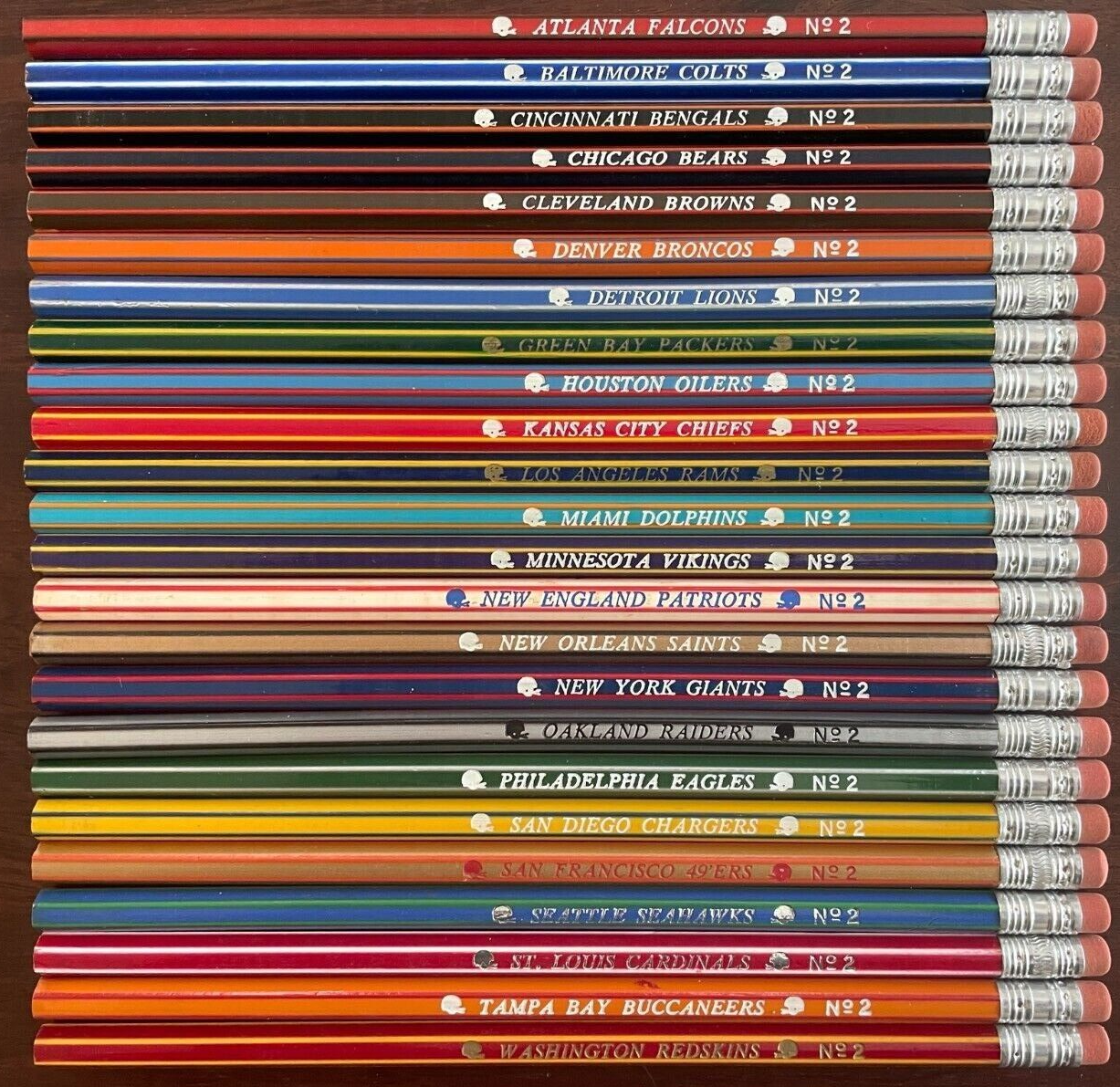
We sold these pencils at the Central Intermediate student store

The truth is that I have no allegiance to the Sooners or the Cowboys sports teams, not because of divided loyalties, but due to indifference.

One illustration of my disengagement from sports is back in the 1970s when I worked in the student store at our intermediate school serving grades 4-6. Boys would purchase pencils representing various teams in the National Football League. I was clueless about the teams and colors. So a kid would demand a “Packers” pencil. I would start hunting, and he would add, “Green Bay Packers!”

When that didn’t speed me up enough, he would groan and yell, “The green and yellow one!”

I remember some kids would purchase a pencil for a team they didn’t like. Then they would just snap it in two. As they strutted off, I would scoot the remains into the trash, muttering, “What a waste of a perfectly good pencil!”

The Recruit

The only university sporting events I ever attended were a few football games at OU, since my girlfriend and I had student season tickets during my freshman year. After that, I was never at a game until I had graduated and was recognized at halftime as the Outstanding Senior of one of the university’s colleges, in my case the College of Education.

As I stood out there on Owen Field, way above me was the Santee Lounge up underneath the overhang of what was then Oklahoma Memorial Stadium. I gazed up there, recalling a funny moment up there the summer before I started my freshman classes.

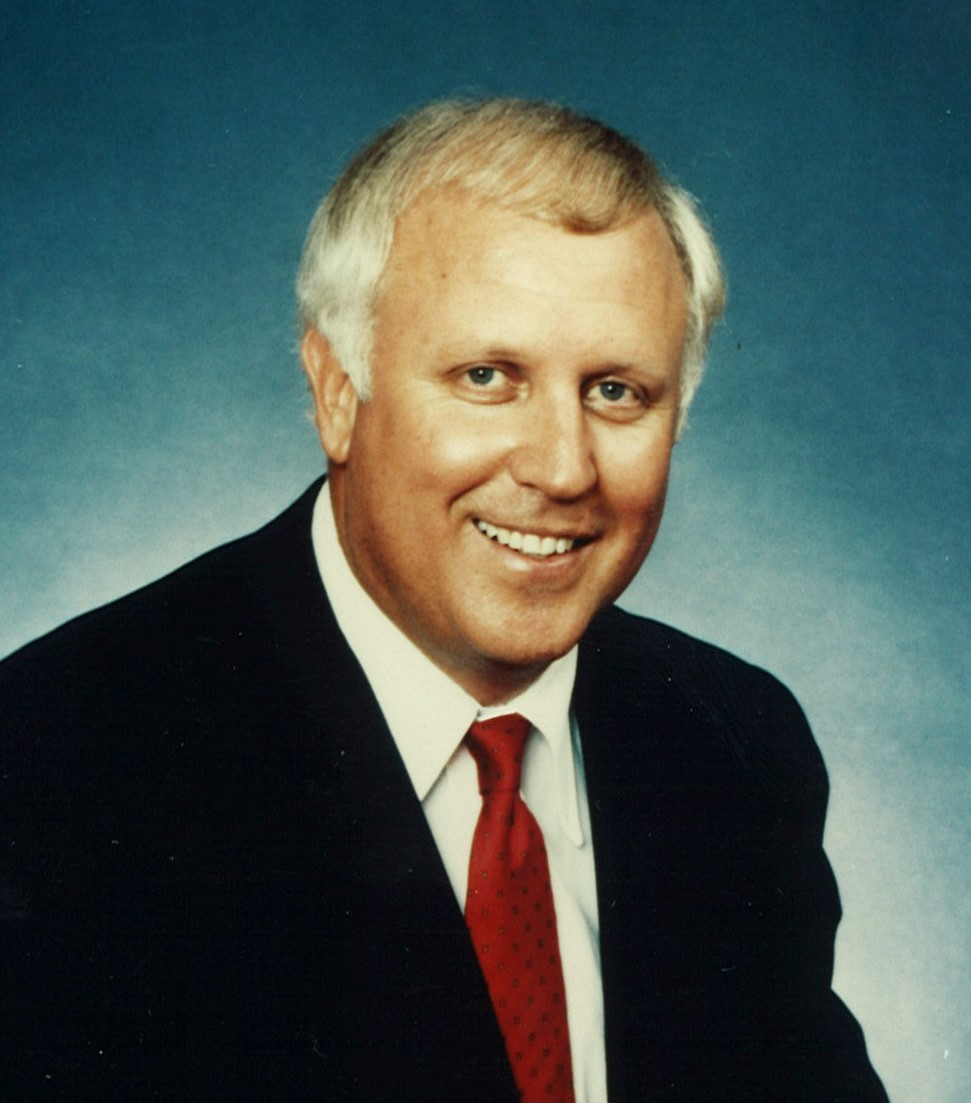
Did Donnie Duncan recruit me for OU?

All of the university’s scholarship recipients had been gathered together and introduced up in that premier area of the stadium. I was one of the R. Boyd Gunning Scholars, which at the time was the university’s most lucrative academic scholarship.

When he introduced me, Dr. Stephen Sutherland, whom I would later work for in OU Scholars Programs, mentioned that he had first heard of me through Donnie Duncan, the university’s well-known athletic director. He joked how I was the only R. Boyd Gunning Scholar that had been referred to him by the athletic department.

What he didn’t explain was that a coworker of my father was also a friend of Mr. Duncan, and he had mentioned to Duncan my academic achievements. That is what prompted Duncan to pass my name along to Sutherland, and he had skeptically looked into my academic record, realized I was indeed a top-performing high schooler, and started recruiting me.

The only reason I remember any of that is because, after all of the introductions, there was a mixer up there in the Santee Lounge of the scholarship recipients. Several attractive girls, who appeared to be fit athletes, walked up to me and were clearly sizing me up in my dress suit. I started to think university life was going to be interesting. Then one exclaimed, “I’ll bet you play tennis!”

What sport could this little guy play to get the attention of the OU Athletic Director?

I was confused, and answered, “Uh, no.”

That prompted another to grin and state, “You run cross country!”

“Er, no.”

A third added, “So what are you great at? Chess?”

I finally realized that they presumed I had come to Duncan’s attention for my athletic prowess, and my slight 5’8″ frame had them all speculating what sport I excelled at.

I’ve always been far too honest, and they were clearly disappointed when I explained how Duncan had heard of me. Once I confessed that I had never played any sport and had no athletic ability, and I didn’t even know how to play chess, they lost all interest.

Boomer Sooner.

Posted in history, nostalgia, random | Leave a comment